Ads.txt is missing or out of date
Completed
I am receiving this error in my dashboard. I have followed all of the troubleshooting steps recommended and still cannot figure out how to fix it. I just contacted with my host and was able to have them clear my cache on their end as well as confirm the asd.txt file is in the right place, but I am still receiving the error. What else can I do?
-
Official comment

We recently issued an update to the ads.txt file so you'll need to update to the newest version. You can follow the steps in our Ads.txt help article based on the platform you're using. If you needed someone to help you set up your initial ads.txt file, you'll need to have them update it for you!
-

Unfortunately, the steps you recommend relate to onboarding. For those of us who already had the ads.txt file….and happen to not know much about how to add or change….it really does not tell us what to do from there.
Spelling it out in nice,simple English would help those of us who are beginners. Like, where do we find the file and how do we update it.
I went to: Settings--Ads.txt to update…I think that worked.
I am sure there are others who would appreiciate that as well….we are all anxious to get going!
My site has the ads.txt file, so not sure what the problem is. https://thecatholictravelguide.com/
Also…do we get automatic notice of when the file is updated?
0 -

Hi Gloria,
Since you're hosting the ads.txt file on your site, it'll need to be updated when a new version comes out. If you head to your Journey settings, you can find a URL to the current version here:
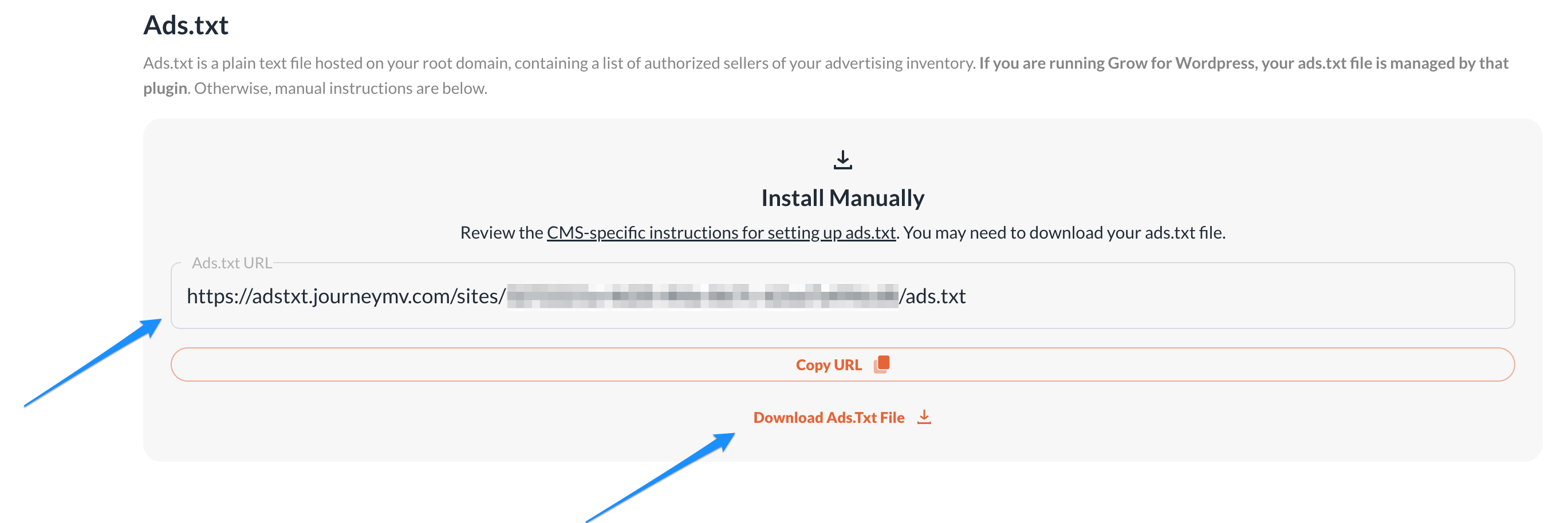
You can also download the file directly below with the link below the URL. So you'll just need to grab the updated ads.txt and replace the current one with it. Your host should be able to assist with this. Thanks!!
0 -
I think I got it updated. Went in to settings and just added the new ads.txt file (after deleting the old one). Was that a good way to do it?
0 -
That certainly could be a good way to update it, depending on what plugin or method you're using to put the ads.txt on the site. If it's a plugin, then this would likely do the trick. I'm not, though, seeing the updated file on the site just yet. It's possible that this is due to some caching, and clearing out all of the caching on the site could get this resolved.
If it doesn't, I would definitely recommend reaching out to your host as they should be able to assist with this.
0 -
One really stupid question…where are my journey settings. I am using the grow for WP plug-in, but I don't see any settings for Journey.
0 -
Gloria Barr - not stupid! You'll log into Grow here- https://publishers.grow.me/login and your settings will be in the siderail!
0 -
I updated the file, but I am still receiving the error message.
0 -
I have the latest ads.txt file, since my host installed it for me, but still shows the msg “missing or outdated”. Not sure where to go from here. Here is my ads.txt file, V.20240701,
0 -

Sharon Pilgreen I'm not seeing an ads.txt file when I visit yoursitename.com/ads.txt – I just see a blank page. You'll want to reach out to your host to have them make sure the ads.txt file is uploaded to the correct place in your root directory. Here's a help article they can reference for sites manually installing the ads.txt file.
Gloria Barr It looks like there might be an accidental extra space in your ads.txt file. I would re-download it and copy and paste the exact contents again, clear all caching, and then see if that does the trick. If not, you might need to have your host ensure there aren't any firewalls or security settings preventing our crawlers from reading the ads.txt file.
0 -
I do see the extra space right after
journeymv.com, 3272221a-4d20-4fda-867c-62aa7a496cd8, DIRECT, 1363c924529b3998
But I do see the file when I look up https://thecatholictravelguide.com/ads.txt
So that space is the problem?
I have now spent several weeks trying to get going with Grow…I am obviously no expert, but it should not be this difficult. I have an excellent host (Lightning Base) so they cannot be the problem. If it is something on my end, would like a nice SIMPLE explanation. I am using the Grow plug-in, which I thought took care of everything.
0 -
Got this from my host at Lightningbase, but you still show as missing
> Hello Gloria,
> Thank you for holding on.
>
> I have now added the code you mentioned once again from my end and
> ensured that it is working via
> http://www.thecatholictravelguide.com/ads.txt. Please see attached.
>
> I don't see this IP as fully blocked but it is tripping a security rule
> repeatedly. We've modified that now so it should not continue to be
> blocked in this instance - can you ask her to try this again and let us
> know if any further trouble occurs?
>
> Awaiting your reply,
>
> Regards,
> Catherine
>
> ----------------------------------------------
> Ticket ID: #065920
> Subject: updatre my ads.txt file
> Status: Answered
> Ticket URL:
> https://secure.lightningbase.com/viewticket.php?tid=065920&c=sQnnbTSh0 -
Gloria Barr the ads.txt file is missing the # at the very beginning that looks like this:
# Ads.txt v20240701
There are also a few extra spaces you can see if you compare the ads.txt file on your site with the ads.txt file you can download in your Journey dashboard using Diffchecker.com. They need to add in the hash and copy the exact contents of the ads.txt file without any modifications or extra spaces for it to show as up to date.
0 -
Thanks, Rachel. A basic question…how do I find my ads.txt file? When I go to Journey it takes me to the onboarding section, and that is where I get lost, since I have already on-boarded. Just need to find my ads.txt file and my host will install it for me.
0 -
Gloria Barr you can find your ads.txt file in your dashboard under Journey Settings → Ads.txt file. Here's a post with a screenshot of where you can find it.
0 -
Thanks…I found it…my host updated it, so should be working. Not sure about the extra spaces, though. One question I asked before, but not sure I got an answer…how often is the ads.txt file updated, and how do we know?
0 -
There's not an exact schedule for ads.txt file updates since there has to be an update whenever there are new partners added or removed from the ads.txt file. When there is an update though, you'll see the out of date notice in your dashboard and can have your host update it for you.
0 -
Thanks, Rachel, I think I understand it now.
0 -

I've been told to “disable Ads.txt Manager for the Journey ads.txt file to work.” As I have no idea how to do this where can I find some help please?
0 -
Annette Jones First, you'll need to disable the Ads.txt Manager plugin and clear out your caches (plugin caching, CDN caching if you run Cloudflare, and server side caching, which your host can help you with).
That should do the trick but if not, it's possible you'll need to disable any configurations or redirects in your Ads.txt Manager account - here's the Ads.txt Manager login page in case you need it.
0 -
Thanks Rachel
I don't have the txt plugin installed.
I've cleared out all caches. I don't have Cloudflare.
Before this, I didn't have an ads.txt manager account.
Do you have a video with instructions none of the suggested steps appears to be working for me?
Thanks.
0 -
Annette Jones It looks like your site is somehow integrated with Ads.txt Manager, but we don't have a video since we're not sure how exactly it's integrated on your site. It's possible you have a redirect set up somewhere from /ads.txt to the Ads.txt Manager file.
You can see for yourself that the ads.txt file redirects to a file hosted by adstxtmanager.com if you go to yoursitename.com/ads.txt (just replacte yoursitename with your own domain).
Since we're unable to tell exactly where it's coming from on our end, you would just want to reach out to your host with the above information and have them check if there's a redirect or something else integrating Ads.txt Manager with your site.
0 -

Hi,
My Journey Settings page is asking me to update my ads.txt file. However, when I click on the Download Ads.Txt File link, it doesn't download. It's always worked for me before whenever you publish an update. Not sure why it's broken today. I tried refreshing and it didn't help.
Can you provide me with the latest ads.txt file another way?
Thanks, Robin
0 -
Hi Robin,
I just took a look at your settings, and I was able to download the current ads.txt just fine on my end. It's possible that you have a security setting on your computer that's preventing the download, but we can't say for certain on that.
An alternative, though, is to just use the ads.txt URL just above the download option in your settings. It's identical to the download file, so you should just be able to grab the content from it and use it to update the exisiting file on the site. Thanks!!
0 -
The URL worked! Thanks!
0 -

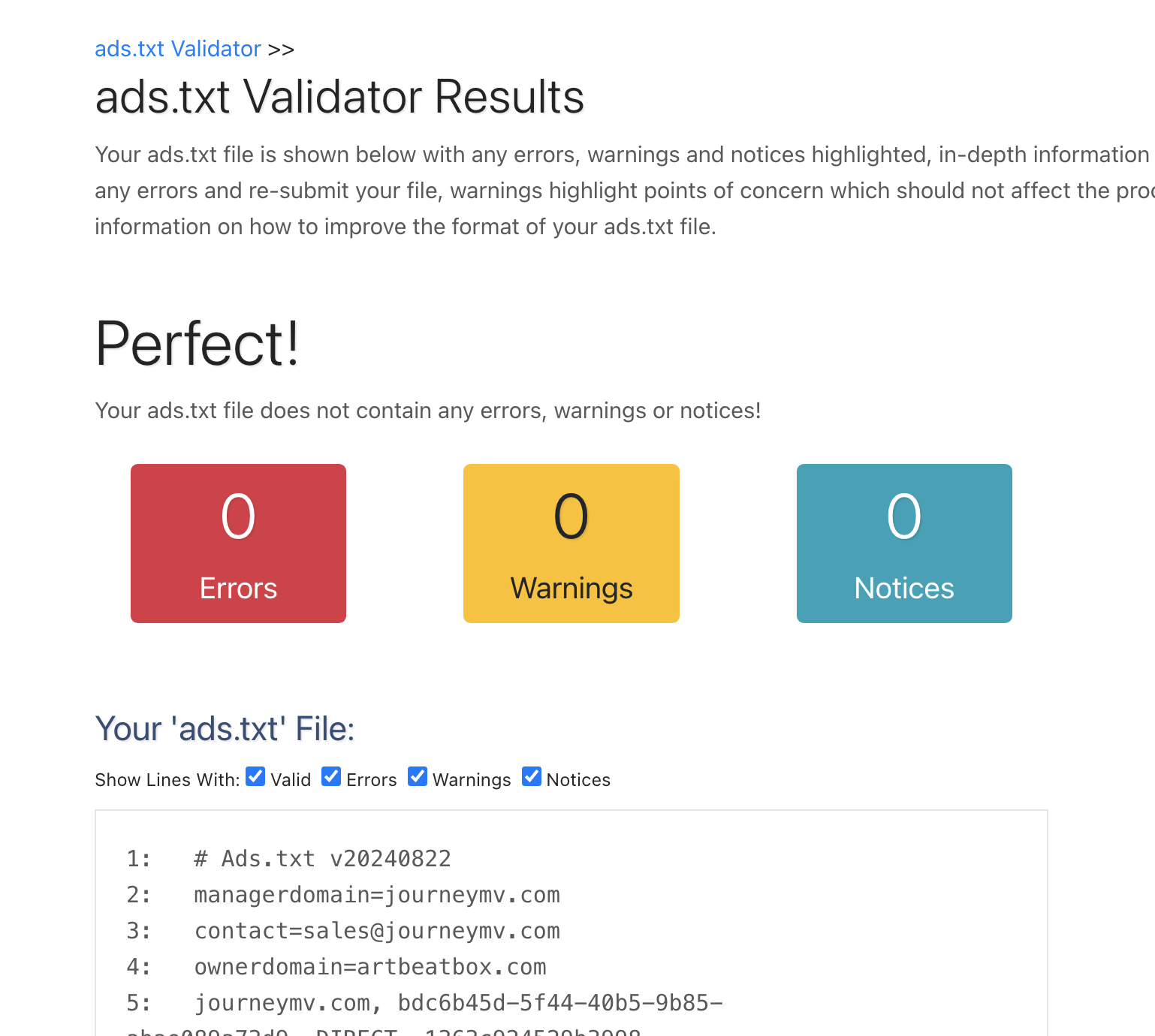
Hi there! We are having an issue with the ads.txt file in Squarespace — we've followed the directions given in our Grow account, but nothing is working. We've reached out to Squarespace and followed their directions and checked the ads.txt with this tool: https://adstxt.guru/validator/url/, and it returns no errors (see screenshot below), but we're still seeing the error in the backend of Grow. We're at a loss of how to fix this?
 0
0 -

Hey, @Kelly Etz - It looks like we're not seeing any ads.txt in place when attempting to access the file at https://studioartbeat.com/ads.txt - this would explain why you're seeing a ‘missing’ error in your Journey Dashboard.
If you haven't yet, I recommend connecting with Squarespace for further troubleshooting - after an ads.txt file can be found at the above URL, you should see this error clear from your Journey dashboard.
0 -
Hi there! We have connected to Squarespace support and they have directed us back here. The problem we're seeing is that when we go here: https://studioartbeat.com/ads.txt, it downloads the file rather than shows the file and we've haven't seen how it's possible for the file to actually appear. Again, we've followed all the instructions and tutorials given by both Journey and Squarespace. Any assitance would be appreicated.
0 -
Hi, @Kelly Etz - I'm sorry to hear about the issues you're bumping into! Having the file download instead of load when directed to it isn't something we're able to troubleshoot from our end, I'm afraid. This is something that Squarespace would need to investigate further on their end.
0 -

I'm completely confused with ads txt. Am I supposed to have an ad.txt manager account (I do but when I deleted the plugin I thought I didn't need the account.
I posted here yesterday about not being able to complete the adding script process. I would go through the process and it would send me in circles. I got a reply from Ryan saying " I'm seeing the Journey Script properly installed on your site, but it looks like you're sites's Ads.txt file is redirecting to an empty file hosted at srv.adstxtmanager.com, which is why you're unable to complete onboarding.
In this case, you'll need to disable this redirect and remove the adstxtmanager plugin from your site, which should allow Journey to place an Ads.txt file on your site instead.
I contacted Cloudways and they looked in the file manager and didn't see any ads.txt files. They also cleared cache and told me to do the same at Cloudflare which I did also. I looked in my redirects and didn't find anything in there. I had already deleted the adstxtmanager plug-in from my site yesterday. Still going around in the same circle and not able to proceed. Any other suggestions?
Thank you.
0
Journey is Self Supported
Please sign in to leave a comment.
Comments
33 comments