Ads.txt is missing or out of date
Completed
I am receiving this error in my dashboard. I have followed all of the troubleshooting steps recommended and still cannot figure out how to fix it. I just contacted with my host and was able to have them clear my cache on their end as well as confirm the asd.txt file is in the right place, but I am still receiving the error. What else can I do?
-

Hey Debbie Wexler - sorry to hear about the trouble you're bumping into! There's likely still a redirect set up on your site so that all traffic to your Ads.txt domain is instead directed to adstxtmanager.com, which you were likely using previously to add an Ads.txt file to your site. If removing the plugin didn't take care of the issue, I recommend the following:
1. Log into your account at https://www.adstxtmanager.com/, followed by clicking on the settings button in the upper right-hand corner. From here, double-check that ‘Enable Ads.txt’ is disabled
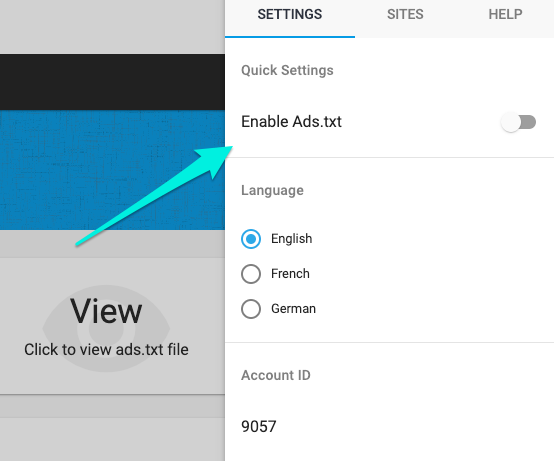
2. Connect with your host and have them double check for any redirects from your Ads.txt domain, to another URL. The first place have them check would be your site's .htaccess file, if you have one. It's likely there's a 301 redirect that's directing traffic to this srv.adstxtmanager.com URL we're seeing when we access your site's Ads.txt file.
Journey itself will take care of placing your site's ads.txt file on your site, so you won't need another tool to accomplish this. After this is done, you should see your Journey Ads.txt file in place, which will allow you to finish up onboarding.
0 -

Thank you so much. I will get back in touch with Cloudways and have them check for the redirect. I appreciate your help
0 -
That worked.
Thank you again for your help.
0
Journey is Self Supported
Please sign in to leave a comment.
Comments
33 comments