Keeps disconnecting from my wordpress
Answered
Hi, I enabled Ads and they've been running in the background. I've notice that about every 2 days my Grow inside of wordpress is disconnected from my account and it says it has no access. I reconnect and then it seems to work fine.
But then I notice that on those days that it's been disconnected I'm showing sessions at 0 in my journey dashboard and earnings are 0. So I'm concerned that ads are running but I am not going to get paid for those days. I also don't understand why it keeps disconnecting from my account in wordpress.
Please help!
-

Hi Sarah, we'd be happy to look into this for you! For some additional insight, could you let us know which days showed as having zero sessions and zero earnings. When we check on our end, we're seeing sessions and earnings consistently over the past few weeks with no sudden dips to zero. Are you still seeing zero sessions and earnings for any day on your end?
Additionally, when you say that Grow was disconnected, for clarity do you mean that the plugin was deactivated or that when you accessed your Grow settings it gave you an option to log in to the dashboard? If you have any screenshots, that would be very helpful as well.
0 -

Hello Jacob - I am facing the same issue than Sarah regarding my Grow connection in WordPress—it keeps disconnecting, and I receive this message

Is there a way to stay consistently logged in without having to be disconnected in my grow settings in wordpress every 30 minutes ? What are the impacts ? Does it have to do with my analytics not reporting correctly (sessions and pageviews) ?
For clarity, the plugin is still working properly and connected.
0 -

Hi Thierno,
It looks like your site is currently connected, and I'm seeing analytics data for every day so that it looks like the connection has been constant and analytics are working just fine.
If there's no issue (per your screenshot) with the admin user you're using in WP, then it's difficult to say why you're needing to login again. It's possible there's a security setting or server configuration on your host's end that's causing it? You could check any security plugins and reach out to your host to see if they have any insights. Thanks.
0 -
Hi John - Thanks for you reply.
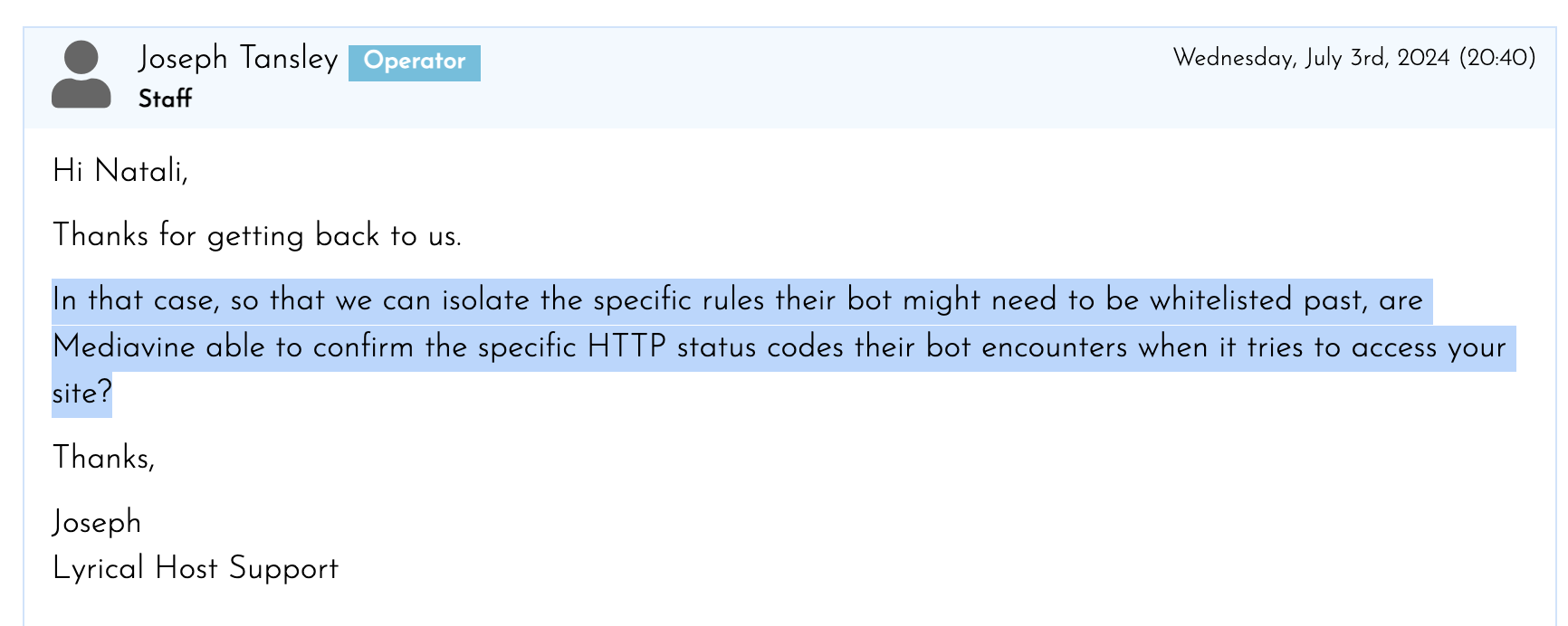
Here is the answer from my host, could you please help with that request ?
 0
0 -
Hi Thierno,
This isn't something we're able to provide, but often hosts are able to allowlist a user agent with out this specific information. So hopefully your host will be able to generally whitelist the agent regardless of status codes. The MediavineMetadataParser/* user agent is what they would be allowing. Again, we're not able to say definitively that this is why the plugin is having you log back in since there could be other factors/configurations on the site, but it's a good place to start. Thanks!!
0 -

Curious if this was resolved? I'm having the same issue. Now everyday I have to go in and “activate” the grow plug-in, meanwhile it's showing 0 sessions/earnings on those days. It just started happening randomly about a month ago, but the frequency of the issue has gotten more frequent. I haven't changed much/anything in the last month or two.
0 -

Hi Megan Layton ! In the other cases here, it sounds like sessions and earnings were still tracking normally, so we might not have run into this specific scenario in the past.
Just to clarify - when you say that Grow was disconnected, do you mean that the plugin was deactivated or that when you accessed your Grow settings in the plugin it gave you an option to log in to the Grow dashboard? If the plugin is deactivating, could you let us know if this happens with other plugins as well? If you have any screenshots, please send them over because that should help us here! Plugins deactivating on their own is unusual, but typically due to some sort of configuration on the host or server side.
To avoid this moving forward though, I would recommend manually installing the scripts instead of using the Grow plugin. You can manually install the ad script following these instructions, the ads.txt file following these instructions, and the Grow script following these instructions.
Thank you!
0 -
Hi Rachel,
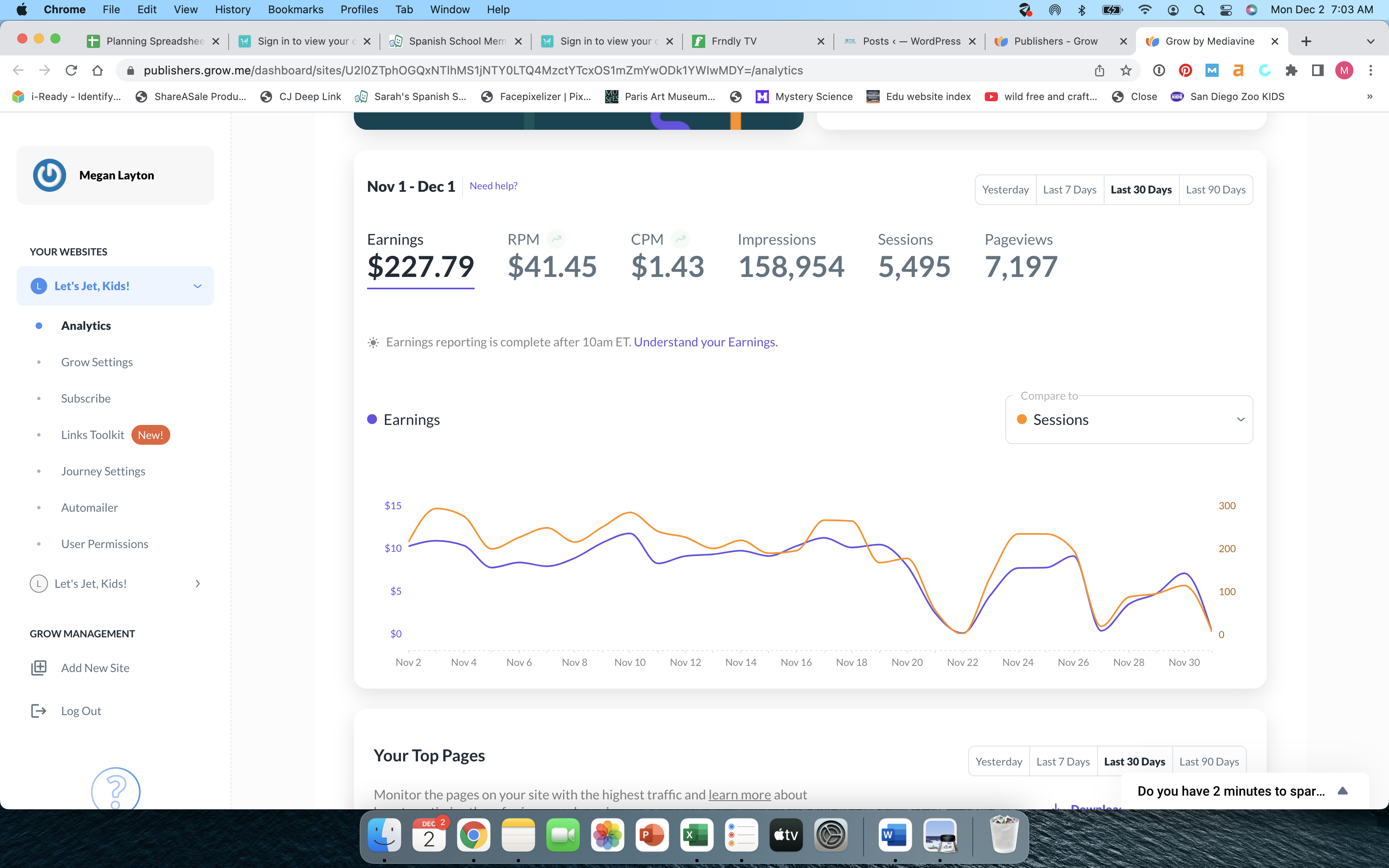
I mean that it deactivates. I have to go into plug-ins on my WordPress dashboard and hit “activate” No, none of my other plug-ins do it. It looks good right now, but at the same time it's still not reporting correctly (shows 5 sessions yesterday.) I had a few days when it first started happening that reported 0 sessions, and 0 earnings. Here is a screen shot from today. You can see the days it stopped reporting, and then didn't reactivate until I noticed.
I will look at your instructions to try to add the scripts manually.
 0
0 -
Hi Megan Layton ! Thanks for the screenshot and additional details. If the plugin is deactivating, then that would result in a drop in sessions and revenue since the plugin is what adds the ad script and Grow script to your site - without these scripts, ads won't load and analytics won't be tracked.
It's definitely strange it's deactivating on its own, and it's something we would recommend asking your host about since there could be a security setting or some sort of automatic process running in the background causing this.
That said, to ensure consistent earnings and more accurate analytics, disabling the Grow plugin and manually installing the scripts instead would be a safe option.
Thank you!
0 -
Thank you Rachel. It looks like it's been active the last 24 hours (haven't had to reconnect it, thank goodness). So why would it be showing just 5 sessions yesterday?
0 -
Hi Megan Layton ! It's difficult to say without being able to troubleshoot in real time - it could definitely be related to the issues your describing with the plugin even if it was still activated. My suggestion would be to manually install the scripts and then monitor to see if the numbers look more normal. As long as they do, then we can assume it was some sort of issue with the plugin and possibly a server/security configuration.
Thanks!
0 -
Thanks for your quick responses. I'm about to add the scripts and hopefully it helps!
0 -
Hi Rachel,
I've deactivated the plug-in. I can't get the ads.txt to work inserting manually, so I'm still working on that. But as far as the grow script… even deactivated, it says I'm still connected with grow even with the plug-in deactivated, so is it necessary to insert the grow script? Is it possible I'm connected some other way?
0 -
Megan Layton Your host should be able to help with the ads.txt file and can even set up a redirect to our servers so you don't have to manually update the ads.txt file any time there's an ads.txt update - you can read instructions on how to do that here.
For the Grow script, it's possible you added it to the site manually at some point in time. As long as you see the Grow functionality loading on the site without the plugin (like the widget in the bottom corner), that would indicate the Grow script was added to the site and you don't need to add another Grow script.
0
Journey is Self Supported
Please sign in to leave a comment.
Comments
14 comments