Issue with Ads.Txt

Hello! I can see from the posts that others are having issues with getting past this step but no solution is working for me. I've been working with my host (Big Scoots) for over 3 days now to try to complete the onboarding and its not working. We got the first file installed and now there's an error on the ads.txt. This is what Big Scoots is saying. Anyway I can get this resolved?
The login from the WP admin will still need grow access, but that will not be required as you will find that the ads.txt file is already loading up OK:
domain.com/ads.txt?nocache
or
domain.com/ads.txt
does show the same content. I will recommend asking the support team at mediavine to see if they are not able to view the publisher details and contents OK there.
-
The error I'm getting from Grow says: “We can’t seem to find your Ads.txt file. Check our FAQ for troubleshooting options.”
Although BigScoots has promised up and down that the ads.text file is installed. And they also lessened the security on Cloudfare and its still not working. I'm not sure what to do at this point?
0 -
Big Scoots is requesting the exact error message from the back end of Journey. I can't see that. I only see the one in Grow that says the file is not there but its been loaded a few times.
0 -

Hey Monica, I see that ads are up and running on your site, and I'm not getting the error. Are you still having an ads.txt issue?
0 -

Interestingly enough I am getting the same error as well. Everything is set up fine, nothing changed on my website and suddenly the Grow dashboard says the ads.txt out of date, i went to update it, i did, everything is in place, flushed the caches and it still says can't verify ads.txt.
0 -

Hi Uzair Ghani ! There was an issue with some ads.txt files showing a false out of date status on Friday and then over the weekend, but it should now be resolved now if you go into your Journey settings in your dashboard and click the “Refresh” button above the Ads.txt section. Thanks!
0 -

I am getting this error as well. I have updated my WP Rocket and PerfMatters plugins with the information provided in the help center. I have also flushed my cache and even added the text manually into my file manager since the troubleshoot for WP was not working for me. Any help would greatly be appreciated!
0 -

Hey Jennifer Holt - It looks like the ads.txt version you have currently on your site (# Ads.txt v20240822) doesn't match the version that's available in your Journey Dashboard (# Ads.txt v20240912). Updating your Ads.txt file should do the trick (we have a few guides on this here)
Another option would be adding a redirect to our servers so you don't have to manually update the ads.txt file any time there's an update, and you can read instructions on how to do that here.
0 -
Ok! So I went in and updated the ads.txt file with the updated version (that you mentioned above). I also created a redirect (using the redirection plugin) with the information you shared in another article. So, if I understand correctly, the redirect should take care of the manual updates moving forward? Thank you!
0 -
Hi Jennifer Holt - that's correct. As long as you're seeing a redirect when navigating to your site's ads.txt file, you're all set.
0 -

Hello, I am having the same issue - and my hosting is saying there is nothing on their end. I have the ads.txt set up and it matches when i enter my website.com/ads.txt
Just wondering if there is another ongoing issue for this? Thank you!
0 -

Hi Rachel Helppi ! It looks like your ads.txt file is out of date -- the most recent file is from 10/21 and the one on your site is from 9/12, so you'll want to copy and paste the new ads.txt file contents into your ads.txt file, clear all caching, and then that notice should go away. You can also refer to this help article. Thank you!
0 -
Thank you for your help! I got it cleared!
0 -
Hi Ryan! I am back with a question about the redirect. I set everything up as you shared above, but I just received the dreaded ads.txt missing/out of date error message again. Can you please advise on what I need to do? Thanks so much!
0 -
Jennifer Holt - it looks like your Ads.txt file is still hosted on your site, meaning you there could be a cached version of the file that our monitoring service is seeing.
If the redirect is properly set up, you should see a ‘adstxt.journeymv.com’ as the base URL (with some additional text after) when navigating to your site's ads.txt file. If you haven't yet, I recommend connecting with your host if you're looking to set up a redirect.
0 -
I reached out to my host and this is what they said…
I established a new redirection through your Site Tools panel, under the Domain-->> Redirects section. This adjustment seems to have resolved the issue.
After being redirected to https://adstxt.journeymv.com/, I noticed a message stating "Missing Authentication Token". It seems there may be additional steps necessary to fully resolve the issue. I recommend reviewing the tutorial provided to ensure all settings are correctly configured.
Can you please advise, Ryan? Thank you!0 -
Jennifer Holt You'll want to reach out to your host and have them update the URL that you're directing Ads.txt traffic to, as currently, it's just updating to https://adstxt.journeymv.com/, instead of the URL where your Ads.txt file is hosted.
Information on how to find the URL where your Ads.txt file is hosted can be found here.
0 -
Got it! Thank you!! :)
0 -

I just can't get to this screen:
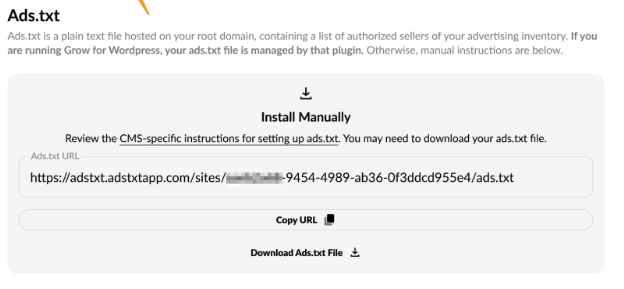
I have removed advanced ads plugin, i've cleared my cache (server and side).
Why I just can't see the screens Journey is posting, please help me to let Journey access my ads.txt file0
Journey is Self Supported
Please sign in to leave a comment.
Comments
18 comments