Analytics showing 0 Sessions & Earnings
Completed
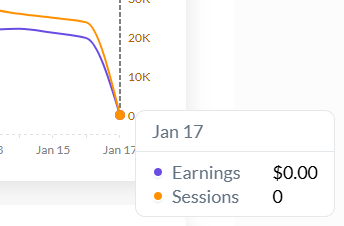
My analytics have been showing zero sessions and earnings for the past two days (January 17th and 18th), despite my website receiving thousands of sessions on those days and the ads being active (and still running). Could this be due to maintenance issues or other technical problems affecting the reporting?
Best regards.
-

Hi Halit Baskurt ! Thanks for letting us know about this. We had our data team take a look and run a backfill, and you should be seeing data now for those days.
1 -
Jasveena R. Prabhagaran I'm seeing data in your dashboard for the 10th so everything looks good on our end.
0 -

Hello this is also now happing to my site. There is no reason for it to flatline from my end so could you take a look at it?
0 -

Hi Michelle R ,
It looks like your site is optimizing our script which will cause problems displaying ads. This Help Document explains what is going on and how to exclude our script from several popular optimizers.0 -
Hi again,
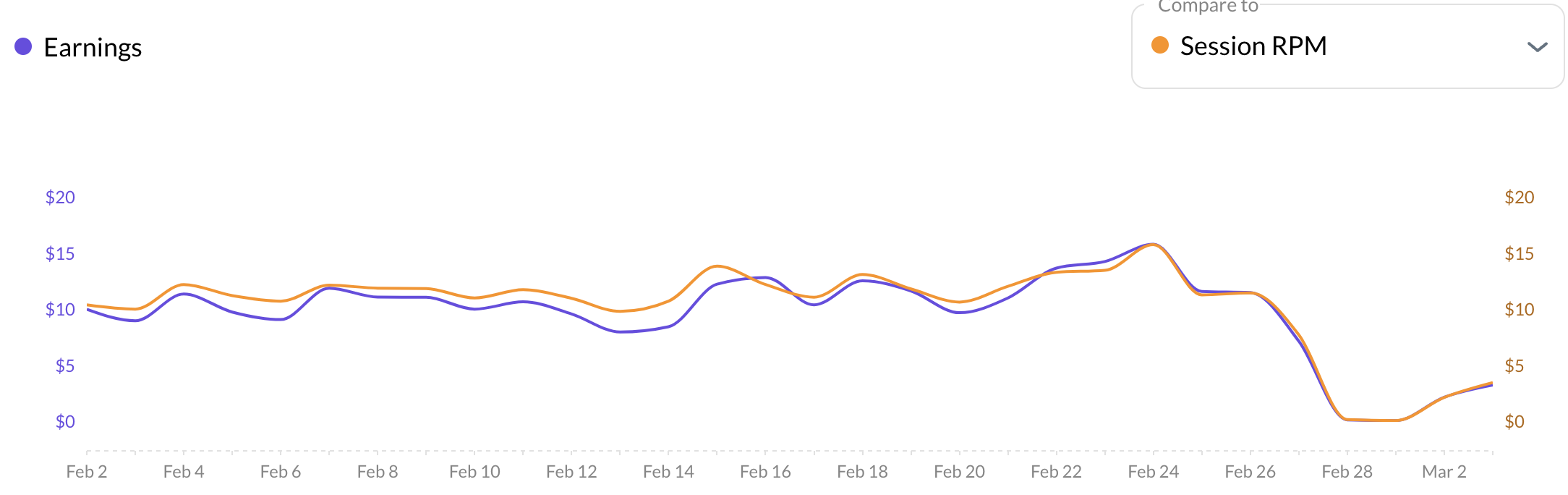
I made sure to set my optimizer to the correct setting but my analytics still aren't back to anywhere near where they were. As you can see I didn't have any issues prior to the end of February.. is this common to just change by itself suddenly and remove all your progress?
 0
0 -
Hi Michelle R ,
I took another look at your site and it looks like the Journey script is still being optimized. This will cause issues with ad placement, so you'll want to exclude our script from optimization.
0 -
Hi again Tim,
Thanks for taking another look. From my side, Nitropack has confirmed that they're not delaying any ad scripts, the ad script opitmization feature is turned off, there are no custom delayed scripts and I've set the general optimization mode to standard as per the help article.
I can't understand how the adscript is being delayed all of a sudden and from where you are seeing that the Journey script is still being optimized on my site. Could you please give me more details so I can try to fix it. I still haven't got back to anywhere near the impressions I had before Feb 26.
Many thanks
Michelle
0 -
Hi Michelle R The thing that I'm seeing that's telling me that there's some optimization going on is this:

Normally, your script would look like this:
<script type="text/javascript" async="async" data-noptimize="1" data-cfasync="false" src="//scripts.scriptwrapper.com/tags/15aff5e8-4738-4758-a398-f83967b016b9.js"></script>
Because of the added parts, specifically the

is telling me that the script is being optimized by Nitropack.
If they are saying that it has been turned off, there may be some caching at play. If you could clear all plugin, server-side, and CDN caching, that would be great!
0 -
Hi again Tim,
Thanks for letting me know that. I have cleared the cache server side and the CDN, could you please take another look. Thanks for your help.
0

Journey is Self Supported
Please sign in to leave a comment.
Comments
10 comments