Diagnosing 0 Sessions/Pageviews

I’m running into an issue with my non-WordPress custom build where the Pageview and Sessions are not being counted properly. Here’s the situation:
- The Journey script should be firing correctly.
- Earnings, CPM, and Impressions are being reported as expected on Journey.
- Sessions and Pageviews are showing up as 0 on the Journey dashboard.
- Meanwhile, Google Analytics is tracking sessions and pageviews just fine.
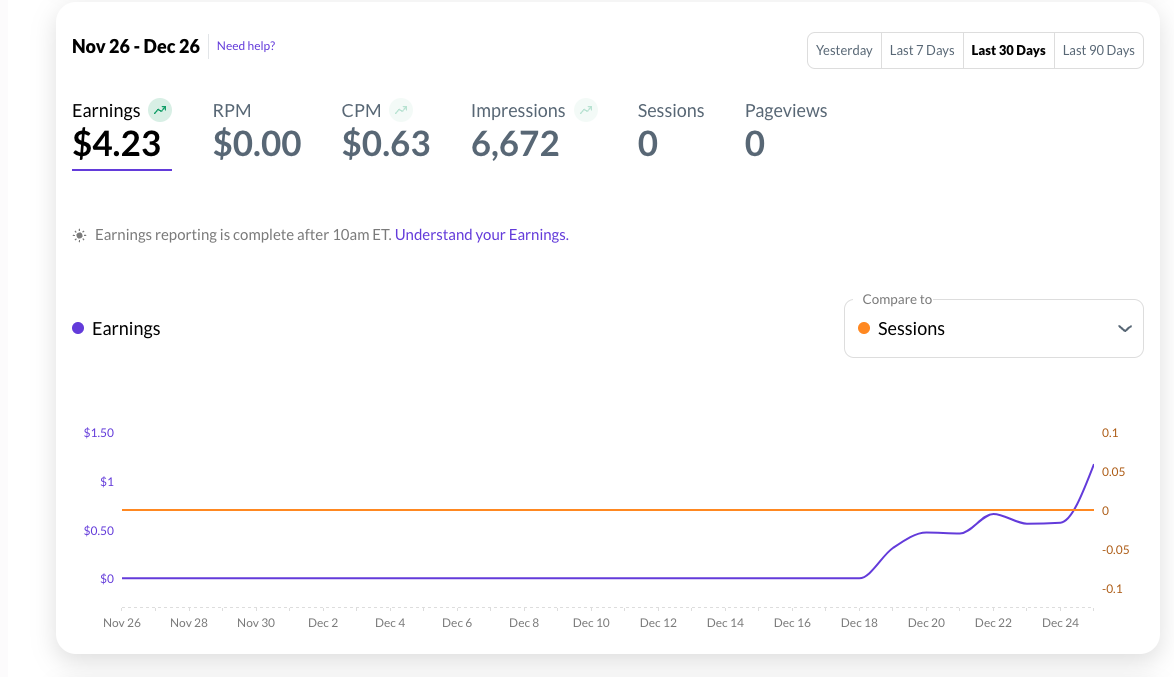
I’ve already double-checked that the Journey script is implemented properly on my site and ensured the site is receiving traffic. I’m wondering if there’s something specific to Journey or Mediavine’s implementation that I might be missing.
Has anyone experienced this before or have any ideas as to what could be causing this discrepancy?
-
Official comment

Hi there! If you're not seeing data in your dashboard, that would likely indicate the Grow script isn't successfully connected to the site anymore, is being optimized, or is being blocked by some sort of crawler firewall or security setting since this is the script that tracks all of your data.
The Grow script is separate from the Journey script – you can add the Grow script following these instructions, and then the reporting numbers should hopefully return to normal. If not, you'll want to ask your host if there are any firewalls or security settings that could prevent crawlers from crawling the site, and also make sure the script isn't being optimized by following the instructions in this help article. You can also refer to this open thread on the same topic for additional information and troubleshooting advice.
Thanks!
-

Hi Journey by Mediavine team, I am having the same issue as the user above. Can you please assist us with a fix?
I have a WordPress website, which has the Grow plugin, Journey has been successfully integrated and I signed in through my Google Analytics so GA is successfully integrated with Journey. However, my analytics dashboard only shows 115,224 Impressions, 0 Sessions, 0 Pageviews (which is NOT the case on Google Analytics).
My CPM is also $0.60, and my RPM is $0, even though 80% of my traffic comes from the US. It has been over 1 month since I have been using Journey.
Can someone from Journey please respond back to us and help us fix this matter? Thanks.
 1
1 -


Hello Support, the ads have been up a few days and my dashboard shows this. It is quite different from Google Analytics, which shows a lot more sessions/pageviews. Also, my RPM is very low. Are the ads fully set up or will it take more time for the scripts to show a more accurate RPM value? Thanks in advance.
0 -
Arul John I'm not seeing the ad script on your site. You'll want to make sure the ad script is added to the <head> of your site as soon as you can for the site to continue earning - you can manually install the ad script following these instructions.
As for Google Analytics being different from Grow analytics, this is to be expected and you can read more about this in this help article: Why Is Grow Analytics Reporting Different Than GA4?
Also it's good to note that you're paid through impressions - not sessions. Your earnings and impressions are tracked separately by the ad server, so they're not based on analytics. So having lower session number through Grow analytics won't have any impact on earnings.
Thanks!
0 -
Support, thank you very much for your detailed reply!
Not sure how my ad script disappeared earlier. I re-added the ad script to <head>, restarted my web server, and now see ads!
Thanks, again!
0
Journey is Self Supported
Please sign in to leave a comment.
Comments
5 comments