Sudden Drop in sessions starting 11/20

I am experiencing a sudden drop in traffic on Journey Analytics but normal on Google Analytics from last 3 days.
The drop is only in the visitor count in Journey Analytics; CMP and total impressions remain consistent.
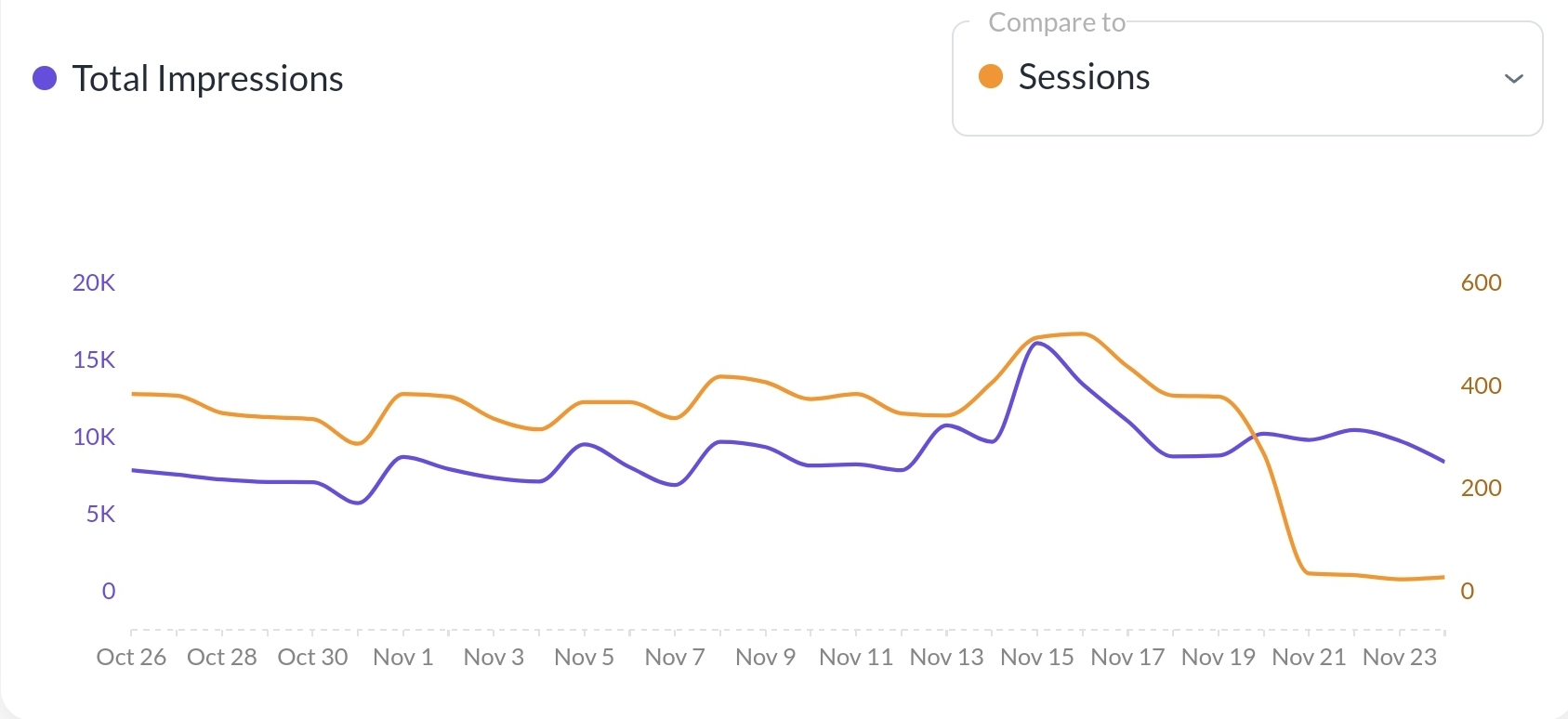
This issue started around 21 November and persists.
-
Official comment

Hi Bibek B ! Thanks for surfacing this. Our data team is reviewing analytics from 11/20 onward since sessions seem unusually low for some sites.
I did just want to assure you that this won’t affect your earnings - it’s only an analytics reporting issue. Your earnings and impressions are tracked independently and are unaffected by any discrepancies when it comes to analytics.
We’ll post here as soon as we have an update from our engineers.
Thanks again!
Update:
Our engineers have made an update that should address this discrepancy going forward - current day and previous analytics won't change. As mentioned above, though, this won't affect earnings at all as they're calculated separately. Thanks!!
-
Okay, thanks!
0 -

Hi, Support my site session also seems to behave differently since the recrawl, with almost half of the discrepancy from GA4 for these last two days. Also, the pageviews had the same issues. Could you please take a look at it? Thank you in advance.
0 -
Hi Rizal Ang ! We'll have our engineers take a look and get back to you when we have an update. In the meantime though, this wouldn't have any impact on revenue or ad performance so it shouldn't be anything to worry about.
Thanks!
0 -
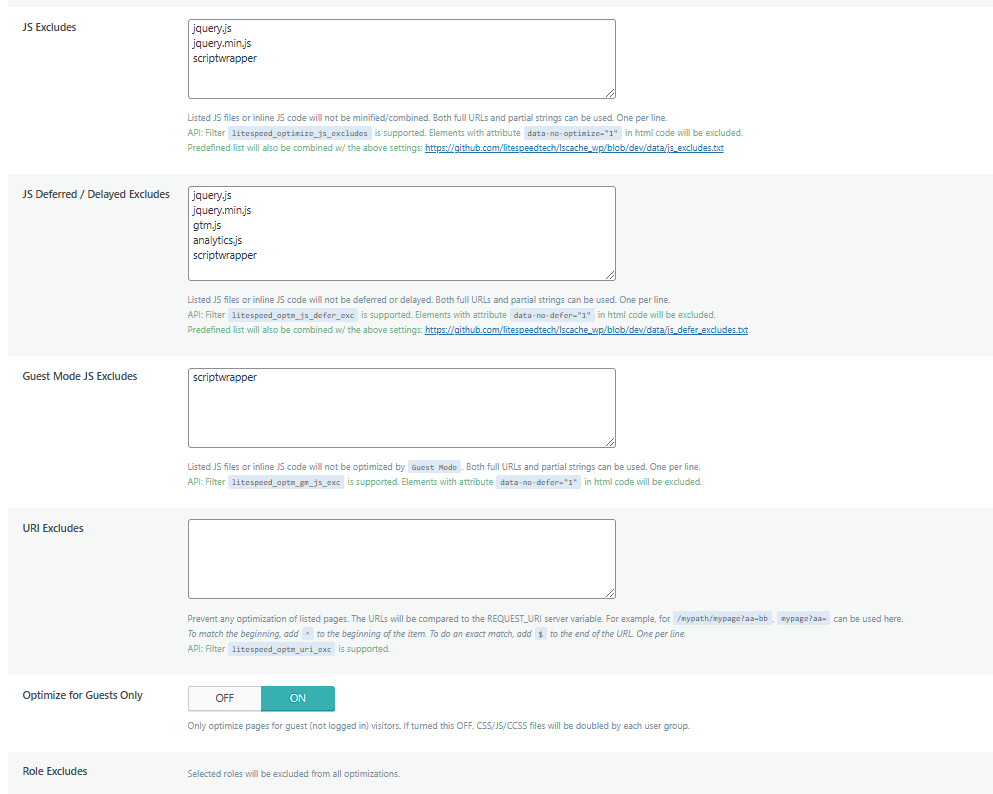
Rizal Ang It looks like Litespeed is optimizing the Grow script, which could be the reason sessions are underreporting. We recommend excluding Grow from Litespeed's optimizations and then seeing if numbers return to normal.
Thanks!
0 -
Hi Support thank you for getting back to me! 😊
I reviewed the settings, and I noticed that "scriptwrapper" was already excluded as instructed well before the re-crawl. However, just to be thorough, I followed the guidance from your link and ensured "scriptwrapper" is only excluded under JS Excludes and JS Deferred/Delayed Excludes. Previously, I had also included it in Guest Mode JS Excludes, but I’ve now removed it. Additionally, I’ve turned off the Optimize for Guest Only option.
Let’s monitor the numbers and see if they return to normal. Could you confirm if this underreporting issue has no impact on revenue? Your support is much appreciated!
0 -
Hi Rizal Ang ! It's best to have the script excluded from any Javascript optimization settings to be on the safe side. This won't have any impact on revenue though because you're paid through impressions - not sessions. Your earnings and impressions are tracked separately by the ad server, and they're not based on analytics. This means that your earnings will still be accurate and unaffected by any analytic issues that may occur.
0 -
Hi Support
The issue remains unchanged—the numbers are still not back. Setting aside the underreporting concern, I reviewed the impressions from previous months on Journey Analytics. Before the sidebar was re-crawled (it has only been live for less than a month), the revenue dropped drastically—by half or more. While I understand this is the post-holiday period, the site on GA4 is showing growth. Is this kind of decrease considered normal?
Thank you so much for your continued support and assistance—I truly appreciate it!
0 -

Hi Support , I'm having the same issue as Rizal. My sessions have been incorrectly reported for the past few days in my earning reports on Grow dashboard.
Also, my RPM has been extremely low for the past few weeks, and the highest I've hit is only $18 (most of my traffic comes from Q1 countries), I wonder if I need to tweak something on my site or if it's due to the Grow script optimisation.
0 -
Hi Jasveena R. Prabhagaran ! Your numbers are looking normal on our end. It's important to note that Grow analytics will always be different from GA4. You can read more about this in this help article: Why Is Grow Analytics Reporting Different Than GA4?
Ultimately, you're paid through impressions - not sessions. Your earnings and impressions are tracked separately by the ad server, and they're not based on analytics. This means that your earnings will still be accurate and unaffected by any analytic if any issues do occur. In this case though, we're not seeing the Grow script optimized or anything that would indicate a data issue.
Thanks!
0 -

Hi Support - I noticed a huge drop in RPMs in December - is there a reason they are so low suddenly. The RPMs were steadily going up then dropping and my sessions haven't gone down much. Can you let me know why this might be?
0 -

Hey mystilettolife - Because it was an election year normal spending patterns got changed up a bit. Advertisers spent most of their budgets earlier in November which made for a softer December and an earlier drop in preparation for the Q1 reset. I talk a bit about all this here.
0 -
DriftXP yep, looks good.
0 -

A sudden drop in sessions starting 11/20 could be due to tracking errors, site downtime, or SEO and ad traffic changes. Seasonal trends, such as holiday slowdowns or competitor activity, may also impact traffic. Additionally, recent site updates or UX issues could disrupt user flow. Check analytics, traffic sources, and site functionality to identify the cause.
0

Journey is Self Supported
Please sign in to leave a comment.
Comments
16 comments