Unable to receive email

I have got an invitation for one of my site from journey. But I am unable to receive the verification mail during the journey process.It says we have sent you an email but there is no email in my inbox, spam and elsewhere. I am stuck here.
-
I want to change my email that is associated with my grow account. Is that possible or any other way out?
0 -

Hey Muhammad Tayyab - If you sign into your Grow Publisher Portal, you'll see this screen eventually during setup.
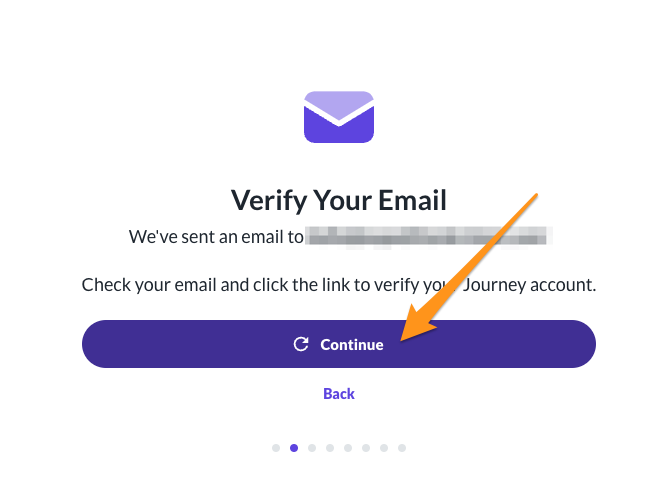
Every time you hit Continue, the email will resend to the email address you have on file as the owner. There's about a 5-minute delay in between emails.
If you want to change the email address associated with your Grow Publisher Portal, I'd recommend adding the email address you want to use as a user first. After that, you can update your User Permissions if you'd like another email address to be designated the owner; only one email address can be an Owner, but you can set up other users as Administrators or Contributors depending on what you'd like them to be able to access. These articles cover User Permissions and Permission Changes:
0 -
I have tried this before adding a user and changing the role to owner but again the verification mandatory via email and here comes the problem, the email they sent not received in my mail account.
0 -
Hey Muhammad Tayyab - Which email address do you want to be the owner of your account? Is it the one you're writing in with?
P.S. I'll be sure to remove the actual email from your reply
0 -

I'm having this same problem. Is there a way you can help? I tried following your steps above and I'm still not receiving any emails.
0 -

Amy Wilson if you log into your Grow Publisher Portal dashboard and click “Finish Journey Setup”, it should take you to the ad script installation part of onboarding and you shouldn't need an email to finish onboarding. Thanks!
0 -

Hello,
I am having the same issue, despite multiple attempts to receive the required email to start setting up.Sarah
0 -
Hi Sarah ! I just triggered the email to be sent again. If you could double check in your Grow Publisher Portal that we have the correct email address and then check your inbox, all spam folders, and for any filters you might have set up, hopefully you'll be able to see the email. I would give it several hours to come through if it hasn't yet. Thanks!
0 -
Hi Rachel,
Thank you for the quick response. I have double checked the email and it is correct. I've received multiple other emails from Journey via this email address without issue. It's been a couple hours now, and I still have not yet received the verification email, including in my spam folder.
0 -
I believe this email will come from Grow instead of Journey, so that's what you'll want to look out for!
0 -
ok, thank you for the clarification. However, there is no recent email from either Grow or Journey, other than the eligible to start email received yesterday and now the forum notification emails received today.
0 -
Hello,
I still haven't received the verification email. I have also lifted Spam protection settings by whitelisting the mail.grow.me domain. Is this the correct domain the email would come via?
0 -
Hi Sarah ! We're having our engineers look into this to see if there's any sort of issue on our side and will let you know when we have an update.
0 -

Hi, I'm having this same issue for my site. Actually I now see the problem. There is an error in my owner email and so I won't ever get the email even to switch user roles. Can someone help me with this problem please? I would like to change owner email to (redacted) as you will see in my dashboard as I entered the wrong email in the first instance.
0 -
Hey Julie Marshall - I just fixed that on the back end for you. You should be good to go!
0 -
Hi! I confirm that I received the verification email now.
Thank you so very much!0 -

I am having this same issue - stuck on the “verify your email” screen in the screenshot above and the email is not coming through. I have tried to send multiple times, waited several hours and checked spam. I received my approval email from Grow to the same email address so I believe I can receive emails from you. Would appreciate if you could help me as well!
0 -
Hey Ashley Wali - We're looking into why you aren't getting that. Once I have an update I'll reach out here and let you know!
0 -
Ashley Wali Our systems say that two emails were delivered yesterday around 12:59PM and around 4:00PM mountain time. I believe the email sender is from Grow, not Journey, if that helps. Could you check through junk/spam/promotions/etc since everything on our end is indicating it sent?
Thanks!
0 -

Hi there- I'm having the same issue as well- not receiving emails after multiple retries and checking spam. I confirmed nothing is blocked, I'm not sure what the problem is- would love some help if possible!
0 -

Hey Nicole Hampton - we noticed that your inbox was flagging these messages as spam, and wasn't allowing us to deliver them. I attempted to send this along a few more times to see if we could bypass this filter - could you let us know if you've seen this email?
0 -
Hi there- I still haven't received any emails. I checked through my junk/spam folders, and also checked if I had any other filters in place on my email but I do not. Today I talked to my email provider and they confirmed that there are no filters in place on their end or mine that should be blocking this. Any other thoughts?
0 -
Hi Nicole Hampton - We noticed that the address in which our emails are sent from has been added to a few known blocklists (0SPAM, s5h.net, and ZapBL), and it's possible that your email provider is respecting these lists, which is causing the emails from Journey to end up being undelivered.
If you haven't yet, I recommend reaching out to them once more and having them see if they can whitelist our email domain (http://mediavine.com/)
After, I recommend trying once more to send out the email confirmation found when going through the Journey onboarding steps.
2 -

Hi I got the email to say I was eligible from Journey, I got the one from zendesk for this forum. But I am not getting the verification email to get started please help!
0 -
Hey Tina - I just took a look and wanted to confirm you were able to get that email?
0
Journey is Self Supported
Please sign in to leave a comment.
Comments
25 comments