Can I Use My Main Domain's Mediavine Code on a Sub-Directory or Subdomain?

I have a WordPress website that's approved by Mediavine Journey, with a brandable domain like mydomain.com.
My questions are:
1. If I create a sub-directory like mydomain.com/fitness/ and install a new WordPress site there, do I need to reapply for Mediavine approval, or can I just use the same code from my main domain?
2. If I create a subdomain like health.mydomain.com, would I need to apply for approval again to run ads, or can I use the same code from my main domain?
Also, if I go with option 1 (sub-directory), will it have any negative impact on my Mediavine grow account?
-

Hey Hush - the setup you're describing hasn't been tested when running Journey, so this may lead to unexpected behavior regarding the analytics that are pulled into your Journey Dashboard.
Additionally, the HTML markup of each subdomain and directory would need to match the markup of your site in order for the script to place ads. Our recommendation for Journey sites is to only place ads on a single domain without using an additional subdomain or sub-directory.
0 -

I'm interested in this as well, as I plan to have a community on a subdomain or subdirectory (more likely). It sounds like we'd potentially need to register it as a new domain for Journey? I know you said you don't recommend it, but if it's what's on our site, what are our options?
0 -

Hi Adultsplaysports! So you potentially can run ads using the existing Journey/Grow scripts from the main domain on either a subdomain OR a subdirectory. The subdirectory option would be the simpler setup - you would just want to make sure the scripts are in place on the subdirectory, and ads should display there. Ads can potentially work on an actual subdomain as well (you wouldn't need to re-apply), but if you decided to go that route you can just let us know so that we can check everything out and make sure it's working properly. Thanks!
0 -

Hi John, I hope you’re doing well! I am working on setting up ads on a subdomain of my website, and I would appreciate your guidance on how to properly implement this.
0 -
Hi ZAKARIA! If you have the subdomain setup, we could take a look and see how things would work there. If you have the subdomain url, we could take a look. We have the main url of the site, so a partial url with just the subdomain would be fine as well. Thanks!
0 -
Hi Huntsperger, Thank you for your response. The subdomain URL is https://cooking….com/. Please let me know if you need any additional details to proceed with the ad setup.
0 -

Hi ZAKARIA ! You would need the subdomain to be running your Journey ad script, Grow script, and for the subdomain ads.txt file to point to your Journey ads.txt file via a redirect or by adding the file to the root of the domain. Once that's all set up, as long as you see ads loading, you should be all set.
Thanks!
0 -

Dear Rachel,
I've followed your advice to add Journey ad script, Grow script and ads.txt (from the main domain which is farmvina.com) to my subdomain (news.farmvina.com - the main blog). However, it seems that the ad and the Grow script do not load on the subdomain. Could you help check? Thank truckloadsss.
0 -
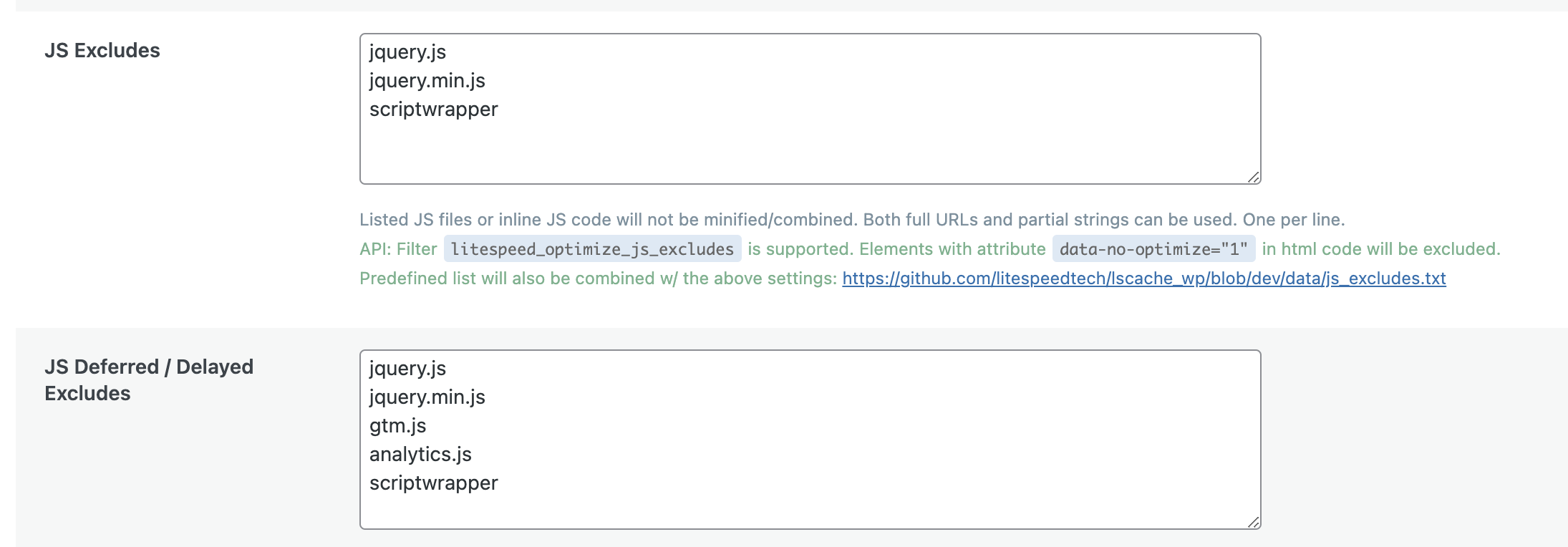
Hey Johny D. Nguyen - checking over your site, I'm seeing the Journey script place ads on your subdomain. I noticed, however, that you're running some type of delay JS feature (possibly through Lightspeed Cache?) which is delaying the Grow script, which may be causing issues. I recommend double checking that both scripts have been excluded from any optimizations.
0 -
Thank you Support
I just double-checked and the scripts were excluded from both the main and subdomain … which is strange.
 0
0 -
Support oh, did you mean that I also need to add ‘grow’ to the JS Exculdes and JS Deferred boxes (just like the ‘scriptwrapper’)?
Without the ‘grow’ there, is the CPM of the site affected?0 -
Hi Johny D. Nguyen! Yes, you'll want to exclude grow there as well to make sure its script isn't being optimized either. We're not seeing any issues with ads displaying currently, but to make sure the script can work as intended it shouldn't be optimized. Thanks!
0 -

Hi John, I have a question related to the same topic. My main website (root) has been approved by Journey I have successfully completed all onboarding processes and I see some ads. I have a subdomain on which I would also like to complete the same setup. From what I read:
1. It is possible to do the same setup on a subdomain and I dont need a fresh approval for it, right?
2. My concern is on the Grow dashboard - I did register the main domain and subdomain as 2 separate sites under the “Register a site” option. So now I see 2 sites on the left sidebar and their respective settings - each for the different site. Now Grow Dashboard doesnt allow me to delete the subdomain out from this list, I read they dont have that option yet.
Therefore my question - despite it being registered on Grow's list as 2 sites - I could still do my Point 1 above, yes? Because Site 2 on Grow's list is a subdomain of Site 1 on that list.
If you have my main domain already with you, my subdomain is https://explore…..com, if you could please kindly check and let me know?
Many thanks, P.0 -
Hey PM - You can run Journey ads on your subdomain. All you need to do is run the Journey script on your subdomain, and reach out to us so we can make sure it's working as expected.
Having your subdomain on your Grow dashboard won't affect this - if you would like, we can take care of removing this Grow site if you would like0 -
Hi there, thanks! I've done the following steps and looks like things work but if you can confirm too:
On the Subdomain:
1. Manually injected Root Site's Journey Ads script in wp_head via Snippets
2. Added Journey Ads.txt here too. But also created redirect of this Ads.txt to the Main Site's Ads.txt in .htaccess - is this required though?
3. Cleared WP and server / CDN cache
→→ Result:
A. I see some Ads on the Subdomain Site
B. I also see the scriptwrapper in Subdomain's Inspect - same as that of Root Site… hope you see this too?
With regards to Subdomain's separate listing on Grow dashboard – because its connected with the Grow Plugin and a different Tag ID
1. I see a second scriptwrapper in Subdomain Inspect with this Tag ID.
2. I see a Grow Initializer script also with this TAG ID
3. If I leave it the way it is, I am able to use features like widgets etc on Subdomain also.
4. If I remove this, try to manually inject the Grow Initializer script of Root Site on the Subdomain - the Grow features don't work as expected (I was trying to have just one dashboard control for all Grow features on both sites) but widgets etc. disappear / don't work properly).
-– So if you confirm that I can:
A. Use the Grow Initializer of Subdomain's separate listing?
B. Use Journey Ads Script of Root Site on Subdomain (and let two scriptwrappers run)
There will be no impact on any Ads right? Then I leave things the way it is. But if you expect a conflict then I will request you to remove the Subdomain's listing from my Grow…
Thanks, P.0 -
PM Thanks so much! A few things:
- Your Ads.txt file only needs to be hosted on the root domain.
- Our Engineers need to make an adjustment in order for Grow features to work on your Subdomain. You'll need to use your main site's Grow script on your subdomain for this to work. As soon we have an update on this, we'll reach back out.
- You'll only need to run the ad script wrapper (scripts.scriptwrapper.com) from your Journey accepted on your subdomain
0 -
Hi PM — I just wanted to check in quickly, are you still only wanting the single account on your Grow dashboard, and would you still like us to connect your main account to your subdomain?
If you're still okay with this change, please let us know. Doing so will mark the subdomain grow account as ‘inactive’0
Journey is Self Supported
Please sign in to leave a comment.
Comments
17 comments