Question regarding the Ads.txt file
Completed
Hi there
I'm writing to you today to seek clarification on a few aspects of my experience with Journey by Mediavine after utilizing it on my website for a week.
My first question concerns the Ads.txt file:
-
Specifically, I'm referring to my Ads.txt file, Ads.txt v20240701.
Upon examining the Ads.txt file of an individual who recommended Journey to me, I noticed that it differs from mine. Their file is named "Mediavine Ads.txt v20240702" and displays advertisements in an appealing and effective manner, which is precisely what I desire for my own website.
Given that my website receives a substantial amount of traffic, I would like to inquire about the specific timeframe or minimum traffic volume required for this file to be updated on my site.
My second question relates to the absence of a scrolling sidebar advertisement:
-
I'm unable to observe a scrolling sidebar advertisement on my website when visitors scroll up or down the page.
I believe this type of advertisement could be beneficial as my current earnings are not meeting my expectations.
In addition, I would like to inquire about the possibility of having a Journey engineer place an advertisement next to the website's logo at the top of the page. This section is currently designated for advertising but remains vacant.
I kindly request your prompt responses to these questions so that I can take the necessary actions to optimize my earnings, which have been less than satisfactory during the initial week.
Thank you for your time and consideration.
My website: sawahits.com
-

Hi SAWAHITS! I'll answer your questions in order.
1. It sounds like the other ads.txt file you're referencing is from a site on Mediavine since the Journey ads.txt file won't start with “Mediavine". Journey has the same default ad placements and settings as Mediavine though on post templates, so the appearance of ads is equivalent. You can read more about transitioning from Journey to Mediavine in this thread.
2. There's no sticky sidebar ad because your sidebar sticks as the user scrolls, which will overlap with the sidebar ad and could lead to accidental clicks. If you disable the sticky functionality of the sidebar, the script should be able to place the sidebar ad unit.
3. Right now, there isn't an option for custom ad placement. It also sounds like you might be referring to a leaderboard ad, which we don't recommend anyway because they negatively impact overall ad viewability and therefore performance.
Hope this helps!
0 -
Thank you, Rachel Johnson, for your clear and helpful responses to my questions. I know that Mediavine requires 50,000 visits and has other policies, and I will work hard to achieve this soon.
0 -

SAWAHITS - thanks for making an adjustment to your sticky sidebar! The sticky sidebar ad should be loading alongside your content now.
While working, I noticed that I was getting a lot of spammy redirects when clicking around the site - here's an example of a post I'm seeing this behavior on: https://www.sawahits.com/how-do-we-use-cookies-an-in-depth-guide/?test=killswitch
You may want to connect with your site host and have them perform a malware scan just to be safe.
0 -
I would like to express my sincere gratitude to you, Ryan, for your prompt attention to this matter. The side advertisement is now functioning as expected. As for the pop-up ads, I have discovered that I had inadvertently omitted the code for the POP ad and have since rectified the issue. Thank you once again for your valuable assistance.
0 -
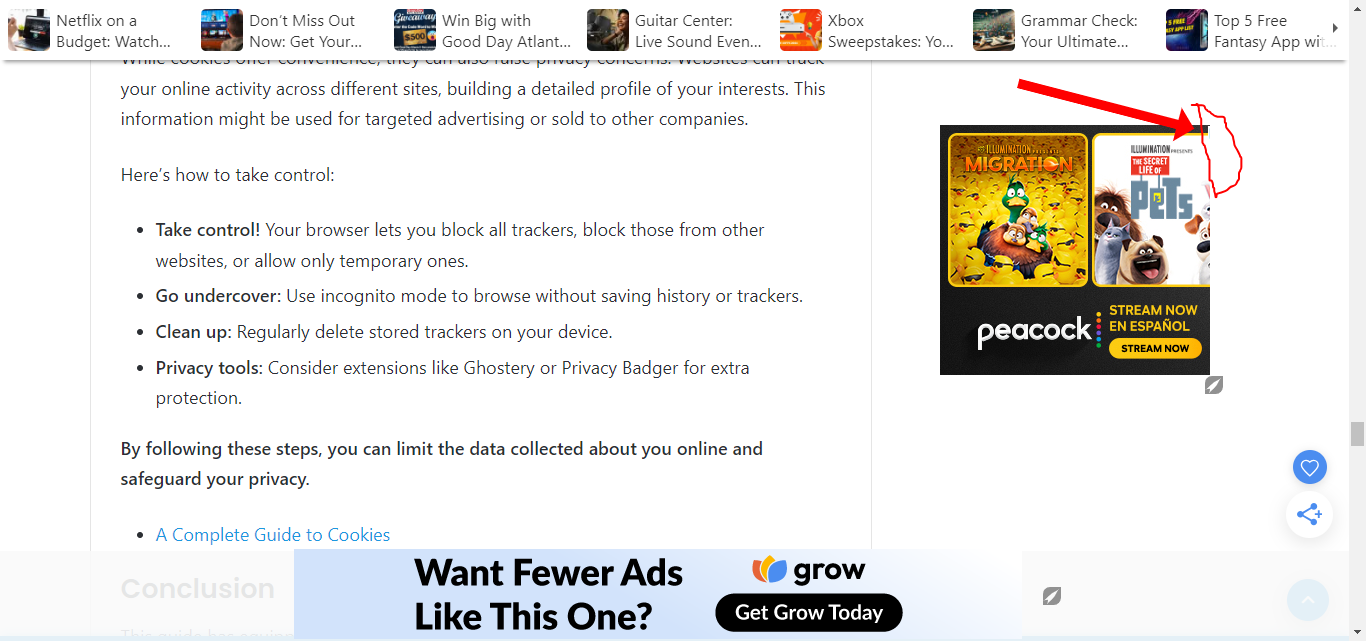
I have one final observation: why is the ad not displaying fully in journey ads, as shown in the image?
 0
0 -
SAWAHITS It looks like there's a little CSS from your theme that's overriding a few styles on the ads, causing it to look cut off. I've written a little CSS which can be added to your site under Customize > Additional CSS that should take care of this:
/*Journey - Adjust AdBox padding */
.mv-ad-box .container {
 padding: unset !important;
}
/* End CSS */
0 -
Thank you very much Ryan I will put the code today. Best regards
0 -
Hello today I was surprised that the profits and statistics of the previous 5 days disappeared and are no longer available, please take a look or give me an answer what is happening in my account.
0 -
Hi SAWAHITS ! This is a reporting bug for 7/26-7/29 -- no dashboards are showing data for this date range. Our data team is looking into it and this is only a reporting issue. You can follow this thread for updates on when this is resolved.
Thank you!
0 -

This Ads.txt thing is a headache. It keeps warning me on the dashboard that it is out of date yet, however much I try to download a new one, purge all caches (I am using the W3 Total plugin), and refresh, it doesn't change a thing.
I have even gone ahead to talk to Namecheap, who put it in the root domain, but still, the error keeps coming back. I feel that advertisers are losing trust in my site if there is anything like that.
0 -
Hi Wycliffe Nyaanga! To avoid having to manually update the file in the future, I would recommend adding a redirect to our servers so you don't have to manually update the ads.txt file any time there's an update, and you can read instructions on how to do that here. Thanks!
0
Journey is Self Supported
Please sign in to leave a comment.
Comments
11 comments