No ads in sidebar
Pinned Completed
Hi. Ads aren't showing in my sidebar. It was a sticky sidebar, so I removed the code so that it's no longer sticky, but that hasn't helped.
Also, in the process of trying to get sidebar ads to work, I clicked the add script button again (after ads were already running for a few days). Will doing it twice cause issues?
Thanks.
-

Matt you're all set!
0 -

Hi Support, I have disabled the sticky sidebar on the website. And I don't see any sidebar ads popping up. Kindly do the needful.
0 -

Hi Agalya Saravanan. You're all set as well!
0 -
Thanks John…Yes, I can see the sidebar ads now. Also, a quick question about the video Ads? It would be great if I have video ads for Desktop only. If there is no customization, please add it to both mobile and desktop.
0 -

Hi Rachel, it's the same on my site – there are no ads visible in the sidebar. Could you take a look at it as well?
0 -
Hi Tim Nocent ! It looks like your site uses a fullwidth template, so there isn't a sidebar to target. You'd need to choose a template with a sidebar in order for us to target that ad placement. Thanks!
0 -

Hi,
On Sunday I tweaked my non-food website's (LNOM) container width, sidebar padding, etc. in an attempt to optimize for better RPM. I was wondering if we could maybe check if I messed up something with the sidebar and if the site is still running a sidebar ad properly.
thanks
- M.
0 -

I have turned off the sticky sidebar of my website, kindly add the sidebar ads on my website.
0 -
Arnaf Abir You're all set with the sidebar ad!
0 -

Hi! for https://www.howtoeatthis.com/ I have turned off the sticky sidebar setting. Can I request a script recrawl?
Thanks!
0 -

Hi Rachel
Can you please get the script to re-crawl my website to try and get the ads to appear?https://askbart.org/crochet-hot-water-bottle-covers/
Thanks
0 -
Tim Te You're all set!
Alex Outlaw Your sidebar is sticking as the user scrolls. The sticky feature needs to be disabled for us to target the sidebar ad.
Thanks!
0 -

Hi Rachel Johnson, I am also facing same problem, i remove the sticky side bar but yet the adds aren't showing on my side bar
0 -
Mahghang Fonkwa Asobo Cynthia you're all set!
0 -

Hello, I am having the same issue - ads have appeared at the bottom of the site but sidebars are empty.
0 -

Support Hi Rachel - I'm having a similar issue as the rest of this thread, sidebar ads aren't shown. I've checked that my sidebar is not sticky or flex.
Is there any way to request a recrawl of my site, or is it only via this thread?
0 -

Hello
I made a post regarding this 12 days ago and was told to remove sticky sidebar. Already removed it 12 days ago, still I can't see sidebar on it.
Thank you.
0 -
Hi Rachel
I've now removed the sticky sidebar, can you please re-crawl my website?
https://askbart.org/crochet-hot-water-bottle-covers/
Thanks
0 -
Veronica Lobanov please provide the URL for your site - I'm unable to find it with the email you wrote in with.
Michael I only see sticky sidebars on your site. Please send a URL where a sidebar isn't sticking and we can take a look.
Alvin Bohol You should be all set.
Alex Outlaw The sidebar doesn't have widgets, but I'm still seeing the sidebar set to position: sticky and it still sticks if I locally add a block to the sidebar, so this still needs to be disabled.
0 -
Thank you. Already see side bar now.
0 -
Hi Support first off thanks for your help, you please double check that you are checking the latest version of the website and not a cached version as the developer assures me that the sticky code has been removed.
Thanks
0 -
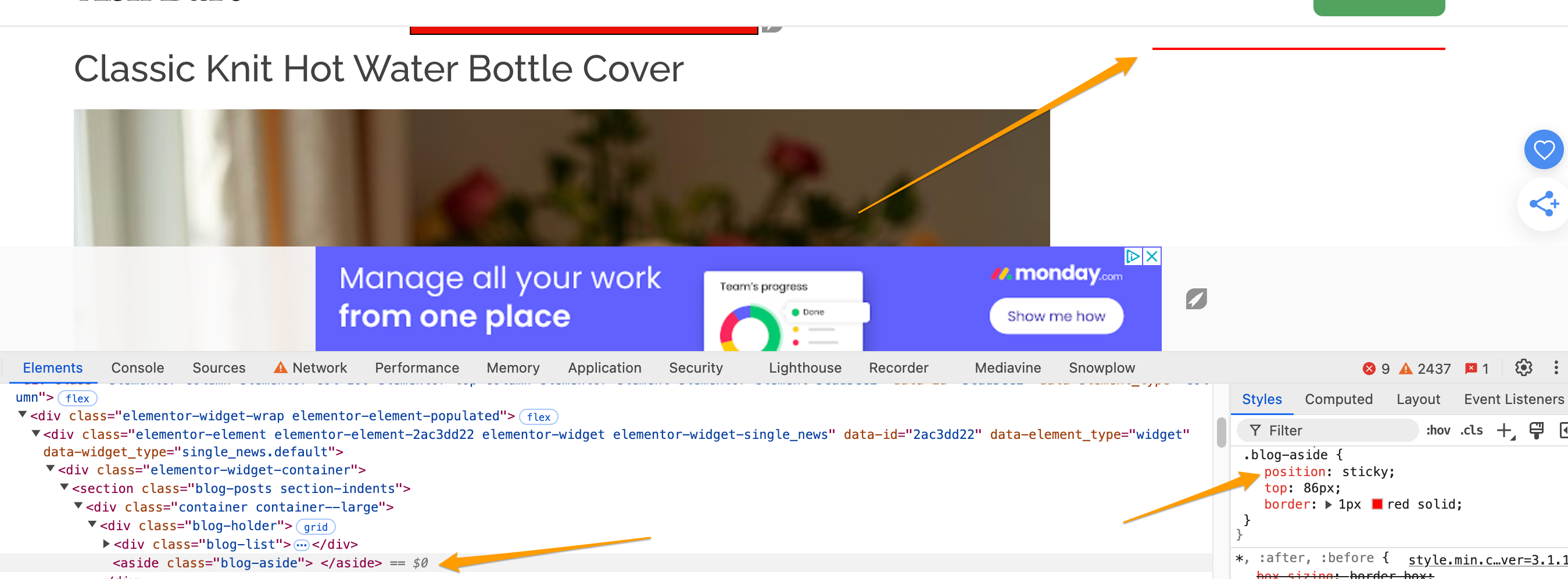
Alex Outlaw the position:sticky is applying even if I bust the cache with ?test=1234. If it is caching, then your developer will need to clear out all caches and check in an incognito window to ensure the sidebar isn't sticking. Once the position: sticky is no longer there and the sidebar isn't scrolling as you scroll when you insert some sort of placeholder box in it, let us know and we can take another look.
 0
0 -
Hi Support , URL for our site is https://zendine.co. Thank you!
0 -
Hello Rachel Johnson! hope you doing good, please I mistakenly change my adds from optimal to high. but i have bring it back to optimal. can you go through the website the so it updates please…..
0 -
Veronica Lobanov You're all set!
Mahghang Fonkwa Asobo Cynthia These settings work out of the box, so there's no additional action to take.
0 -
Hi Rachel Johnson thanks for your reply
Michael I only see sticky sidebars on your site. Please send a URL where a sidebar isn't sticking and we can take a look.
Here's an example - https://castfacts.com/blog/top-rom-coms-of-21st-century/
0 -
Michael this sidebar also sticks as the user scrolls, which means we can't place a sidebar ad here. It has to remain static at the top of the page and not stick as you scroll to place a sidebar ad. If it's static on your end, you might need to clear out caching.
0 -
Hi Support
The developer has now done a chache busting refresh, and I can now see that the test text no longer sticks if I'm in incognito mode. If you could also try in incognito mode https://askbart.org/best-crochet-towel-topper/ hopefully you will see the change
Thanks
0 -
Hi Rachel Johnson , thank you for your help - ads have now appeared on our sidebar in blog posts. However they are still missing on internal pages and articles of the site, such as this one: https://zendine.co/dining/menu/dishes/bento-box/ (any pages/articles that are not under zendine.co/blog are missing sidebar ads). Any chance this could be adjusted to mimic the sidebar on blog posts? Thank you!
0 -
Veronica Lobanov and Alex Outlaw You're all set!
0
Journey is Self Supported
Please sign in to leave a comment.
Comments
128 comments