Unable to Enable Ad Script
Featured Completed
Hi! I'm having an issue with adding the ads script to my site. Here's what's happening:
1. It's showing a yellow notification that I need to update the plugin (but I have already).
2. I head to Wordpress, enable the script and it says success.
3. I cleared my cache
4. Checked for the script and it's not there
Any insight for what to do next would be appreciated!
-

Hi Tanya Joslin ! We recommend trying all of the troubleshooting steps mentioned in the official comment here (including logging out of the plugin and trying to log back in). I would try all of the steps, but step 4 seems like it could be relevant in this case.
If none of that does the trick, you can manually install the ad script following these instructions and the ads.txt file following these instructions. Hopefully that will get you up and running!
0 -

I have a problem with Ad Script. It doesn't seem to work for me. Please help.
0 -
Wycliffe Nyaanga It looks like you just need to finish onboarding by filling out your payment information in your dashboard and then you should be all set.
0 -

Hi, I am also having problems with Ads Txt - I have cleared the WP Global Edge cache several times on ASMR Living.
I downloaded the ads txt file and added into Apps.txt and Add-apps.txt Settings. (didn't work just being in Apps.txt so added to Add.apps in case that was the place to add it.)
Tried add ?test=1234 and the Ads.txt still shows. So is this a caching issue?
Any help appreciated!
0 -
Hi Peter N Jackson ! There was an issue with some ads.txt files showing a false out of date status over the weekend, but it should now be resolved now if you go into your Journey settings in your dashboard and click the “Refresh” button above the Ads.txt section. Thanks!
0 -
Resolved and all working. Thanks!
0 -

Hi I am having the same problem, and unable to add ad script. I cleared the cache and exclude “scriptwrapper” from java script files.
When I click on enable ad scripts in connects to my website but doesn't launch the Grow plugin the way it shows in the step-by-step documentation.
I am already in contact with my host but they don't see anything form their end.
Please let me know where to look next.
Thanks in advance.
0 -

Hey Noune DiCesare - if you're having a little trouble adding the script after clicking on the Enable Ad Script button during Journey Onboarding, we have further troubleshooting steps here.
Otherwise, you can also manually install the Journey script on your site by clicking on ‘Install Manually’ during onboarding. From here, all you'll need to do is add the script to all pages on your site through the use of a Hooks plugin, or by contacting your host for assistance.0 -
Ads Script not working again. Have cleared cache, reinstalled Ads script manually as doesn't seem to be any other way even on a WP site.
0 -
Hey Peter N Jackson - I checked a few posts and I'm seeing content ads load in great on my end, but we have a great article here that goes over why you might not be seeing them on your end.
0 -
Thanks Ryan, I am seeing some ads, but do still get an error message in WP saying:
Journey Could Not Be Enabled
Error encountered while trying to activate Journey. Please try again. If the error persists, return to Grow.
0 -

Hi Peter N Jackson ,
If you installed the script manually, then the script should be in place despite the plugin (potentially due to a security measure or something similar) not being able to automatically place the script. I just checked on the site, and ads are displaying well. So you should be all set.
Thanks!
0 -

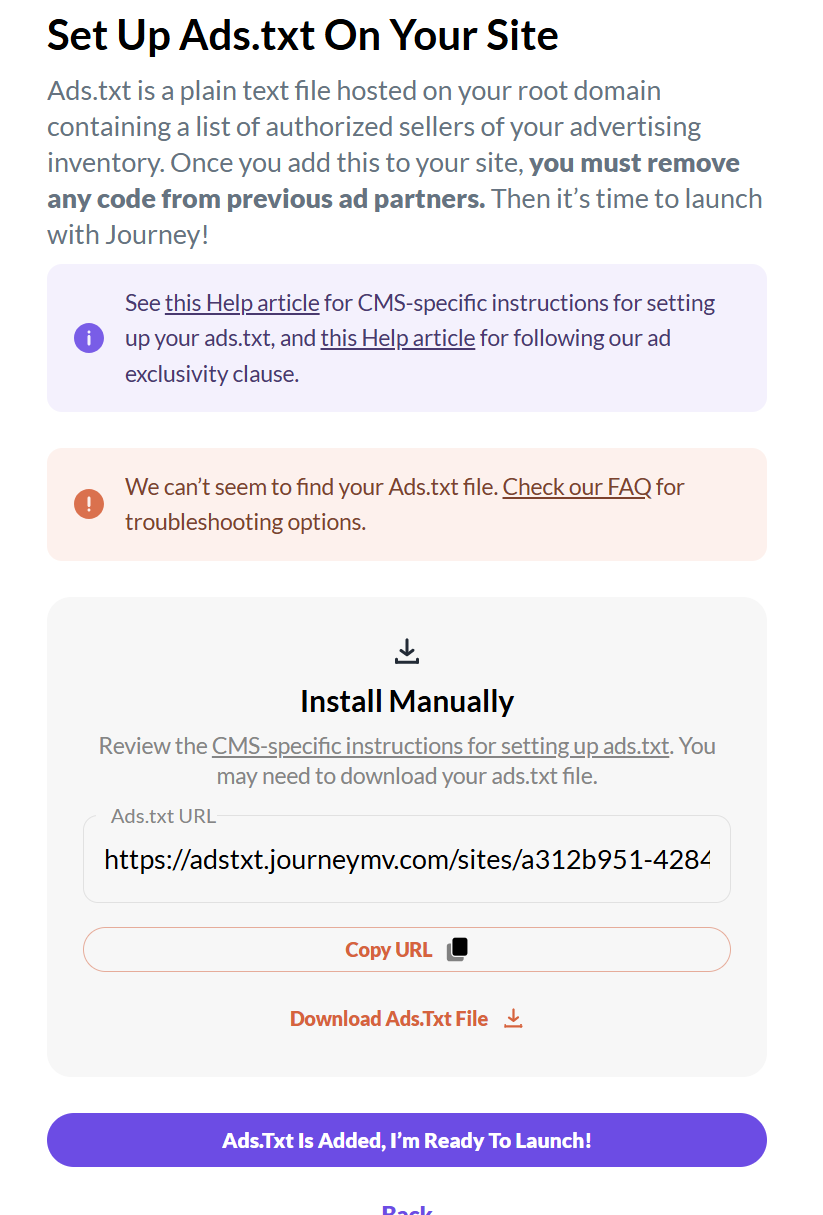
Having problems see ads.txt. I can't get pass this screen.
 0
0 -
Hi Jennifer Overstreet ! If you go to yoursitename.com/ads.txt file, you'll notice it redirects to Ads.txt Manager and the Journey ads.txt file isn't present. You'll first want to remove Ads.txt Manager, and then we have a great article here that goes over how to troubleshoot a missing ads.txt file if you're still seeing that notice once it's removed. Thanks!
0 -

Hi,
I am accepted to Journey. I have the Grow plugin activated. On my dashboard, I click Enable Ads Script. It takes me to my WP admin page dashboard. I do not see the button to Enable Journey. I have reinstalled Grow, deleted cache, deleted cache from plugins, asked my host to delete cache, and it is still not working. My host also put the script in the header manually and that did not solve the issue either. Any help would be appreciated.
0 -
Emily Janio —if you haven't yet, try reading over this help doc and see if it helps. Otherwise, try following the instructions here to manually install your ad script.
0
Journey is Self Supported
Please sign in to leave a comment.
Comments
46 comments