Privacy Policy is not found at this URL.
Answered
I am adding my privacy policy page, but journey isn't recognizing it. Any help would be appreciated!
-
Official comment

We think we've spotted the issue and for most that are encountering this issue, you just have to make sure that what you have entered in the privacy policy link is the same as the url on your site. This means that if you put in https://site.com/privacy-policy, but the url on your site has a slash at the end like https://site.com/privacy-policy/ , then that means you'll encounter this error.
We're going to adjust our logic to be a little more lenient about those slashes at the end, but in the meantime, I'd recommend looking at what you have added in the privacy policy link setting and making sure it matches exactly how the url looks on your site.
If you still encounter that error even after making the adjustment, just mention what site you're experiencing this issue on and we'll look into it a little further.
-

I am also having this issue. The privacy policy is there, and I even created a new page just to test if Journey would pick it up (it wouldn't).
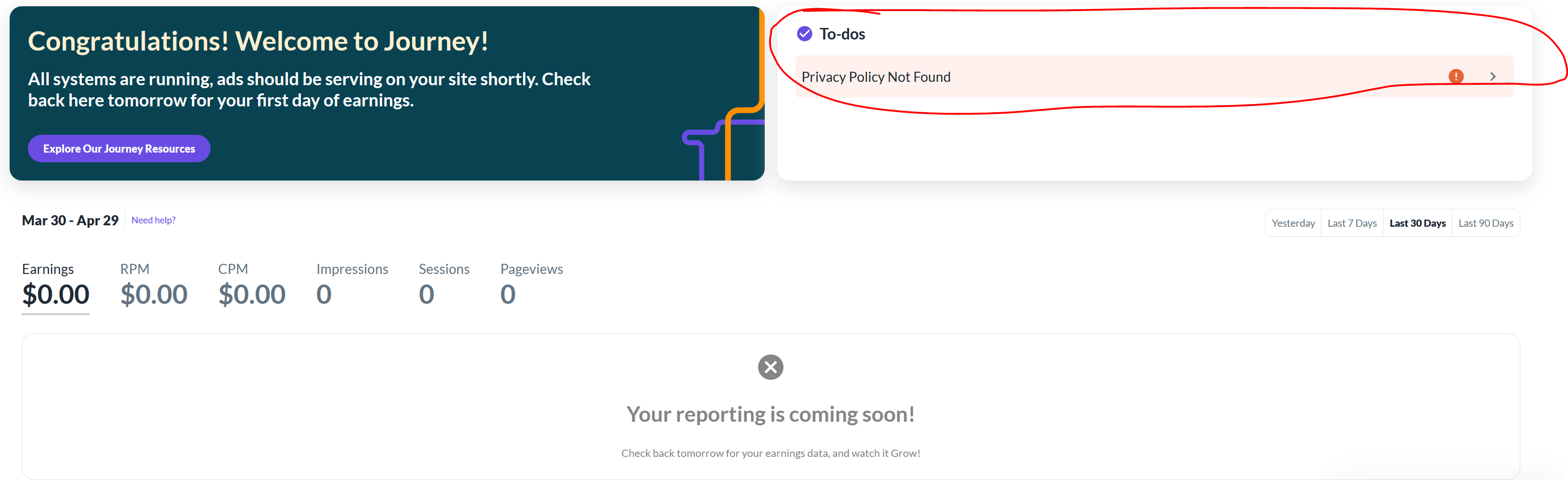
Ads do appear to be running on my site but I still see the error message in my grow account:
 0
0 -

I'm also having the same issue and went through all the trouble shooting steps with no success.
0 -
HI everyone, we're looking into this on our end. We'll be sure to follow up once we get more information.
0 -

I was just accepted to Journey and got as far as the privacy policy, and I'm also having this issue. I tried a few times and it's not working. My privacy policy is there, with a simple link to it, denoting it's the privacy policy. If viewed incognito, there is no / at the end of the url. Please help for this url: https://www.missionpalmtrees.com/privacy-policy.html
0 -

Hey Karentmb - thanks for reaching out! It looks like the Journey script is missing from your Privacy Policy page, which may explain the issue we're having. After adding the script to this page, you should be able to proceed through onboarding.
-1 -
Thanks, as I added that script to the main page in a way that goes to about all my pages. But I'll check on that.
0 -
It only took me a moment. I see it there in the head. I just rebuilt the page, and I'll wait a little bit and try to enter it again. Thanks again.
0 -

I just joined and I am so exciting but having the same issues, I can’t seem to get that part to work, I’ve tried everything of my knowledge, please help! https://andimans.com/privacy-policy
0
Journey is Self Supported
Please sign in to leave a comment.
Comments
9 comments