Adhesion Working, But No In-Content , & Leaderboard Ads and other ads Showing

Hi Mediavine team and community,
My site was recently approved for Mediavine Journey. The Journey script is loading correctly on all pages, and I can see the sticky adhesion ad (bottom anchor) without any issues.
However, in-content ads and other ads are not showing at all on my content-heavy pages.
I’ve already checked and made some adjustments based on common advice:
- Ensured longer text sections (no short paragraphs or heavy card grids)
- Simplified nested layouts and reduced interactive components on content pages
- Blocklists are configured to allow in-content (desktop + mobile) on text pages (templates, question bank, study plan, results explanations)
- No conflicting scripts (removed all old AdSense code)
- Tested in incognito on mobile/desktop, adhesion/leaderboard load fine, but no in-content placeholders or ads
Would someone mind taking a quick look at one of my example content pages and letting me know if there's anything in the structure/layout that could be preventing in-content ads from rendering?
Example page: https://band9pte.com.au/pte-templates.html
(It's a long text-heavy page with templates and explanations — should be ideal for in-content.)
website: band9pte.com.au
-

Hey sazan — thanks for sending that link along! It looks like Journey wasn't able to identify a unique ‘body class’ on the HTML element that's wrapping the content on your page.
I took a quick look at the example you sent along, and I've made a small adjustment — could you let me know if this helps?
0 -
Hi Team,
Thanks for the adjustment! However, I'm still seeing the same issue
after clearing cache and testing in incognito mode.CURRENT STATUS:
✅ Adhesion ads working though placeholder ad is only showing, yesterday there were real ad shown.
❌ In-content, leaderboard, sidebar ads not appearing
❌ Adjustments endpoint still returning 500 errorERROR (from browser console):
GET https://scripts.journeymv.com/amazon/v1/adjustments?offering=journey
Response: 500 (Internal Server Error)IMPACT:
- Journey wrapper script loads successfully
- window.mediavine remains undefined (due to 500 error)
- Ad initialization fails at adjustments fetch step
- Only adhesion ads serve (which use fallback system)TEST DETAILS:
- Tested in Chrome incognito mode
- Hard refresh + cleared all cache+ cache flush
- Tested multiple pages (index.html, pte-question-bank.html, pte-templates.html)
- Error persists across all pagesTECHNICAL VERIFICATION:
Journey script tag present on all pages
No blocklist restrictions on content pages No CSP headers blocking external scripts
No conflicting ad scripts
❌ Adjustments endpoint configuration on backendREQUEST:
Could you please verify that the backend adjustment was deployed
successfully? It appears the /adjustments endpoint configuration
for my account (offering=journey) is still encountering a server
error.Script ID: 6598fcee-0677-4227-bdc8-69fcf6687a2a
Test URL: https://band9pte.com.au/pte-question-bank.htmlThanks for your help!
0 -
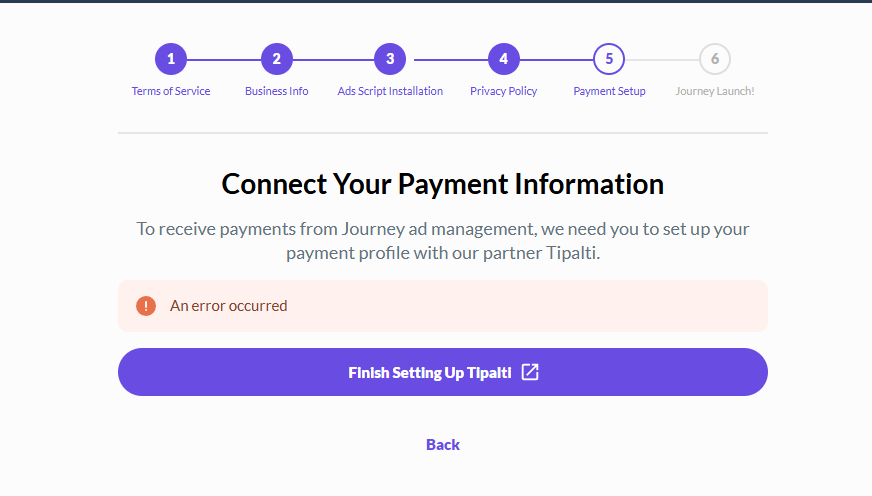
also see the error below this has been another issue in setting up payment information and signing TOS which also shows error. tried clear cache, incognito nothing works
 0
0 -
sazan, Journey will not be able to display ads inside of Grid elements, like on this page. The 500 error you're seeing is unrelated and can be ignored.
It also looks like you've completed onboarding — could I have you try accessing your dashboard once more in a new incognito browser, and let me know if this helps?0 -

I therre i couldn't find anything about payment again in dashboard, hopefully it has been fixed. but the ads are almost 99.9% are placeholder after 4 days, in 1st day ads were there and i could see Adhesion ads working perfectly and just others ad were not loading now i cannot see any ads just placeholders only. can you please look into it, as its getting frustrating
0 -
sazan thanks so much for confirming. Seeing ‘placeholder’ ads means that the script is able to serve ads to your readers. I can confirm that I am seeing ads that are not placeholders on my end.
As the site owner, you spend more time on the site than the average reader, meaning advertisers are less likely to bid on your traffic. This manifests as seeing these ‘placeholder’ ads on your site.0
Journey is Self Supported
Please sign in to leave a comment.
Comments
6 comments