Urgent Tasks Problem + 2 other questions

Hello there,
So, I'm, a new member of your publishers, and I activated the ads on the 29th December 2025, three weeks ago.
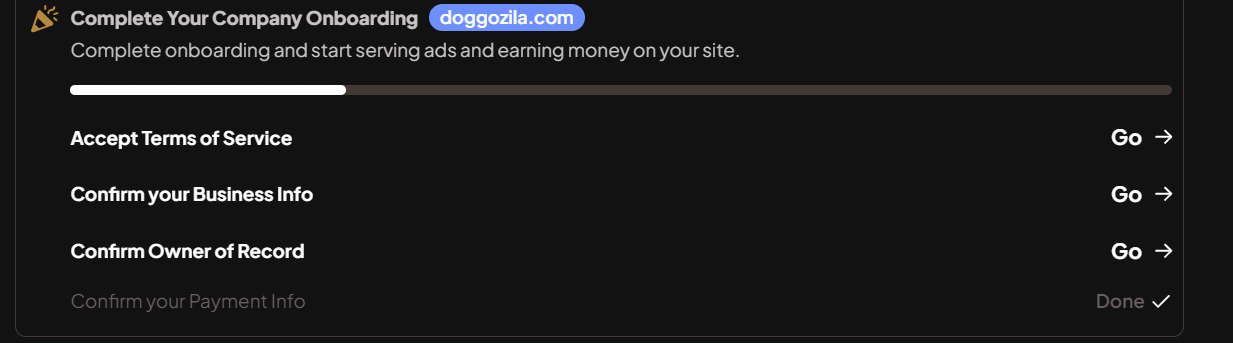
Today I noticed this problem as it is stated in the title of the thread, I cant proceed with the tasks after clicking on them nothing happens. (also I think I finish them in the beginning but I'm not sure)
see picture below:
Other question that I have is, ads are showing only in posts and not in pages?
My last question that I wanted to ask is about the ad impressions, why the small amount of ad impressions, as the posts on my website are in-depth and there are lots of ads in them but only few are recorded.
For example in one blogpost there are 20+ ads and if there are 100 views on that posts there are only 100 ad impressions.
I was having this problem with adsense where only the first 3 ads were recorded in the stats and we learned that the litespeed cache was the problem.
So, I started the journey ads without the caching plugin and the earnings are lower even from adsense, and with them I was having 10-12 ads per page. I was hoping that it was the “ramp up” period which can be from one week to a month, but the stats are going downward instead other way around. :)
Not sure If its something wrong with the website or with some plugin maybe, if you can help me fix these stuffs and set up journey properly.
I would appreciate the help to set journey properly so I can focus on the other stuffs.
p.s. Today I enabled the litespeed cache plugin and exclude the scriptwrapper from JS Excludes and JS Deferred / Delayed Excludes as I read in the community.
Let me know if needed I will disable and delete again, or anything that should be done.
I hope I would get help as with adsense even that is not possible.
-

Darko Todorovski — Thanks for reaching out! I checked your dashboard this morning, and I wasn't able to view the tasks you sent a screenshot of. If you're still having trouble, could you try accessing your dashboard in a new incognito browser?
Regarding your questions:
- Ads will only display on posts in Journey.
- Pageviews don't always translate over to impressions. This can be due to a number of reasons, but usually means either unmonetizable traffic (traffic from low-advertiser-tier countries, traffic running adblock), or readers leaving a page before they can view ads. I am seeing ads load in, as expected, and I don't believe there are any outstanding issues tied to how you're running the Journey script on your site.
- Q1 is notorious for being slow, especially so this year. What you're seeing reflected in your earnings likely isn't unique to your site, as other publishers have expressed something similar.1 -

Dear Mediavine Journey Team,
I hope you are doing well.
I am currently completing the onboarding process for Mediavine Journey. I have successfully completed the payment setup steps, including ID verification and face verification.
However, the dashboard is still showing that my payment verification is incomplete and continues to ask me to complete the payment setup again. I am unsure what the next step is, as all required verifications appear to be completed from my side.
Could you please review my account and guide me on what I should do next to complete the payment setup successfully? If any additional information or action is required from me, I would be happy to provide it.
Thank you very much for your support. I look forward to your guidance.
Best regards,
Muhammad Yasir Aslam0 -
Muhammad Yasir Aslam The onboarding step you're currently on is seperate than the ID verification you did previously. Please check your email (including your spam folder) for an email from our payment partner regarding payment setup.
If you're not seeing this, please let us know.
0 -
Support Thanks for the reply, those tasks are not in my dashboard at this moment, they were for a few days.
Now in the calendar in Journey analytics, I can't set on the last day to see stats. For example, today is 20th and I should see the stats from yesterday the 19th, but I can only select on the day before, the 18th, and every day is the same, as I'm losing a day :-)
Can you check why is this happening?
0 -
Hello Journey Support Team
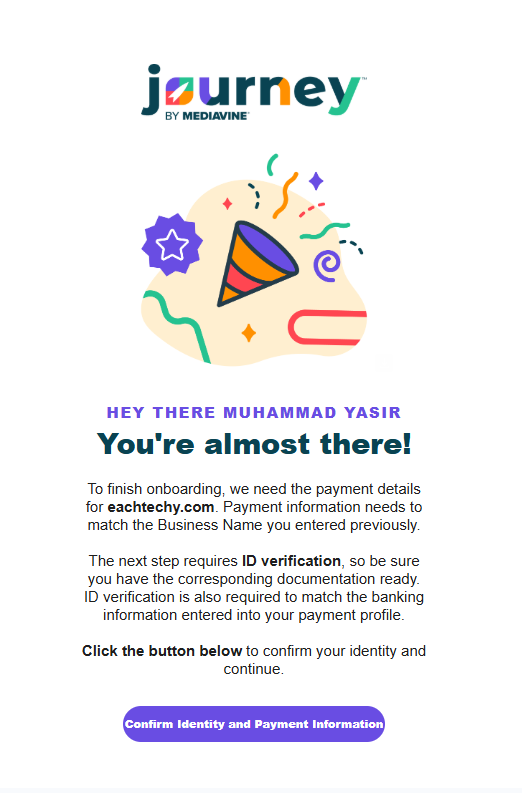
I only see this email, and I have completed this step. I checked my email and did not find any other email related to Tapalti, Mediavine Journey, or Grow. I only found this mail, which is already complete with ID and Face verification. Please guide me on what to do next.
 0
0 -
Muhammad Yasir Aslam I touched base with our team, and they've confirmed that they've connected with you via Email regarding identity verification. If you have not seen our team's email, please check your spam folder.
If you are working with Support on a different channel, please do not post a new thread or comment on existing threads in an attempt to reach a resolution quicker, as this will have the opposite effect.
0 -
Darko Todorovski Earnings and Session data are delayed by 24 hours, as Google does not provide accurate session data until this time, meaning it's normal to not see ‘yesterday’ data until another day has passed.
If you haven't, I recommend using the community's built-in ‘search’ function, as it's designed to help answer questions you may have about Journey.0
Journey is Self Supported
Please sign in to leave a comment.
Comments
7 comments