URLs with page views, but 0 impressions per page view, CPM, and earnings

Hi,
I have these 2 pages which have decent page views on the analytics page, but the impressions per pageview, CPM, and earnings are 0.
Could you help me understand why is this happening?
Thanks
https://kunyitpepper.com/recipe/asian-ginger-chicken-feet-soup
https://kunyitpepper.com/how-to-cook-lentils-in-a-rice-cooker/
On the analytics page, the url is showing different though:
For the chicken soup it shows this way:
/recipe/category/course/soups/asian-ginger-chicken-feet-soup/ but when I click on it, it opens the correct url which is https://kunyitpepper.com/recipe/asian-ginger-chicken-feet-soup
For the lentils recipe it shows this way:
/healthy-eating/how-to-cook-lentils-in-a-rice-cooker/ but when I click on it, it opens the correct url which is https://kunyitpepper.com/how-to-cook-lentils-in-a-rice-cooker/
Am I still receiving payments from these pages and it's just not showing on the dashboard? Or is there something I need to do to fix this to start earning from these 2 pages? These 2 are some of my top performing pages.
Thanks
-

Hey Nudra Rosli - you may want to check your Google Analytics to see if you're seeing those duplicate URLs here, as this is where Journey is pulling data from
0 -
Hi Support
Thank you for getting back to me.
I checked my GA4 and I see this
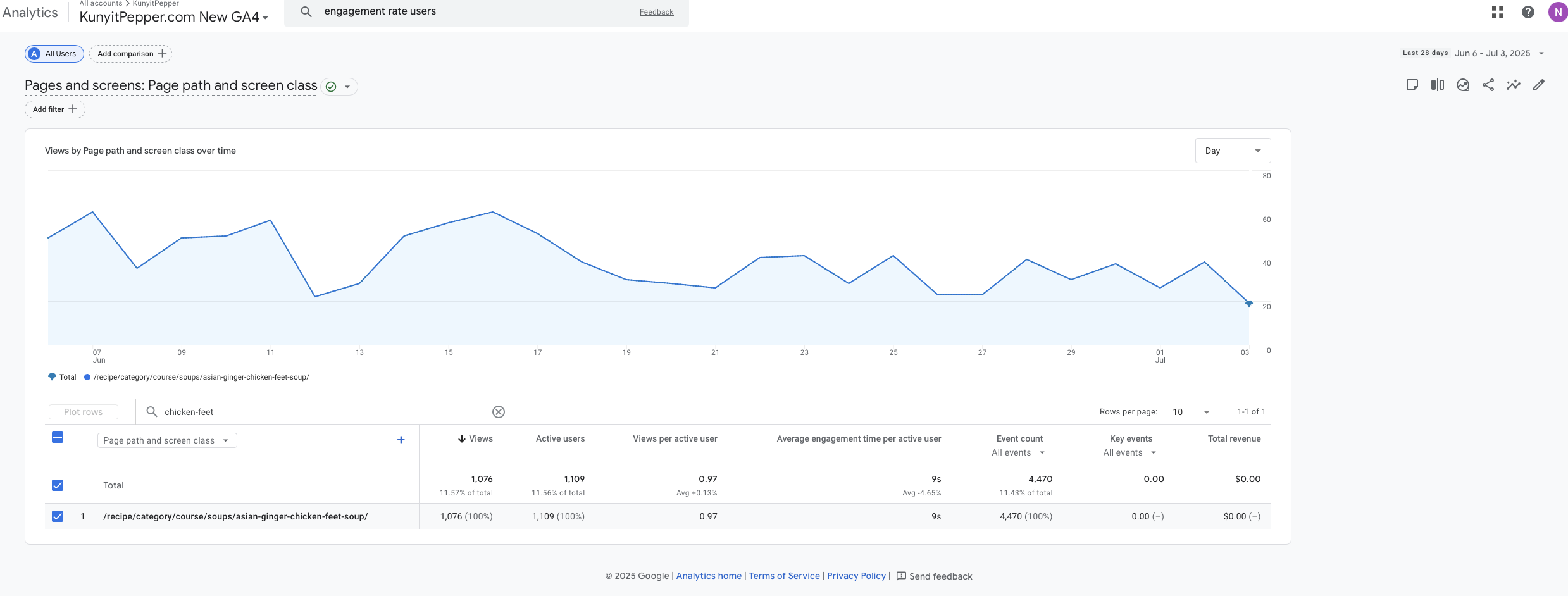
On my page source in Chrome, I see this:

What should I do here? Is there a way for Journey to track the correct url?
Thank you
0 -
Nudra Rosli - your Google anlaytics account is attributing session data to https://kunyitpepper.com/recipe/category/course/soups/asian-ginger-chicken-feet-soup/, which is why you're seeing it in your Journey Dashbaord. The reason that you're not seeing any earnings is because Journey uses the canonical URL to attribute impression data to a specific URL. Earnings will still be correctly calculated for these posts, just not attributed to the above URL.
As you've stated, https://kunyitpepper.com/recipe/category/course/soups/asian-ginger-chicken-feet-soup/ redirects to https://kunyitpepper.com/recipe/asian-ginger-chicken-feet-soup, so my best guess is that there's a link out there people are clicking on that still has the older /recipe/course/soups format, and not the updated /recipe/ format.
As long as google is reporting sessions for the older version of the URL, your Journey dashboard will reflect this. You may want to connect with a Google Analtyics export to see if there's a way to ensure that data is tracked on the correct version of the URL. I also invite anyone in the community who has insight to chime in.
0 -
Thank you Support
Maybe there is an internal link or on my social media accounts that is using the older link. But yes it redirects to the correct link.
I'll try to discuss with an GA expert too.
Thank you0
Journey is Self Supported
Please sign in to leave a comment.
Comments
4 comments