G4 TimeZone

I have had Grow up and running on my blog almost a month with no issues. Almost a week ago I received an error that I needed to change my G4 TimeZone to New York. I checked my G4 and it’s already set to this time zone but the error still appears on my Grow Page and my session counter is no longer working. How do I go about fixing this?
-

Hey TandraNicole - Thanks for reaching out! It looks like the GA4 property you currently have connected to your Grow Dashboard isn't returning any data, and is likely a different property then the New York Time property you referenced in your message.
We have a help article written to help troubleshooting this here, but to sum it up:
1. The Google Analytics tag associated with the property you've connected is not on your site.
2. The incorrect Google Analytics property was selected when connecting Google Analytics. This either means that you have multiple Google Analytics properties tied to the Google account used to sign in to your Journey Dashboard, or you logged into a Google Account not associated with the Google Analytics property that's currently connecting data on your site.
I recommend logging into the same Google Analytics account as the one you logged into on your Journey Dashboard and double-checking that the property you've connected has been set up. Google has a guide covering these steps here. We also have a guide on double-checking the timezone set for the connected Google Analytics property here.
0 -
Hi Ryan,
I only have one website, and I can see the stats on the Google Analytics website specifically. I double-checked the time zone again, following your instructions, and everything is correct. It just doesn't make sense why it worked for weeks, and then it |quit for no reason and started giving me an error message.
Is there a way to get help with this?
0 -
Hi TandraNicole - to ensure that we're collecting the correct information for your site, can I have you confirm that the property ID associated with the Google Analytics property that's set to a New York Time timezone and you're seeing data on matches the ID we're seeing connected to your Journey Dashboard (411286946?)
This information can be found in Google Analytics by Navigating to the Google Analytics property selector found at the top of the page after logging in to Google Analytics (This should read as the name of your property), followed by navigating to the analytics account associated with your site. The property ID is found under ‘Properties & Apps’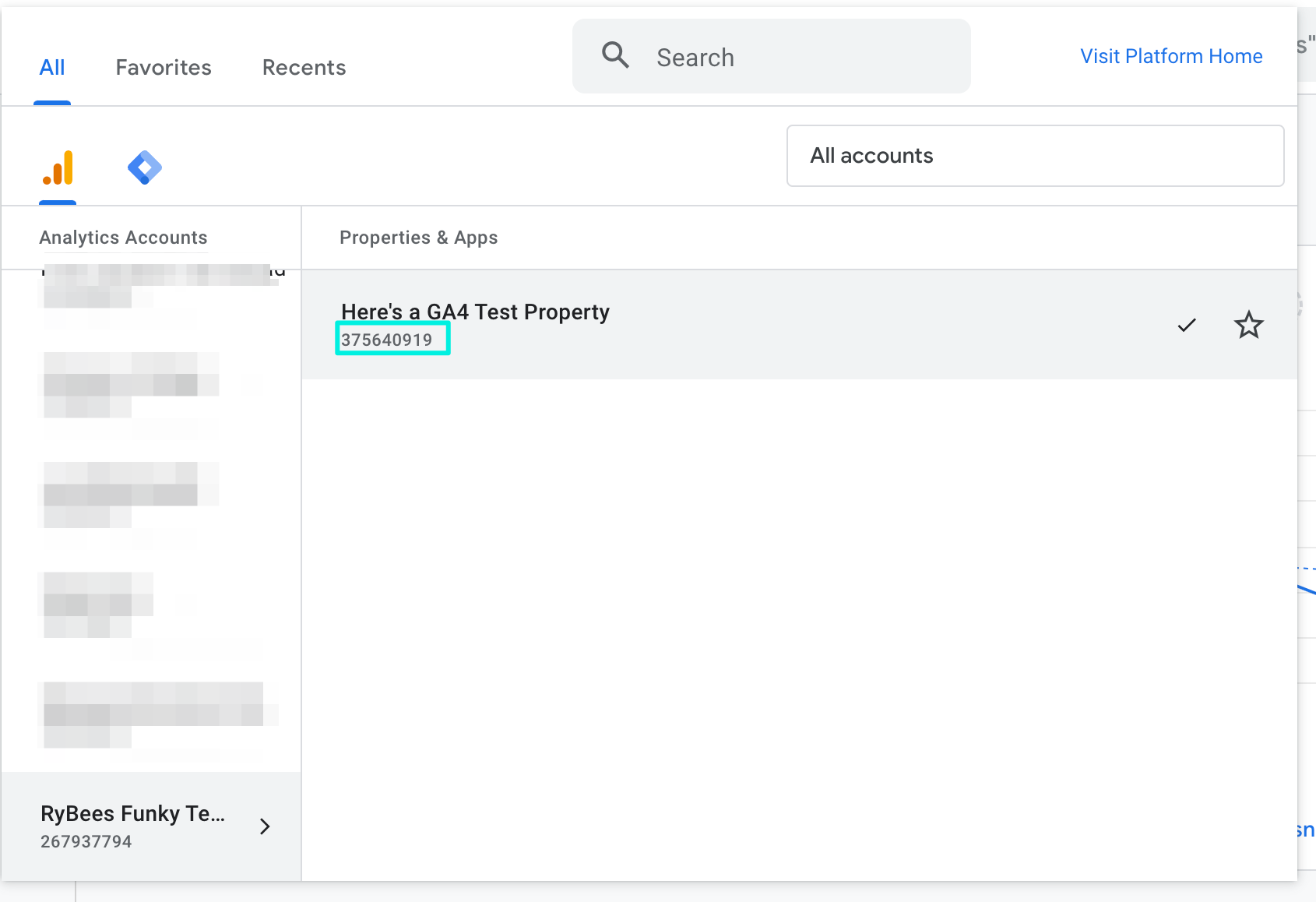 0
0
Journey is Self Supported
Please sign in to leave a comment.
Comments
3 comments