Issue with Losing Connection Between My Website and Google Analytics 4

Hello Google Analytics Support Team,
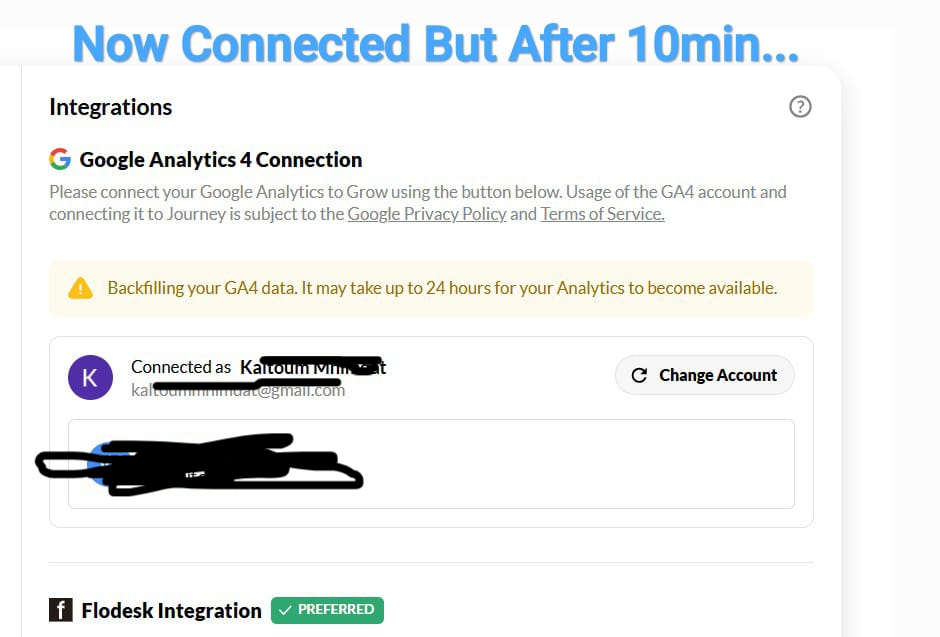
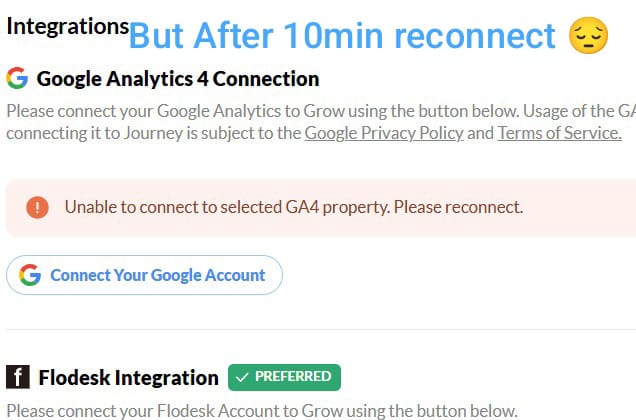
My name is Mastafa Mhimmat, and I am experiencing an issue with connecting my website to Google Analytics 4. The connection is initially successful, but after about 10 minutes, it gets lost, and I receive the following message:
“Unable to connect to the specified GA4 property. Please reconnect.”
Connection method: The tracking code is inserted directly inside the <head> tag in WordPress
I have already checked the following:
✅ The tracking code is correctly implemented
✅ Google Analytics settings and data streams
✅ No plugins are blocking the connection
✅ No firewall or hosting restrictions
However, the issue persists. Could you please help me understand why the connection keeps getting lost and provide a solution?
Thank you in advance for your support. I look forward to your response.
Best regards,
-

Hey mastafa - I'm not seeing a site tied to the email address you're using to write in. Could you please let me know the name of your site?
Thanks!
0 -

Hi,
I am having a similar issue since I started with Journey yesterday.
Your connected GA4 property does not contain any data. Finish configuring Google Analytics or select another property to connect. Fix GA4 Connection → This is the error I am receiving but also I received another error: Fix GA4 Property Timezone
I even went to the forum last night and made sure to read what Journey suggested to do so I created a new GA4 with the east coast timezone. I am on the West coast so I didn't want to change my blog timezone from my GA4 original.
Oh, and my blog just read “you have a crucial error on your blog page” I have never seen that before.
Can anyone please help assist? I am having a hard time trying to fix this. I already sent two msgs in the forum and still waiting for some help. My blog is kouzounaskitchen.com.
Thank you,
Krystina
0
Journey is Self Supported
Please sign in to leave a comment.
Comments
2 comments