Ads.txt - Troubleshooting and Hosting help have not solved problem
Completed
Hi
mmbmagazine.co.uk
‘We can’t seem to find your Ads.txt file’ Going round in circles with this. Seemed to be a caching problem, involved hosting and they are as confused as I am.
Running WordPress with Grow and Google Sitekit. Was previously running Google Adsense. Have disconnected Adsense through site kit. Couldn't make Grow install ads.txt (don't seem to have ‘Analytics’ in the menu as shown in the help guides. Have manually added so can be found at mmbmagazine.co.uk/ads.txt.
When I do mmbmagazine.co.uk/ads.txt?=1234 I also get the ads.txt so the help guides suggest this is a caching problem.
Here is full site info should it be helpful:
`
### wp-core ###
version: 6.7.1
site_language: en_GB
user_language: en_GB
timezone: Europe/London
permalink: /%postname%/
https_status: true
multisite: false
user_registration: 0
blog_public: 1
default_comment_status: undefined
environment_type: production
user_count: 29
dotorg_communication: true
### wp-paths-sizes ###
wordpress_path: /home/sites/26b/3/3510f6c740/public_html
wordpress_size: 83.78 MB (87847962 bytes)
uploads_path: /home/sites/26b/3/3510f6c740/public_html/wp-content/uploads
uploads_size: 1.17 GB (1251961181 bytes)
themes_path: /home/sites/26b/3/3510f6c740/public_html/wp-content/themes
themes_size: 18.08 MB (18954232 bytes)
plugins_path: /home/sites/26b/3/3510f6c740/public_html/wp-content/plugins
plugins_size: 29.78 MB (31230082 bytes)
fonts_path: /home/sites/26b/3/3510f6c740/public_html/wp-content/uploads/fonts
fonts_size: directory not found
database_size: 252.00 MB (264241152 bytes)
total_size: 1.54 GB (1654234609 bytes)
### wp-active-theme ###
name: Wisteria (wisteria-trellis)
version: 1.0.2
author: Mediavine
author_website: https://www.mediavine.com
parent_theme: Mediavine Trellis (mediavine-trellis)
theme_features: core-block-patterns, title-tag, automatic-feed-links, mv_trellis_background_accent_color, mv_trellis_headings_control, mvt_hooks, mv_trellis_hide_page_title, widgets-block-editor, tha_hooks, post-thumbnails, menus, widgets
theme_path: /home/sites/26b/3/3510f6c740/public_html/wp-content/themes/wisteria-trellis
auto_update: Disabled
### wp-parent-theme ###
name: Mediavine Trellis (mediavine-trellis)
version: 0.18.1
author: Mediavine
author_website: https://www.mediavine.com
theme_path: /home/sites/26b/3/3510f6c740/public_html/wp-content/themes/mediavine-trellis
auto_update: Disabled
### wp-themes-inactive (1) ###
Twenty Twenty-Five: version: 1.0, author: the WordPress team, Auto-updates disabled
### wp-mu-plugins (1) ###
StackCache: author: Stack CP, version: (undefined)
### wp-plugins-active (13) ###
Complianz | GDPR/CCPA Cookie Consent: version: 7.1.5, author: Really Simple Plugins (latest version: 7.2.0), Auto-updates disabled
Export All URLs: version: 4.7.1, author: Atlas Gondal, Auto-updates disabled
Grow for WP: version: 1.5.1, author: Grow, Auto-updates disabled
If-So: version: 1.9.3, author: If So Plugin, Auto-updates disabled
If-So Geolocation: version: 1.4.1, author: If So Plugin, Auto-updates disabled
Rank Math SEO: version: 1.0.235, author: Rank Math SEO, Auto-updates enabled
Rank Math SEO PRO: version: 3.0.77.1, author: Rank Math SEO, Auto-updates enabled
Simple User Avatar: version: 4.7, author: Matteo Manna, Auto-updates disabled
Site Kit by Google: version: 1.142.0, author: Google, Auto-updates enabled
WordPress Hide Posts: version: 1.1.1, author: MartinCV (latest version: 2.0.2), Auto-updates disabled
WPCode Lite: version: 2.2.3.1, author: WPCode (latest version: 2.2.5), Auto-updates disabled
WP Content Copy Protection & No Right Click: version: 3.6.1, author: wp-buy (latest version: 3.6.2), Auto-updates disabled
WP Post Page Clone: version: 1.2, author: Gaurang Sondagar, Auto-updates disabled
### wp-media ###
image_editor: WP_Image_Editor_Imagick
imagick_module_version: 1809
imagemagick_version: ImageMagick 7.1.1-29 Q16-HDRI x86_64 21991 https://imagemagick.org
imagick_version: 3.7.0
file_uploads: 1
post_max_size: 128M
upload_max_filesize: 128M
max_effective_size: 128 MB
max_file_uploads: 16
imagick_limits:
imagick::RESOURCETYPE_AREA: 503 GB
imagick::RESOURCETYPE_DISK: 9.2233720368548E+18
imagick::RESOURCETYPE_FILE: 768
imagick::RESOURCETYPE_MAP: 252 GB
imagick::RESOURCETYPE_MEMORY: 126 GB
imagick::RESOURCETYPE_THREAD: 1
imagick::RESOURCETYPE_TIME: 0
imagemagick_file_formats: 3FR, 3G2, 3GP, AAI, AI, APNG, ART, ARW, ASHLAR, AVI, AVIF, AVS, BAYER, BAYERA, BGR, BGRA, BGRO, BIE, BMP, BMP2, BMP3, BRF, CAL, CALS, CANVAS, CAPTION, CIN, CIP, CLIP, CMYK, CMYKA, CR2, CR3, CRW, CUBE, CUR, CUT, DATA, DCM, DCR, DCRAW, DCX, DDS, DFONT, DNG, DOT, DPX, DXT1, DXT5, EPDF, EPI, EPS, EPS2, EPS3, EPSF, EPSI, EPT, EPT2, EPT3, ERF, EXR, FARBFELD, FAX, FF, FILE, FITS, FL32, FLV, FRACTAL, FTP, FTS, FTXT, G3, G4, GIF, GIF87, GRADIENT, GRAY, GRAYA, GROUP4, GV, HALD, HDR, HEIC, HEIF, HISTOGRAM, HRZ, HTM, HTML, HTTP, HTTPS, ICB, ICO, ICON, IIQ, INFO, INLINE, IPL, ISOBRL, ISOBRL6, J2C, J2K, JBG, JBIG, JNG, JNX, JP2, JPC, JPE, JPEG, JPG, JPM, JPS, JPT, JSON, JXL, K25, KDC, KERNEL, LABEL, M2V, M4V, MAC, MAP, MASK, MAT, MATTE, MEF, MIFF, MKV, MNG, MONO, MOV, MP4, MPC, MPEG, MPG, MPO, MRW, MSL, MSVG, MTV, MVG, NEF, NRW, NULL, ORA, ORF, OTB, OTF, PAL, PALM, PAM, PANGO, PATTERN, PBM, PCD, PCDS, PCL, PCT, PCX, PDB, PDF, PDFA, PEF, PES, PFA, PFB, PFM, PGM, PGX, PHM, PICON, PICT, PIX, PJPEG, PLASMA, PNG, PNG00, PNG24, PNG32, PNG48, PNG64, PNG8, PNM, POCKETMOD, PPM, PS, PS2, PS3, PSB, PSD, PTIF, PWP, QOI, RADIAL-GRADIENT, RAF, RAS, RAW, RGB, RGB565, RGBA, RGBO, RGF, RLA, RLE, RMF, RSVG, RW2, SCR, SCT, SFW, SGI, SHTML, SIX, SIXEL, SPARSE-COLOR, SR2, SRF, STEGANO, STRIMG, SUN, SVG, SVGZ, TEXT, TGA, THUMBNAIL, TIFF, TIFF64, TILE, TIM, TM2, TTC, TTF, TXT, UBRL, UBRL6, UIL, UYVY, VDA, VICAR, VID, VIFF, VIPS, VST, WBMP, WEBM, WEBP, WMF, WMV, WMZ, WPG, X, X3F, XBM, XC, XCF, XPM, XPS, XV, XWD, YAML, YCbCr, YCbCrA, YUV
gd_version: 2.3.3
gd_formats: GIF, JPEG, PNG, WebP, BMP, XPM
ghostscript_version: 9.54.0
### wp-server ###
server_architecture: Linux 5.14.0-427.40.1.el9_4.x86_64 x86_64
httpd_software: Apache
php_version: 8.0.30 64bit
php_sapi: fpm-fcgi
max_input_variables: 2500
time_limit: 300
memory_limit: 1024M
max_input_time: 60
upload_max_filesize: 128M
php_post_max_size: 128M
curl_version: 8.1.2 OpenSSL/3.0.8
suhosin: false
imagick_availability: true
pretty_permalinks: true
htaccess_extra_rules: true
current: 2025-01-09T10:59:40+00:00
utc-time: Thursday, 09-Jan-25 10:59:40 UTC
server-time: 2025-01-09T10:59:39+00:00
### wp-database ###
extension: mysqli
server_version: 10.6.19-MariaDB-log
client_version: mysqlnd 8.0.30
max_allowed_packet: 134217728
max_connections: 1024
### wp-constants ###
WP_HOME: undefined
WP_SITEURL: undefined
WP_CONTENT_DIR: /home/sites/26b/3/3510f6c740/public_html/wp-content
WP_PLUGIN_DIR: /home/sites/26b/3/3510f6c740/public_html/wp-content/plugins
WP_MEMORY_LIMIT: 40M
WP_MAX_MEMORY_LIMIT: 1024M
WP_DEBUG: false
WP_DEBUG_DISPLAY: true
WP_DEBUG_LOG: false
SCRIPT_DEBUG: false
WP_CACHE: false
CONCATENATE_SCRIPTS: undefined
COMPRESS_SCRIPTS: undefined
COMPRESS_CSS: undefined
WP_ENVIRONMENT_TYPE: undefined
WP_DEVELOPMENT_MODE: undefined
DB_CHARSET: utf8
DB_COLLATE: undefined
### wp-filesystem ###
wordpress: writable
wp-content: writable
uploads: writable
plugins: writable
themes: writable
fonts: not writable
mu-plugins: writable
### google-site-kit ###
version: 1.142.0
php_version: 8.0.30
wp_version: 6.7.1
reference_url: https://mmbmagazine.co.uk
amp_mode: no
site_status: connected-site
user_status: authenticated
verification_status: verified-non-site-kit
connected_user_count: 2
active_modules: site-verification, search-console, analytics-4, pagespeed-insights
recoverable_modules: none
required_scopes:
openid: ✅
https://www.googleapis.com/auth/userinfo.profile: ✅
https://www.googleapis.com/auth/userinfo.email: ✅
https://www.googleapis.com/auth/siteverification: ✅
https://www.googleapis.com/auth/webmasters: ✅
https://www.googleapis.com/auth/analytics.readonly: ✅
https://www.googleapis.com/auth/tagmanager.readonly: ✅
capabilities:
googlesitekit_authenticate: ✅
googlesitekit_setup: ✅
googlesitekit_view_posts_insights: ✅
googlesitekit_view_dashboard: ✅
googlesitekit_manage_options: ✅
googlesitekit_update_plugins: ✅
googlesitekit_view_splash: ✅
googlesitekit_view_authenticated_dashboard: ✅
googlesitekit_view_wp_dashboard_widget: ✅
googlesitekit_view_admin_bar_menu: ✅
googlesitekit_view_shared_dashboard: ⭕
googlesitekit_read_shared_module_data::["search-console"]: ⭕
googlesitekit_read_shared_module_data::["analytics-4"]: ⭕
googlesitekit_read_shared_module_data::["pagespeed-insights"]: ⭕
googlesitekit_manage_module_sharing_options::["search-console"]: ✅
googlesitekit_manage_module_sharing_options::["analytics-4"]: ⭕
googlesitekit_manage_module_sharing_options::["pagespeed-insights"]: ✅
googlesitekit_delegate_module_sharing_management::["search-console"]: ✅
googlesitekit_delegate_module_sharing_management::["analytics-4"]: ⭕
googlesitekit_delegate_module_sharing_management::["pagespeed-insights"]: ⭕
enabled_features:
adsPax: ⭕
audienceSegmentation: ✅
conversionReporting: ⭕
firstPartyMode: ⭕
gm3Components: ⭕
privacySandboxModule: ⭕
rrmModule: ✅
signInWithGoogleModule: ⭕
active_conversion_event_providers: none
consent_mode: disabled
consent_api: not-detected
search-console_shared_roles: none
search-console_management: owner
analytics-4_shared_roles: none
analytics-4_management: owner
pagespeed-insights_shared_roles: none
pagespeed-insights_management: all_admins
key_metrics_status: Setup and Enabled
key_metrics_source: Tailored Metrics
search_console_property: https://mmbmagazine.co.uk/
analytics_4_account_id: 7211••••
analytics_4_property_id: 3442962••
analytics_4_web_data_stream_id: 4320••••••
analytics_4_measurement_id: G-HW••••••••
analytics_4_use_snippet: yes
analytics_4_ads_conversion_id: none
analytics_4_available_custom_dimensions: none
analytics_4_ads_linked: false
analytics_4_ads_linked_last_synced_at: 1736244126
analytics_4_site_kit_audiences: none
`
-
Official comment

Hi Natalie Juna ! This is a caching issue - I see the AdSense file when I visit the ads.txt file. However, when I manually bust the cache using the ?test=1234 query, I see the Journey ads.txt file.
The only thing that will resolve this is continuing the try to clear out all caching. I'd make sure you've cleared out all caching plugins, CDN caching if you use one, and server side caching. We have an article here on caching as well that could help.
Thanks!
-
Hi
When I go to mmbmagazine.co.uk/ads.txt I get this:
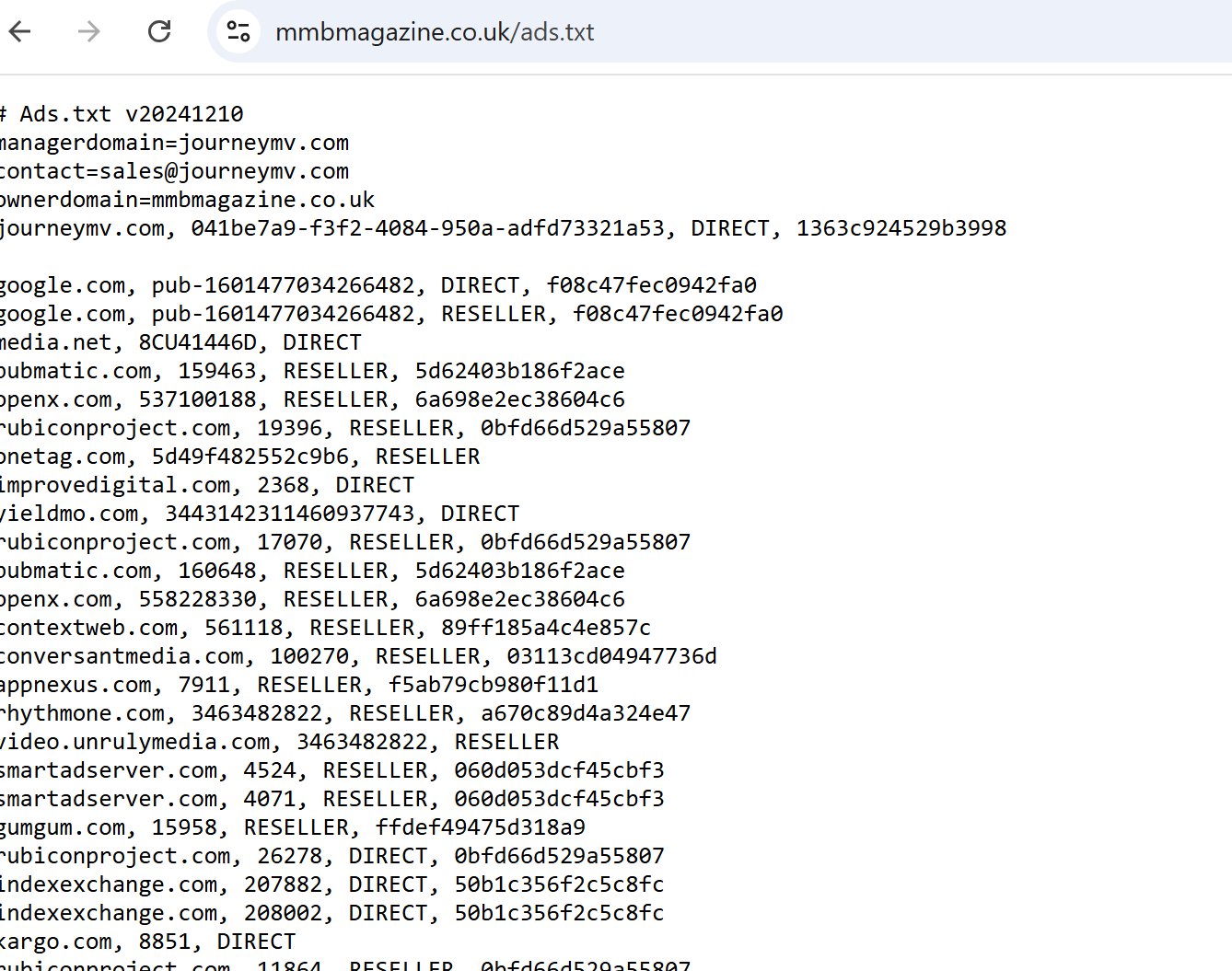
Which to me looks right.
I spent all day yesterday clearing every cache I could find:
- Theme Cache
- Stackcache
- Edge Cache on Serve
I then approached two different people at my hosting 20i.com and they cleared all cache.
What do I do now?
I have been through all the guides and followed the steps multiple times.
0 -
Hi Natalie Juna ! I'm still seeing the Google AdSense ads.txt file on my end. Are you logged into WordPress when you're checking the ads.txt file? If so, that would remove any caching layers, which is possibly why you're seeing the Journey ads.txt file. If you check in an incognito window though, you'll likely see the AdSense ads.txt file instead unless there's some sort of regional caching at play.
Caching can be tricky, especially if you have several layers of aggressive caching (we've seen Stackcache caching take a while to clear in the past, for example), but there isn't anything we're able to do on our end specifically to clear it up since it's based on caching running on your site and server. I would try clearing all caches in WordPress again and reaching out to your host to see if they can clear out any caches on their end again. If that still doesn't do the trick, it's possible there's another caching layer (through a plugin, theme setting, CDN, server, etc) that isn't being accounted for.
As a side note, I also noticed you have an AdSense script being inserted by the Site Kit plugin. This will need to be removed as well to complete onboarding.
Thanks!
0 -

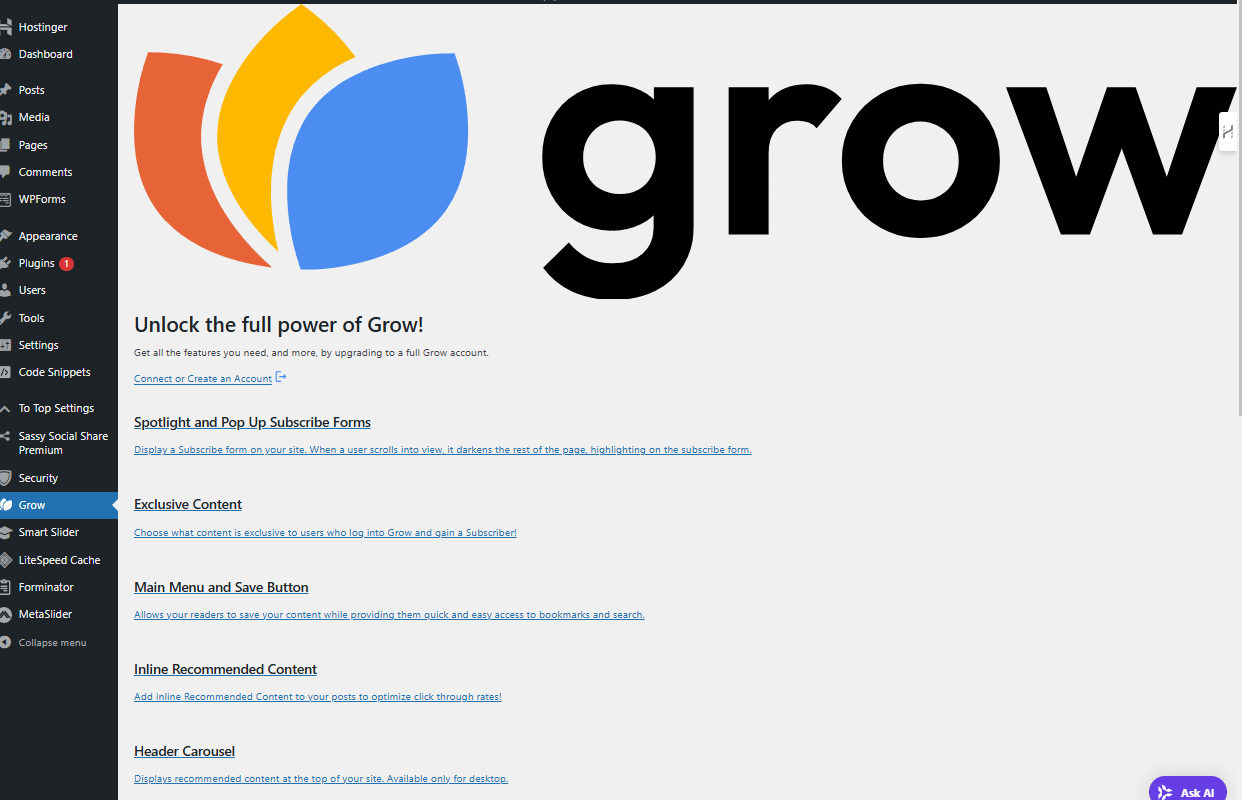
I'm also not able to find ads.txt. Just stuck here with Grow and can't figure anything else out:
- I've already been connected and everything. Approved and accepted. Nothing will allow me to properly use Grow and get past this page.
 0
0 -
If you're running into issues with the Grow plugin (typically this is due to a firewall/security setting), you can manually install the ads.txt file following these instructions. If needed, you can also manually install the ad script following these instructions and the Grow script following these instructions.
Thanks!
0
Journey is Self Supported
Please sign in to leave a comment.
Comments
5 comments