Low RPM Even After Three Weeks Of Joining

Hi, so I have shifted my site from Ezoic to Journey. My site used to get $18 to $24 RPM on Ezoic. But on Journey, it is hardly getting over $9. Can you please check my site and see whether ads are being correctly served? On my end, only Grow ads are shown on my site instead of different brands' ads. Can you please check? Can it be issue with script?
Looking forward to hearing from you.
Thanks
-

Hey Asjad Aamir - I took a look at your site and I'm seeing a variety of different ads serving as expected.

As the site owner, it's expected behavior that you'll see ads a bit differently than your readers. Where your located will also affect which ads you're served and the inventory available.
Since ads are serving the next best thing to do is to make sure there aren't any conflicts with your Journey script and that your posts are as optimized as possible.
Taking a quick look around I'd recommend being mindful of where you're placing your most valuable content. Here's an example of what I mean:
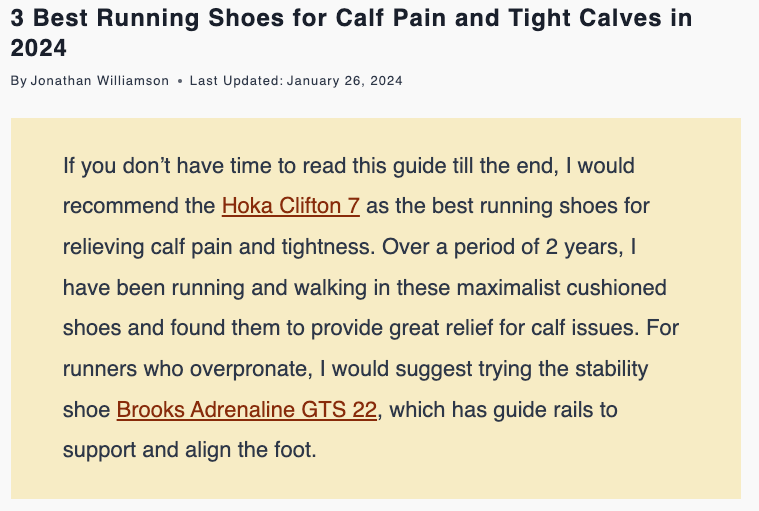
You've essentially answered the question you're addressing right at the top before an ad can serve. This takes away the reader's incentive to scroll. Moving items like this toward the bottom will encourage them to engage with your content AND your ads.
You might also want to consider collapsing your Table of Contents by default. Having a table of contents is great for reader convenience, but if they use that too much they can miss parts of your content along with all of your in-content ads!
0 -
Can you please also explain this point? and what setting should we do for table of content? can you see my site if my table of content jumper links are smooth scroll or not? and what exactly is smooth scroll?
Smooth Scrolling
Problem
These themes automatically enable "Smooth Scrolling" which can affect performance of in-content ads.
Solution
- Turn off "Smooth Scrolling."
0 -
Hey Asjad Aamir - Collapsing your Table of Contents isn't a setting offered through your Journey settings. That would be tied to your theme and/or content management platform. It looks like you're using WordPress so you'd want to reach out to WordPress Support. Some people use plugins to do that by default but I wouldn't be able to recommend one!
If there are any other publishers looking at this thread - I'd love to see some suggestions on what you use to collapse your table of contents by default!
Smooth Scrolling is a transition effect that happens when a user clicks on a link and it's meant to scroll “smoothly” to another section of the page. All that said, I'm not seeing any Smooth Scrolling on your site.
0 -

Hi there Mary, I use the PostX plugin which allows you to choose whether you would like your Table of Contents expanded or collapsed - if it is collapsed then the visitor would need to click on it to expand it. And it's pretty handy because you can toggle this option on and off for each page. Hope this helps!
1 -
Support when someone clicks on jumper links on table of contents, it scrolls smoothly to that section. Is it good or bad? And please please, see if there is any issue in my ads settings or on your end because my RPM is not going above $10 and it has been one month now. For the same site, I was getting $18 plus RPM. But even after one month, I am not even closer to what I was getting with Ezoic and this is a huge disappointment.
0
Journey is Self Supported
Please sign in to leave a comment.
Comments
5 comments