Grow sessions very low compared to Google Analytics
Answered
Hey there!
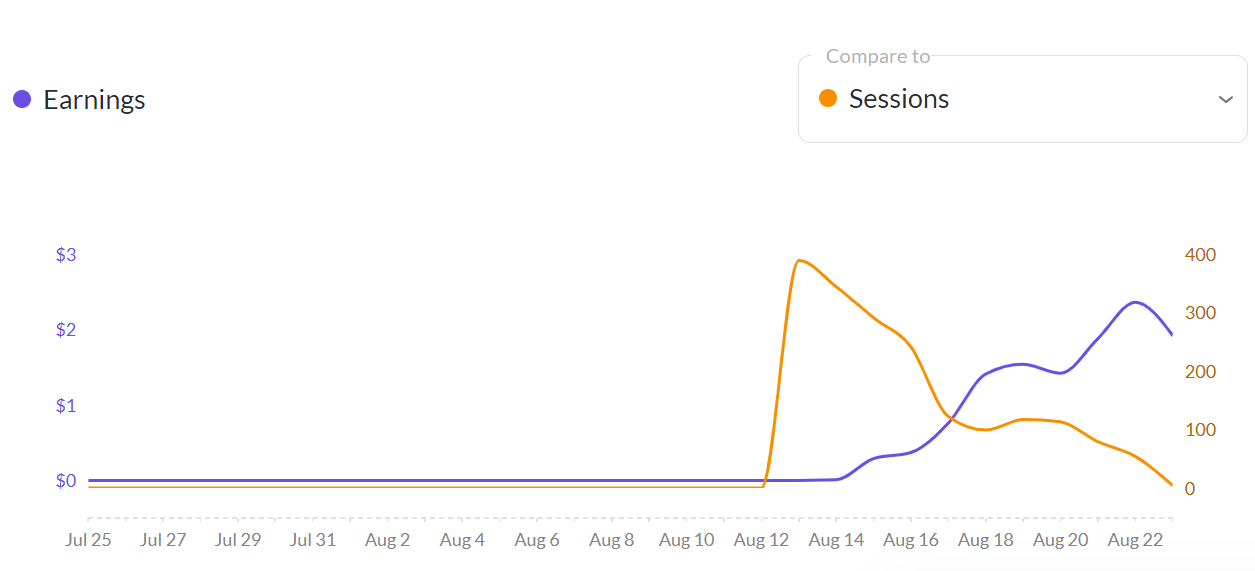
I've been with Journey for 12 days and altough my RPM is going up every day, the sessions are decreasing for some reason even though my website's traffic is actually growing according to Google Analytics. I understand there might be some differences because of different measuring systems, but to give you an idea yesterday Grow shows I had 4 sessions, while Google Analytics shows around 400 sessions. If I calculate my RPM with the real sessions, it's actually very low then. It seems like it was working fine at the beginning.
Any idea why this could be?
Thank you!
-
Official comment

Hi Jana Rybarska ! I took a look at your site and while sessions for yesterday seem more accurate, I did notice that the Journey and Grow scripts are being optimized. They both contain the attribute
o/js-lzl. I'm not sure exactly what plugin/service is adding the attribute, but it looks like it stands for Javascript LazyLoad, and this could be impacting Grow's ability to track traffic correctly.I would try excluding the Grow and Journey scripts from any optimization plugins/services you're running, and your host should be able to help with this. Here's an article on how to exclude Grow from most optimization plugins and here's one for excluding Journey. Hopefully that will do the trick.
Thank you!
-
Hi there,
Thanks for your response. I tried to play around and change some of my optimization plugins as well as exluding the scripts from optimization.
Could you please check if the plugins are still being optimized or if it solved the issue?
Thanks!0 -
*scripts are still being optimized
0 -
Hi Jana Rybarska ! It looks like the Journey ad script is being optimized by Nitropack. Changing your Nitropack optimization settings to “Standard” and then clearing all caching should hopefully do the trick.
0 -
Hi Rachel,
My settings in NitroPack actually were set to Standard as I followed the advices in the article you've sent me, so I'm not sure why the issue persists. Any other ideas?
Thank you!
Jana0 -
Hi Jana Rybarska ! I took another look and I'm actually not seeing Nitropack optimize the script anymore, so we could've just been running into some caching and you should hopefully be all set.
0 -
Awesome, thanks so much for looking into this for me! I have one last question, I had someone looking into speed optimization on my website and might have them to do it again (with excluding the scripts) as my scores aren't ideal right now.
They're saying that this is the order in which Google recommends that we load site resources: HTML --> CSS --> JS --> Images --> Videos --> Adobe Flash --> Fonts --> Ads
Currently the order on my website is different (I think the ads have higher priority now) and I wonder if that can have an impact on my revenues?
Thank you!
Jana0 -
Jana Rybarska Journey ads are lazy loaded and the script itself won't load until user interaction or 5 seconds after page load, so the ads themselves should already be loading after all other components and the script is already fully optimized for page speed and wouldn't be the culprit when it comes to slower performance. You can read more about that here if interested!
0 -
Thank you so much for all the answers! One more thing I was wondering about - is it possible to use NitroPack on Ludicrous mode and add Journey and Grow scripts into exluded resources?
Thank you,
Jana0 -
Hi Jana Rybarska ! You can try to use Nitropack on Ludicrous with the scripts excluded, but Nitropack applies a bunch of really aggressive optimization on that mode that can still conflict with ads such as minifying HTML, so we still don't recommend using it. If you do enable this mode, you would just want to monitor earnings for steep drops and make sure you see ads or placeholder ads loading in an incognito window.
0 -

Hi Rachel Johnson - would you expect the Grow/Journey dashboard to be showing pageviews/sessions which are less than 10% of what Google Analytics is reporting?
My GA4 account shows 1-2k views per day, but the Journey dashboard only shows ~100 pageviews per day. This is fairly consistent too, and a similar major discrepancy on sessions too.
I don't think it's due to visitors bouncing quickly etc, as my avg session time is > 1 min (according to GA4).
Here's a sample URL if you can see anything wrong - https://castfacts.com/goodfellas/
Thanks!
0 -
Michael Grow analytics are different from GA4 and the numbers will be different, which you can read more about here. That said, it looks like the Grow script is being optimized by something and this could cause issues with reporting numbers. I would make sure the Grow script isn't being optimized and is installed normally in the <head> area of the site so you can see it in the site's source code.
0
Journey is Self Supported
Please sign in to leave a comment.
Comments
12 comments