Ads not showing in main body or sidebar (page builder conflict)
Completed
Hey there,
I just onboarded with Journey for https://curiositysavestravel.com/. Everything is running as it should and is set up correctly. However…
I only see ads at the footer and one in the sidebar. I expect to see ads in the main body of my posts and several in the sidebar. I came over from Monumetric and was much happier with their ad and placement in the post and sidebar. So, I hope there is a glitch as to why ads aren't in the body of my posts or a few more in the sidebar to maximize revenue with tasteful placement. Thanks for any help.
-
Official comment

Hi Susanna Shankar ! It looks like you're using a page builder to build your posts, which is why content ads aren't populating. Journey isn't compatible with most page builders, and you can read more about that in this help article.
As for the sidebar ad, Journey only offers the sticky sidebar ad placement because through our testing we've found it's best for ad viewability and therefore overall performance.
Thank you!
-
Hey there, Rachel. Thanks. I had read the information on page builders before onboarding, but I suppose I didn't realize how incompatible it would be. Based on the wording, I assumed there would be some workarounds or perhaps it would just be more challenges to get things up and running. Are there currently no solutions for ads to appear inside posts with page builders? Unfortunately, I might be heading back to Monumetric if this is the case, as their ad placement worked fine with my theme.
Thanks for your help.
0 -
Hi Susanna Shankar ! It really just depends on how you're building your post content with the page builder.
If you were to write the full post in the text editor instead of by using groups of separate blocks for text/images/etc, the script can work fine with a page builder. Otherwise though, it can be difficult for it to figure out where to place ads when there's so much nesting in the HTML. In this case, we would recommend writing posts in the editor without using the page builder blocks/groups, or trying out a non-page builder theme. We realize this is a lot of manual work, but it usually pays off in the end thanks to the ad performance and site speed benefits.
Hope this helps!
0 -

Rachel, I am having the same problem. I have moved some of my post content into the text editor and am just using the elementor template to display. However, I still am not seeing in content ads. Can you check my new post created here in the format you suggested and let me know what I am missing? Why No Haggle Car Dealerships Aren't Your Only Option: Discover Stress-Free Car Buying with a Concierge Service
0 -
Corrie you should be all set with content ads!
0 -
Rachel/Support,
I had some changed made to my site and all of my ads were removed. I have reinstalled my ads.txt file. Can you do whatever you had done to allow the incontent ads to show again on my blog pages?
0 -
I had initially had to do the manual install because of my site using elementor. Do I still need to do that? I had some database cleanup done and I think this is how journey stopped working on my site. I did just updaate the ads.txt file yesterday. Can you provide more detailed explanation of what I need to do to get the ads running again?
0 -

Corrie you'll want to make sure you follow the same steps to install the Journey script as you have previously. Each site may have a slightly different set of steps, but the basic way to do this is:
1. Copy the Journey script from your Dashboard. This is found under Journey Settings > Ads Script2. Place the script in your site <head> - this can be accomplished using a plugin like WP-Code, or if your theme supports it, through some type of ‘hooks’ feature. I recommend leaning on your host if you need asisstance.
0 -
I checked my site <head> and the code is still there so I'm not sure how to troubleshoot this.
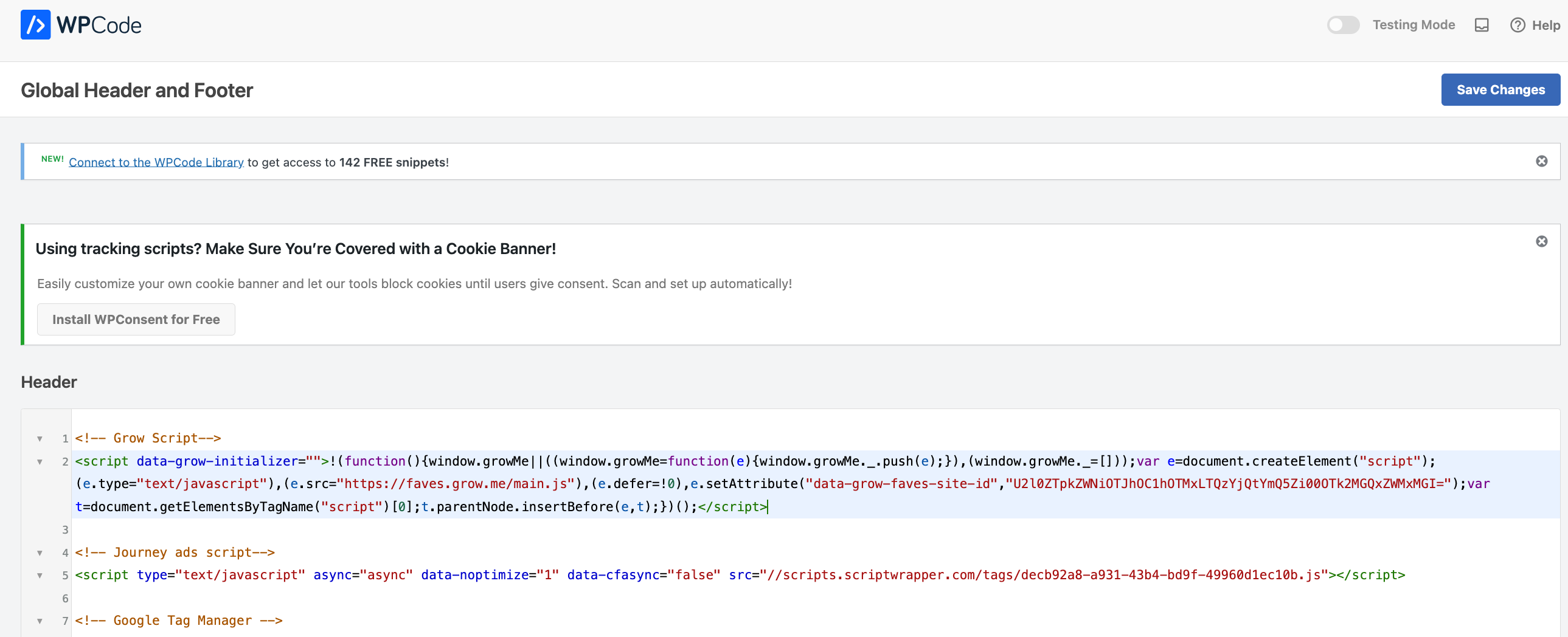 0
0 -
Hi Corrie - it looks like the script only loads when I append a ?test=1234 to the end of any URL I'm testing, meaing there could be some type of caching in play that's causing Issues. When you have the time, could I have you clear out all sitewide, serverside, and any CDN caching on your site?
0 -
Yes, I cleared cache.
0 -
Hi Corrie - thanks for taking care of that! Unfortuantely, it looks like the script is still missing without busting the cache. Could I have you connect with your host for further troubleshooting? They may be able to identify a cache that hasn't been cleared, or another optimization on your site that's causing the Journey script to go missing.
0
Journey is Self Supported
Please sign in to leave a comment.
Comments
13 comments