Change Payment profile

Hello,
I have multiple sites on Journey and I've created two separate payment profiles, How can I switch one of those sites to a different payment profile?
-

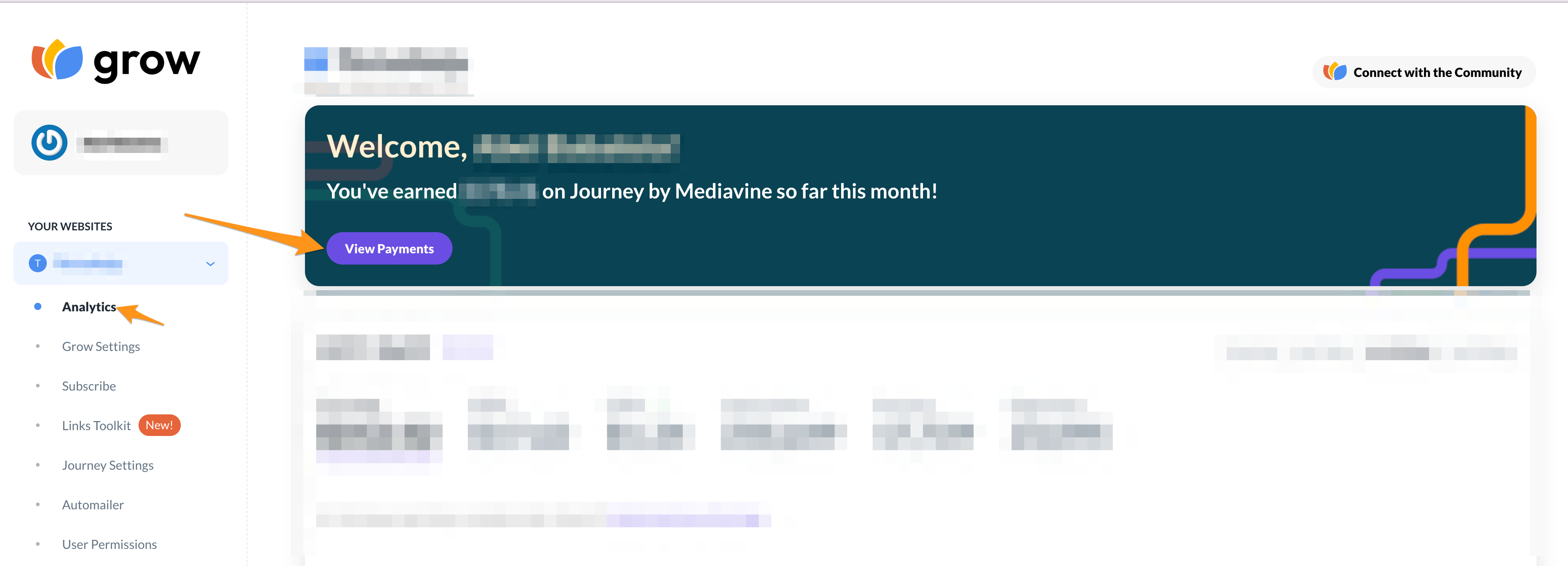
Hey Abel! You should be able to change your Payment Profile by clicking the purple View Payments button from the Analytics tab in your Grow Publisher Portal.
 0
0 -
Yes, but I have two payment profiles setup.
I don't see the option to switch to another payment profile.
0 -
Hey Abel,
Are you looking to update the information in your Payment Profile to match what you have on your second Payment Profile or are you looking to switch views between your two different Payment Profiles?
0 -
So I have two payment accounts.
I have one set to receive with Payoneer and another to do my local bank account.
Now I want to select the other payment account to work with one of the site but now if I edit the one that's already on the site with my local site on the payment profile page, it will most likely affect the others as well?
Basically how can I switch a site to another payment profile easily is the question.
0 -
Hey Abel. It looks like 3 out of your 4 active sites are on the same Tipalti ID so any changes you make to those accounts using Payoneer will affect all three accounts. All three of those sites would be paid as a lump sum because they're all under the same payment profile.
Your 4th site is a Local Bank Transfer so any changes made to that site wouldn't affect the other 3. If you want to switch your Local Bank Transfer to Payoneer, that's totally fine and won't affect your other three sites. You would just need to update the information in your Payment Profile for that specific site. If you switch the Local Bank Transfer to your Payoneer account then it would just be included in the lump sum for future payments.
Now if you're looking to switch over one of the 3 accounts from Payoneer to a Local Bank Transfer, it could affect the other sites attached to that Payoneer account. If that's what you're trying to do, I'd recommend reaching out to payments@mediavine.com so we can help facilitate that change and monitor it to make sure it doesn't affect the other sites attached to that Payoneer account.
Just a heads up - Payments@mediavine.com is only for payment-related questions. Any other questions should still be directed to the community.0
Journey is Self Supported
Please sign in to leave a comment.
Comments
5 comments