Sidebar ad not positioned properly
Completed
Hi. I just got into the program. As I set it up, the sidebar ad isn’t really in place. Please see the attached video link. It should be in the last part of the sidebar and it should be sticky. Instead, it’s at the navigation part.
I hope you can help thanks a bunch!
https://imgur.com/a/pc7o7Mn
-

Hi Maya ! Thanks for writing in about this. It looks like our script perceived the navigation menu as the sidebar element on your site, which was causing that display issue. We just made an update so the sidebar ad should be loading in the right spot now.
Thank you!
0 -
Yey, it's fixed! Thank you very much! 🤎
0 -

Hello 👋
I have the same situation on my site, as the sidebar ad shows in the navigation element (header).
Would it be possible for you to fix it for me as well? I have three elements/classes that can be targeted:
.sidebar (this is one of the main three columns of my post template: content, spacing, sidebar)
.sidebar-section (this is the inner section of the column)
.sidebar-column (this is the column of the inner section)
I appreciate your help!
PS. I temporarily disabled the sidebar ad by adding the HTML settings.0 -

Thanks Ari! It looks like the Journey Script automatically updated your sidebar placement - when you find the time, could I have you re-enable your sidebar ad?
0 -
Hi Ryan!
Thanks for checking!
I re-enabled it, and now the ad does show in a better position, but unfortunately, it is shown on the right of the sidebar (next to it).
I read about this in other posts here, and supposedly it's because of the flex set on the items in the sidebar. Do you think I should try to fix it or is it possible for you to adjust it differently? What do you think?
Thank you again for such a fast response on a Sunday!
UPDATE: I will try to change the display of the element and report back if that fixed it. I changed it manually on a loaded post in the CSS (which fixed it), now I just need to try on the Post template itself (in Elementor).0 -
Fixed! My sidebar ad now shows properly in my custom Elementor Post template.
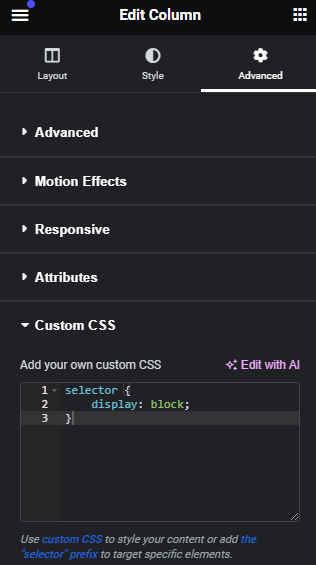
I managed to get the sidebar ad to correctly show after the sidebar's content, instead of to the right side of it, by adding a custom CSS rule “display:block” for the column. This overrides the default “display:flex” of Elementor columns.Thank you again! 🙏
 0
0 -
Hey Ari - great work, thanks for letting us know! We've seen this behavior you're seeing before with Elementor sites, and we've also found the best fix would be to display:block the sidebar element.
0
Journey is Self Supported
Please sign in to leave a comment.
Comments
7 comments