Ads.txt missing - Siteground Optimizer
Answered
I finally got through onboarding, ads are showing, I'm earning… but now it says my ads.txt is wrong again and now it also says my privacy page doesn't exist.
I'm also confused because my views don't match my Google analytics. Can anyone help? I'm in WordPress. when I try to resync the plugin, I'm just taken back to a log in screen.
-
Official comment

Hi Alyssa Reinbolt ! I took a look at your site, and it looks like the ad script is being optimized by Siteground Optimizer. This is why the dashboard isn't picking up the ads.txt file or privacy policy. You'll want to make sure the script is excluded from this plugin. Here's a help article that goes over how to exclude scripts, and you can also reach out to Siteground for assistance. You should just need to exclude the term “scriptwrapper”.
As for the discrepancy between GA4 and Grow analytics, no two analytics tools report the same and this is to be expected! If you want to learn more, you can read more about Grow analytics here and post any further questions in this open thread on the same topic.
Hope this helps!
-

Hi Rachel,
I have Site Ground as well and have the same alert as Alyssa (ads script and privacy policy not picking up).
When I tried to exclude the script “scriptwrapper”, it didn't appear from the drop down options on Site Ground's optimization plugin. There was also no way for me to type it manually.
When I reached out to them for help, they told me that Journey's script was added to an existing file's code, as a snippet, rather than being its own standalone script file, so it won't allow me to select it from the dropdown menu to exclude from JavaScript.
They wanted me to ask you which file the Grow plugin added this code into?
0 -
Hi Samantha Collins ! If it's a dropdown, could you try excluding the Grow plugin entirely?
Thank you!
0 -
It doesn't allow me to select the grow plugin. It is not mentioned in the drop-down.
0 -

Hey Samantha Collins - the Journey script is added to your site through the Grow plugin by the following file:
inc/Grow/AdsScript.phpReaching out to Siteground with this information should do the trick.
Thanks!
0 -
Thank you Ryan. I gave Site Ground your file (inc/Grow/AdsScript.php) to which they replied:
“The problem is that this code is a snippet inside a PHP script meaning it's not a .js file that we can exclude, it's a php file which means our plugin is not causing any issue on it because our plugin does not compress php files. If what Grow says is true, our plugin is not causing a problem to your ads.
Site Ground isn't causing any issues if their javascript is inside a php file. So it is either that they made a mistake by saying the javascript is inside a PHP file or that Site Ground's speed optimiser is not causing the issue. There is literally no way the speed optimiser can actually compress a PHP file as it compresses only formats read through the browser. (html, javascript and css).
If there is still an issue, Grow needs to tell us what it is because what they said means it is not the Speed Optimizer. We can move configurations around but we need to know what it is. The php file is not compressed by any of our technologies.”
Is there still an issue? My account is still showing the 2 original error messages (ad script & privacy policy missing). However, ads are still displaying on my site.
0 -
Hi Samantha Collins - Thanks for following up with Siteground! The issue that we're seeing here is that the Grow/Journey script is included in this ‘combined JS’ file, as shown in the screenshot below:
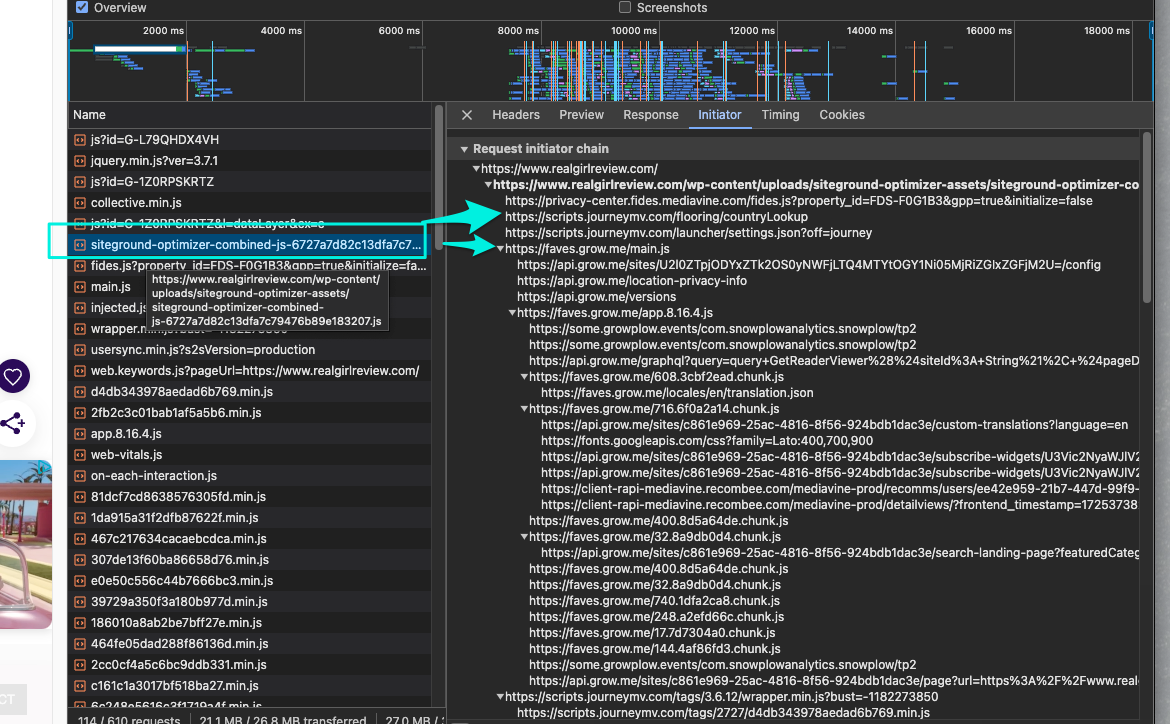
This specifically is what's causing the ‘Your ads script is missing.’ error you're seeing on your Journey Dashboard, as it's unable to verify that the script is placed directly on your site, instead of combined into a ‘combined JS’ file.
This, specifically, is the behavior that we're trying to resolve, as having the Grow/Journey script bundled up like this will cause the errors you're seeing on your Journey Dashboard, and has the potential to cause issues in the future.
In the past, we've found that Siteground Journey publishers have found success by connecting with Siteground's support team to help resolve this. If you don't mind, could you please reach out once more and specifically see if they're able to find a solution that would exclude the Grow/Journey script from this bundled Javascript file? Feel free to reference this forum post and the screenshot I've provided above.
Thanks!
0 -

Hello I am facing a similar issue. Siteground says they need the handles so that they can be excluded properly. Could you share the handles for the .js that the php file is generating?
0 -
Hi Markos Koemtzopoulos ! Please refer to this open thread. Thanks!
0 -

Hey all, I wanted to update you after going through this whole process. After Site Ground with this thread and the other one linked to Markos' issue, they were unable to help me.
In their help ticket, they said:
"After in-depth research based on the articles you have provided, in order to exclude the script, you will need to have the JS properly enqueued as stated in the article you have provided, as it is most likely hardcoded.
Please also keep in mind that we are not professional developers ourselves and that third-party coding and configuration issues are beyond the scope of our support. As your host, our main goal is to ensure that the services we provide are working.
An exception to this rule is our Expert Care service where our experts can go beyond the scope of our regular support service. If you would like to take advantage of it, you can submit a request via your account…"They are saying this is beyond regular hosting services, and if I want help, I need to hire their developer team for an additional cost.
It is a real bummer as SG Optimizer is the best plugin for my site in terms of optimization and site speed. Deactivating the JS combine on the SG optimizer drops my site ranking and speed from 98 to 87.
I never had issues with Journey or other optimizing plugins. I left SiteGround feedback, but it seems Journey and Site Ground are not compatible. I'll leave feedback here as well to see if there is any potential for the Grow/Journey script not to be hardcoded to make this more accessible for us SG users in the future.
Thanks
0
Journey is Self Supported
Please sign in to leave a comment.
Comments
10 comments