Issue with privacy policy
Completed
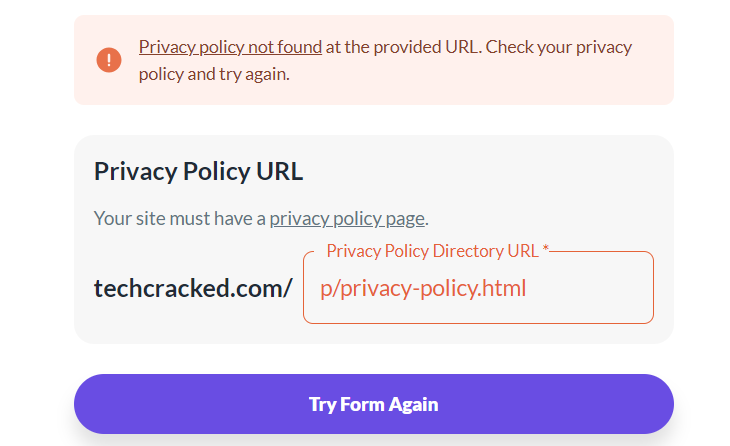
My website is on blogger. Everything went well, stuck here.
-
Official comment

Hi TechCracked ! It looks like the dashboard isn't accepting the privacy policy URL because the ads.txt file has an extra ads.txt line that might be leftover from AdSense at the end of the file, and if there are issues with the ad script or ads.txt file, the dashboard will prevent you from finishing onboarding. Here's the line that needs to be removed:
google.com, pub-1057325815610247, DIRECT, f08c47fec0942fa0
The ads.txt file needs to match exactly what you download from your dashboard, but once this extra line is removed, you should be able to finish the onboarding process!
-
I did that but it still does not work.
0 -
TechCracked It looks like this is due to caching - I still see the extra ads.txt line unless I manually bust the cache, which is why it's still not letting you finish onboarding. You'll want to clear all caching plugins, CDN caching if you use one (like Cloudflare), and your server side cache, which your host should be able to help with!
0 -
Sorry, I don't use cloudflare. I am on Blogspot and there is no way I can clear the cache.
0 -
This is what I tried but NO luck.
Installed cloudflare and purged cache.
Check my robots.txt and everything was clear.
My privacy policy page is on Footer, Menu bar and easily accessible.
0 -
TechCracked it looks like the caching has cleared up and I'm seeing that line removed from the ads.txt file now, so could you try adding the privacy policy again and letting us know if you still encounter the error?
0 -
Thank you! I was able to add the page. Can you please check it confirm that I am all good to go?
0 -
TechCracked yep, looks good on my end!
0 -
I just see “Want fewer ads like this” Ad is it okay?
Sorry for so many questions.
0 -
TechCracked yes, this is normal - you can read more about it here! Also, searching for topics like this in the community is a great place to look for any onboarding/troubleshooting questions that come up since it's very active and you'll likely be able to quickly find answers/solutions :)
0 -
Thanks for the help!
0 -
Sorry, one last question, can you please check my sidebar. If journey can show ads or I have fix the sticky sidebar? Also the header. Thanks!
0 -
TechCracked You would need to remove the sticky functionality of the sidebar before the ad can be placed there by the script. We also don't place ads in the header area (known as a leaderboard ad) because we've found they have a negative impact on overall viewability and therefore ad performance.
0 -
So can I use Adsense or other Ad network for my header section only?
0 -
TechCracked Journey requires exclusivity, so you can't run any other ad networks alongside Journey ads.
0 -
Okay! Can you please check sidebar and confirm? I tried ?test=testAds but it doesn't show sidebar ads. Thanks!
0 -
TechCracked it can take time for the script to automate ad placements after making a change, but you should see the sidebar ad within a day or so now that the sticky functionality is disabled!
0 -
Hey,
It's been 5 days since I installed Journey on my website but my users still see: Want fewer ads like this one?
0 -
TechCracked It's very normal to see the Grow placeholder ads and doesn't mean anything isn't working correctly! You can read more about the placeholder ads and why people are served them in this thread.
0
Journey is Self Supported
Please sign in to leave a comment.
Comments
19 comments