Reoccuring Script/ adtext errors/privacy page errors
Answered
I have been dealing with this issue off and on since my onboard. It would be fixed, then the problem would reoccur. I have tried the grow plugin, it worked, then didn't. I have tried adding it to my website(theme editor) etc. Currentlly, I put a code in the theme editor and have erased any other codes(I believe). Id appreciate someone taking a look at my website and helping me solve this issue once and for all. Marriagesharing.com. Thank you.
-

Hi Felice,
I just checked on the site. I'm seeing the ads.txt in place, but it is actually out of date. For it, you would just want to update it by grabbing the current ads.txt from your Journey settings at at the URL you see under Journey Settings → Ads.txt → Ads.txt URL. If you would prefer to not need to update the ads.txt, you can also have your host setup a redirect to the same URL. Your host will want to set up the redirect from yoursitename.com/ads.txt to the ads.txt URL in your Journey settings.
More importantly, though, I'm actually not seeing the Journey script or the Grow script on the site currently. You'll want to get both added again to get our script and ads displaying. You can find the Journey script in Journey Settings → Ads Script, and the Grow script at Grow Settings → Install Grow Script.
If you run into any issues after getting the scripts added to the site (there are instructions in both sections that should assist you in getting them added), just let us know.
0 -
I have also set the grow script up in my theme editor. Would you mind checking to see if it is installed.
0 -

Felice Mathieu I'm seeing the Journey script and Grow script on the site now, so you'll be good to go once you update the ads.txt file following the instructions in John's original post!
0 -
I don't understand how to update the text.
I grabbed the text from the location he mentioned.
Is there an updated updated text?0 -
Felice Mathieu We have a help article here that will walk you through how to download and update the ads.txt file!
0 -
I had my host apply the redirect. Can someone check it on their end? Because, in the journey account, I am still seeing ‘ad text out of date’ message.
0 -
Felice Mathieu I'm not seeing a redirect in place when I look at your ads.txt file. If you visit your ads.txt file at yoursitename.com/ads.txt, you'll see it doesn't redirect to the URL in your Journey dashboard.
I'd have your host check on the redirect settings and let them know they can verify on their end if it's working by visiting yoursitename.com/ads.txt (replace yoursitename with your domain) and seeing if it redirects to the Journey ads.txt URL.
0 -
On their end, it states that it is redirecting. In my journey account, it is still showing that it is out of date. Can someone give me the next step of this solution?
0 -
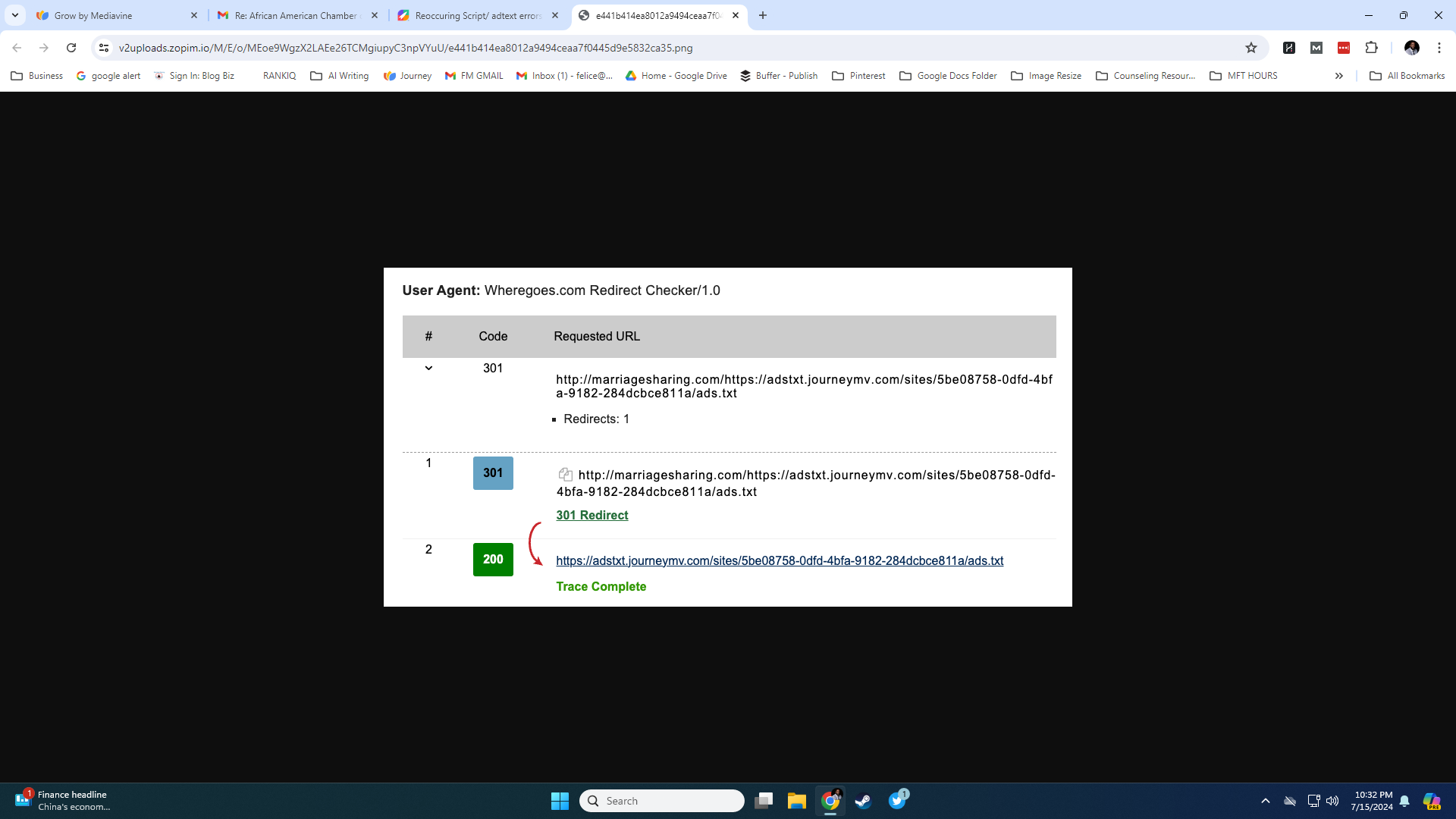 0
0 -
Felice Mathieu they're redirecting https://www.marriagesharing.com/https://adstxt.journeymv.com/sites/yourjourneyid/ads.txt to the Journey ads.txt file.
This means they've appended the Journey ads.txt file URL to the end of your domain, which is an invalid URL and not your ads.txt URL, so it's not redirecting the actual ads.txt file. It's trying to redirect an invalid URL that doesn't exist.
They need to redirect https://www.marriagesharing.com/ads.txt to your Journey ads.txt file in your dashboard. What they have for the 200 URL (your Journey ads.txt URL) is correct, but the 301 redirect URL should be https://www.marriagesharing.com/ads.txt.
Please have your host check https://www.marriagesharing.com/ads.txt once they make the changes to ensure the redirect is working. You can also check this URL on your end to see if it's redirecting to your Journey ads.txt file URL from your dashboard once they make the change.
0 -
I don't understand how to “check if it's working”. My apologies. I had my host ‘fix’ it again.
0 -
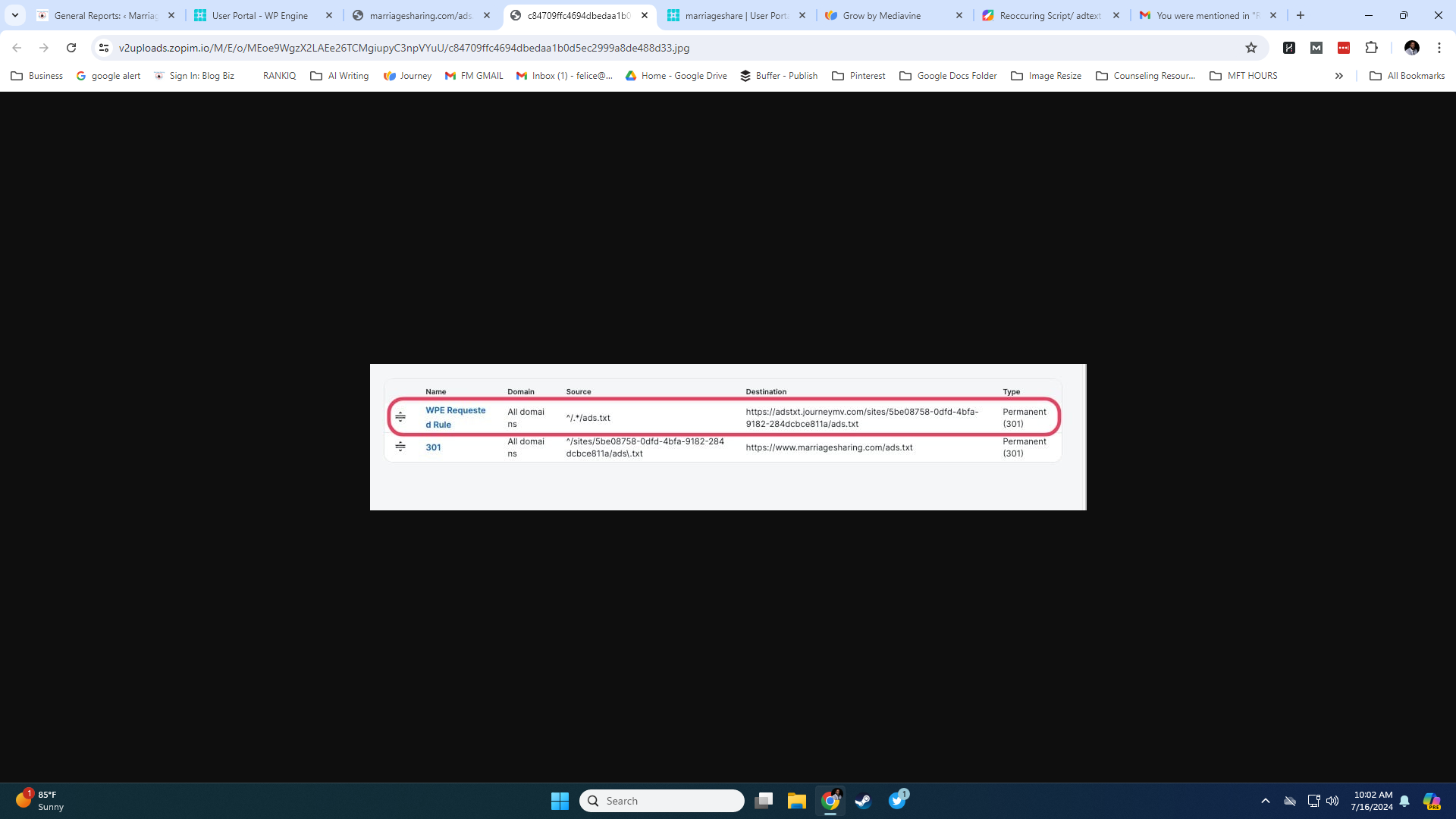 0
0 -
Felice Mathieu No worries! You and your host will be able to know the redirect is working if you visit https://www.marriagesharing.com/ads.txt and are redirected to https://adstxt.journeymv.com/sites/5be08758-0dfd-4bfa-9182-284dcbce811a/ads.txt
0 -
Am i just supposed to see a wall of text and numbers?
0 -

Hi Felice,
An ads.txt file is just a raw-text file that contains lines of advertisers with a trailing unique identifier - what you're seeing in place is a correctly formatted ad.txt file, however, it's currently an older version of the file that Journey has made available for your site.
As Rachel outlined in her previous message, you'll know that the redirect to the most updated version of this file is properly in place, as navigating to https://www.marriagesharing.com/ads.txt will take you to https://adstxt.journeymv.com/sites/5be08758-0dfd-4bfa-9182-284dcbce811a/ads.txt - one thing to note, if this redirect is set up properly, you'll still want to ensure that any version of this file has been removed, in full, from your site. This will allow the redirect to work properly and ensure that this file is updated.
Another option—part of the Journey onboarding process walks you through the steps to update your site's Ads.txt file. This file has been updated since you previously set it up, meaning you can update it on your site by following the same steps. The contents of the updated ads.txt file can be found under Journey Settings → Ads.txt → Ads.txt URL.
0 -
Ok.
I appreciate everyone's input. And I am really not trying to be difficult. I am really trying to get this problem solved.
Several people have commented and said I have an outdated ad.txt file.
Ok.
I have went to journey settings then ads.txt then ads.txt URL. This is the same URL I have been using to update. Yet, many people keep saying it is outdated. This seems to be an issue with journey. I am getting the outdated text from journey's dashboard. Who can provide me with the updated txt then? Since that is the only thing I am missing. And…the forward that I sent from my HOST still is pointing to outdated text.
0 -
And…I chose not to use the grow plug in for my site, because it has caused my site to crash with my theme.
0 -
Hi Felice. The URL that Rachel and Ryan linked above is the same URL you'll find in your Journey Settings. This URL does contain the updated and correct ads.txt. The issue, though, is that the site is not showing this version of the ads.txt. The updated version begins with
# Ads.txt v20240701. If we visit the ads.txt page on your site, the ads.txt begins with# Ads.txt v20240606. This is outdated and why your dashboard is showing the ads.txt as out of date.So you'll just need to get the current version loaded to the site itself (a redirect would work as well) to make sure the /ads.txt URL on the site is showing the current version.
0 -
Ok. This is getting frustrating. How can I get some live help? Perhaps on the phone. No one seems to understand what I am saying. The same text, that everyone keeps pointing me to, in my journey dashboard, is the same ad text and only ad text that is currently in my script on my site. Not only that, but there was also a redirect set up.
So. If the redirect is set up…can I then delete it in my theme editor?
What…dooooo…I dooooo?
Everyone keeps saying my ads text is not updated…well….that is the adtext from my journey dashboard.
0 -
Hi Felice,
Currently, the only support we offer through Journey is through our support forms and our Help Documentation - we're happy to continue troubleshooting with you here.
I see that the Ads.txt file on https://www.marriagesharing.com/ads.txt is different than the one we're seeing on your dashboard - The version on the site is
# Ads.txt v20240606while the version on your dashboard is# Ads.txt v2024070: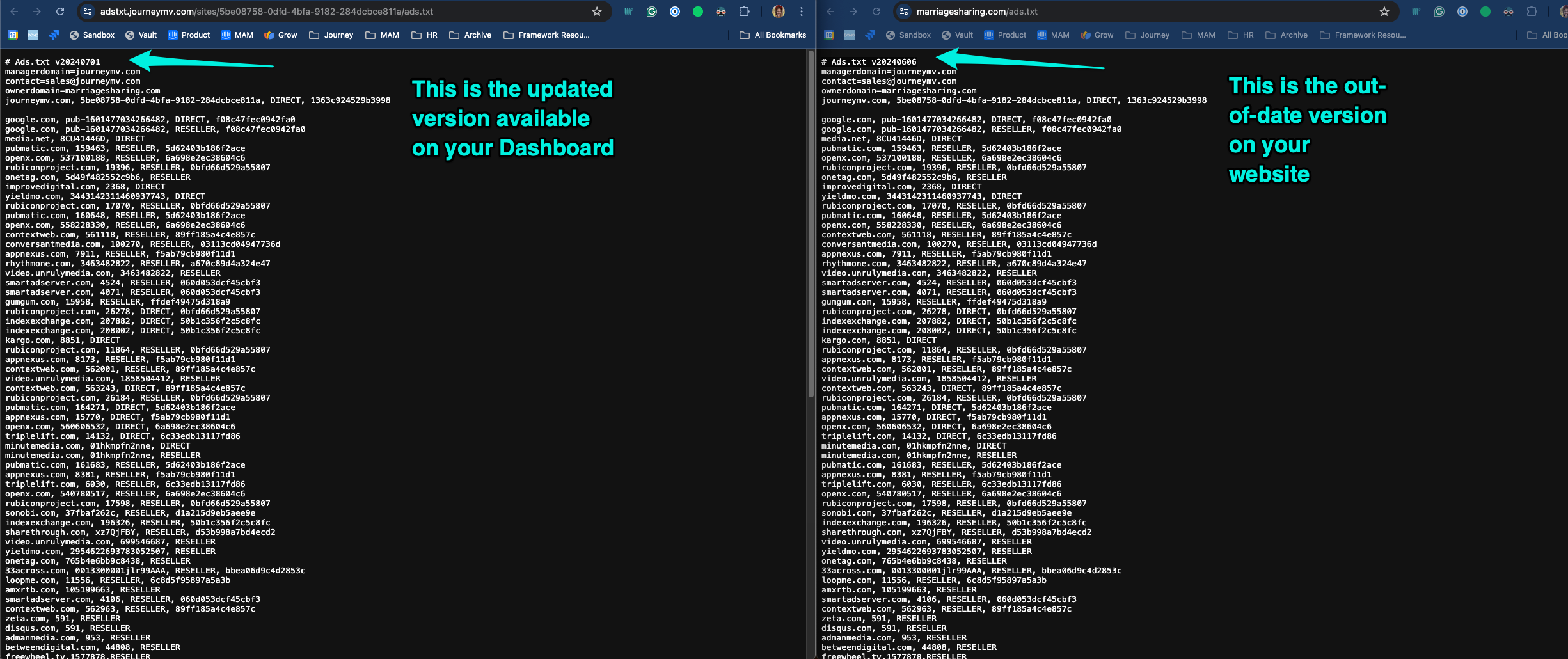
I've also linked a diffchecker outlining the differences between the two files - as you can see, the version on the left-hand side (which is the file on your site) is missing lines that are included in the version of the file on the right (the updated version of this file available through your dashboard.)
Here are the steps I would take to resolve this -
1) Remove the Ads.txt file from your site, as well as any redirects that may have been set up by your host.
2) Once we have a clean slate, download the version of your file located on your dashboard. The file itself is a plain text file, so you can save this version to your desktop.
3) Once downloaded, upload this new file to your site so it's accessible at https://www.marriagesharing.com/ads.txt - there are a few ways to accomplish this, but I recommend leaning on your host for assistance, if needed
4) Once this file is uploaded, clear out all sitewide, serverside, and any CDN caching on your site.
After this step, the out-of-date notice you're seeing on your Journey Dashboard should clear up over the next day. We're also happy to check things over on our end after these steps have been taken.
If you have any questions while working through this, please let us know!
0 -
Ok. Can someone check my site now? I have had the host upload the updated version.
0 -
Hi Felice,
A few of my colleagues and I checked on your Ads.txt implementation this morning, but we're still seeing the older
v20240606when directly navigating to https://www.marriagesharing.com/ads.txt - for reference, the updated version we want to see here isv20240701: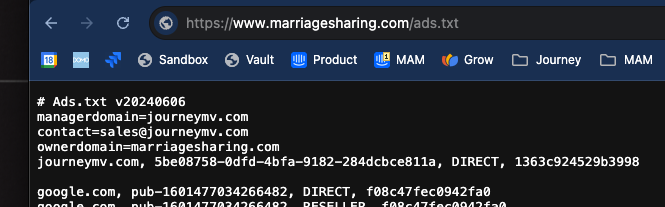
I recommend checking back in with your host to see if they can provide clarity on why the correct, updated version isn't showing up when navigating to your site's ads.txt domain. If they have any questions for us, feel free to follow back up.
0 -
Thanks for all the help. I think….it may finally be fixed. Would someone mind checking now?
0 -
Felice Mathieu The ads.txt file is showing the up to date version now, so you should be all set!
0 -
Thank you all!
Forgive my frustrations.
Thanks for the helpfulness.0
Journey is Self Supported
Please sign in to leave a comment.
Comments
25 comments