In-content ads not showing
Completed
Hi,
I've read some articles about why in-content ads aren't showing, but unfortunately I can't find a solution for my problem. Can anyone help?
Thank you!
website: www.foodfromportugal.com
Pedro
-

Hi Pedro! I'm seeing content ads load on your site on my end:

I recommend checking in an incognito window and making sure you're not running any ad blockers. You can also add ?test=testAds to the end of any URL, and it will show you where your ads are loading for your readers.
Example: https://www.foodfromportugal.com/recipes/roast-veal-regional-cuisine/?test=testAds
Hope this helps!
0 -
Hi Rachel,
I know but, In this example "https://www.foodfromportugal.com/recipes/simple-bread/", isn't it possible to add a few more ads within the "How to make the best homemade bread"? Or are you still testing?
This is only my second day with Journey.Thank you for your support!
Pedro
0 -
Hi Pedro - the Journey script will place ads optimally for performance and user experience, and there currently aren't any settings to adjust the frequency.
That said, in the section you point out, it looks like the text and images are nested within a <div> titled “descriptwo”, which is essentially hiding this section from the script and is why the script isn't placing ads within it. If you remove this extra <div> nesting the content, that will result in more ads in this section.
0 -
Got it!
Thank you so much for your support Rachel!
Pedro
0 -

Hi Rachel,
I am not seeing in content in ads in a lot of my posts now. Everything was working perfectly so I'm not sure what changed. Most of my posts are only showing the video and bottom ad, the in content ads and the side bar ad are rarely showing up. I started to apply a new template to some posts yesterday with a sidebar so that I could make sure the side bar ad would show. Can you help?
0 -
Hi Corrie ! The ad script uses specific elements in the HTML to target ad placements, so changing templates can result in the script no longer targeting the correct element. After making any changes, it can also take a bit of time for the script to recalibrate what element needs to be targeted for ads, but I'm seeing content and sidebar ads on most of your posts at the moment.
That said, the script doesn't work well with page builders in general, which you can read more about here. Moving forward, to ensure consistent ad targeting, you'll likely want to use the same template for all of your posts. If you notice a certain post template has ads and another does not, switching your posts without ads to the template that's getting ads should allow ads to load as long as it's the exact same template.
Hope this helps!
0 -
Hi I actually updated the template to remove a lot of the containers to try to reduce the amount of divs. I'm seeing two posts using the same template. One is displaying in content ads and the other does not. Can you help with why the script is not looking at them the same? My revenue took a big drop because I applied this template to my posts that get the most traffic because it's a better user experience and hope to keep them on the pages longer, more links etc. Are you able to see a main difference between these two posts where an adjustment could be made?
this one is showing the incontent ads great along with sidebar ad
https://yourcarbuyingadvocate.com/commuter-cars/
This one does not show any in-content or side bar ad (and is my most viewed post).
https://yourcarbuyingadvocate.com/car-invoice-price/
Thanks for the help. I want to optimize the best I can. If I need to remove elementor on each post in the long run, that's something I can work to do but for now, I want to try to resolve the best I can.
0 -
Corrie on https://yourcarbuyingadvocate.com/commuter-cars/, all of the content (paragraphs, headings, etc) is organized in one section:
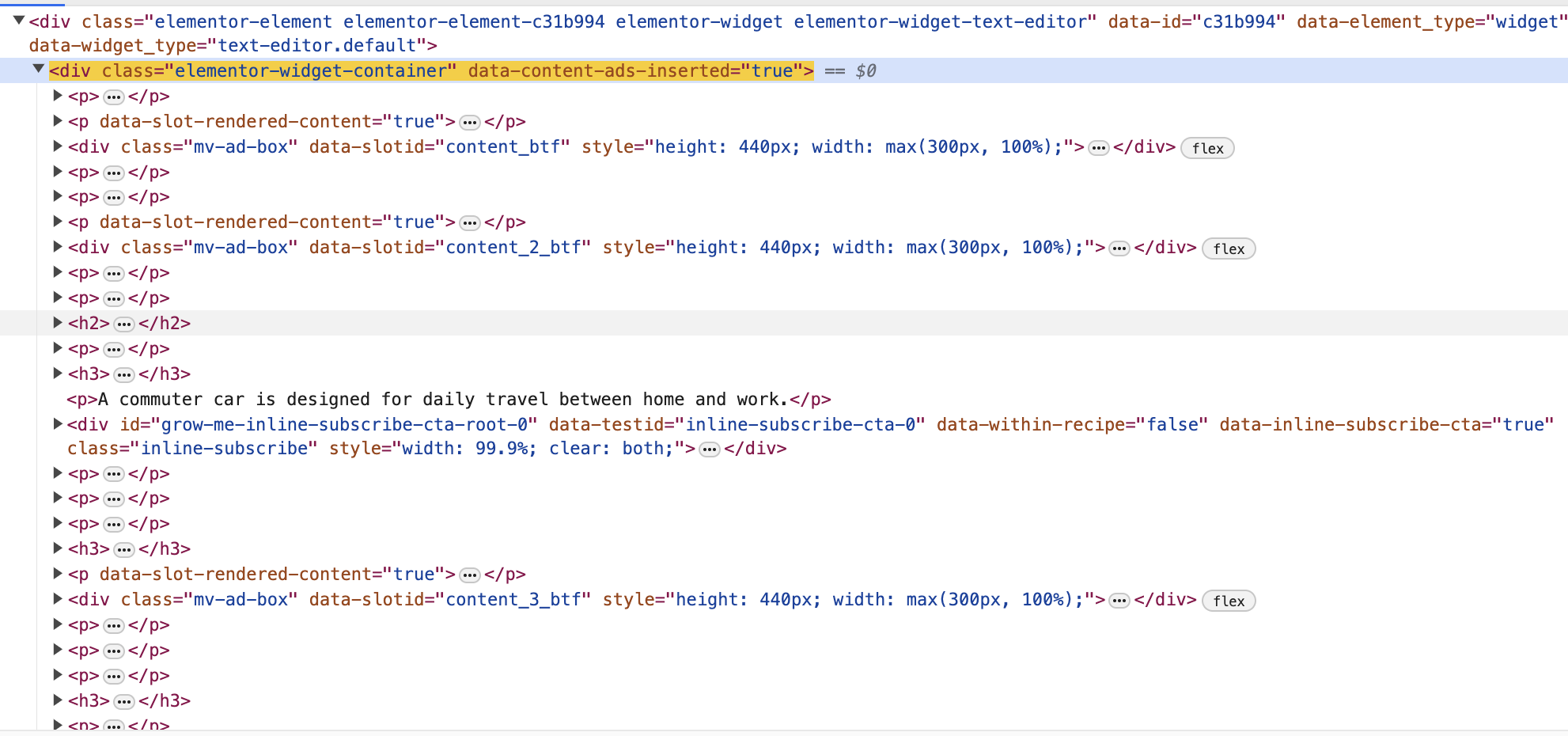
Then here's what the HTML of https://yourcarbuyingadvocate.com/car-invoice-price/ looks like:
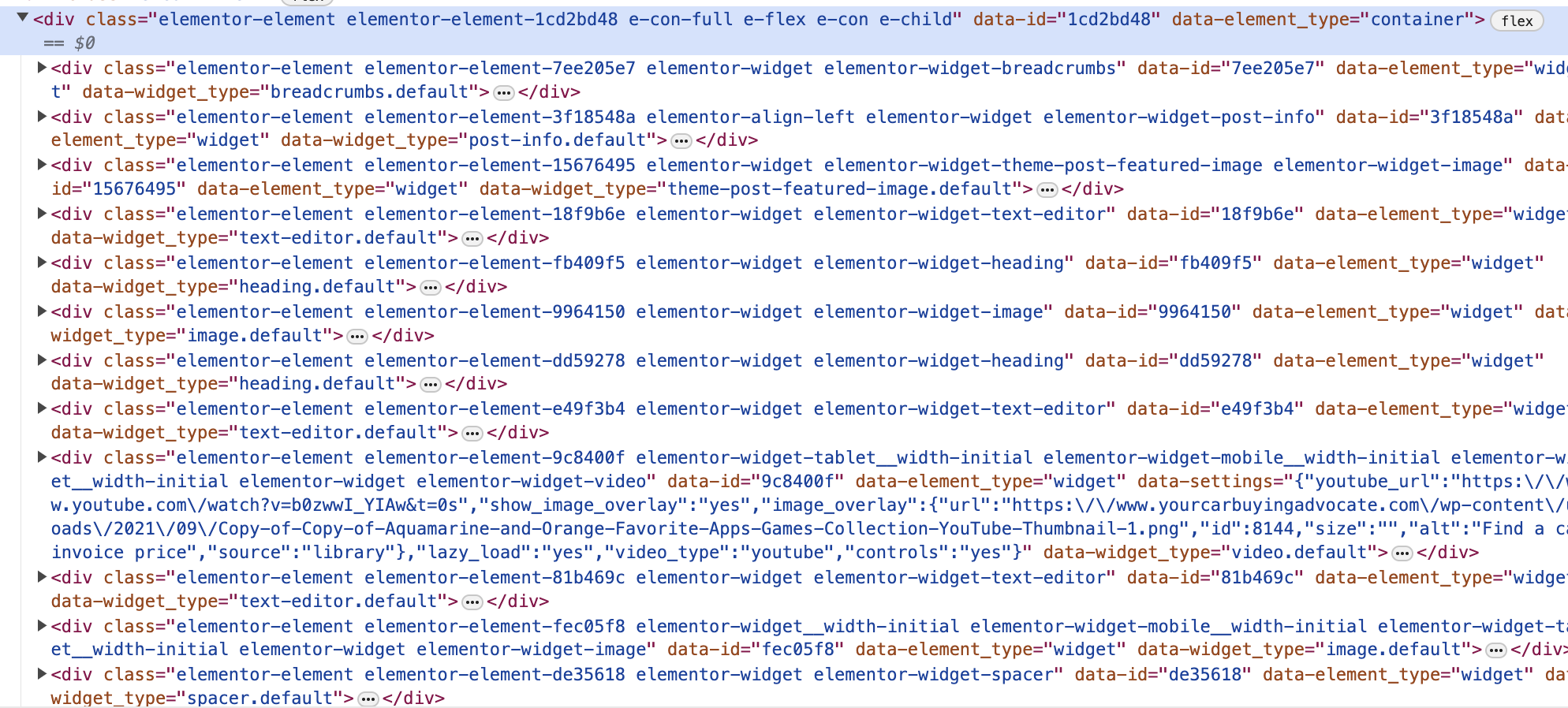
For this post, all of the content is nested in different sections unlike the commuter cars post, which makes it difficult for the script to target ads.
This post is also built exactly like the commuter cars post and works well with ads https://yourcarbuyingadvocate.com/buying-a-used-car-checklist/.
If you build your posts exactly like the commuter cars post and used car checklist post, then ads will populate more predictably. Our article on page builders also goes more in-depth on the topic.
Thanks!
0 -

I have cleared my cache and yet I do not see any ads on my site.
No earnings for 4 days now
0 -
Hi Idoko Nicholas Chinazom ! It looks like the ad script also might be getting optimized. This can prevent ads from loading, so you'll want to ensure the ad script is excluded from all optimizations in any optimization plugins you're using, like WP Rocket. Here's an article that goes over how to exclude the ad script. Once it's excluded, clear all caching plugins, CDN caching, and your server side cache.
Thanks!
0 -
Ok, I have excluded scriptwrapper from the WP Rocket. I have cleared cache as well and would watch it for 2 days and hopefully, I will see changes or some earnings.
0 -
Hi Rachel,
I applied the same template as this post
https://yourcarbuyingadvocate.com/car-invoice-price/
to this post and this posthttps://yourcarbuyingadvocate.com/sell-a-car-or-trade-in/
https://yourcarbuyingadvocate.com/car-negotiator/
and I still can’t get in content ads to show.Are you able to break it down further for me? I can’t see this issue /problem.
0 -
Hi Corrie! All of these pages aren't getting ads because they're built differently from https://yourcarbuyingadvocate.com/commuter-cars/. It's also worth noting the Sell A Car Or Trade In and Car Negotiator post content isn't built the same way as the Car Invoice Price post content.
Ultimately, the goal is to format the post content the same way for all posts (i.e. only using the text editor and not grouping text/images/etc into separate Elementor blocks) and to also use the same template for all posts so that they all have the same underlying HTML.
If you build the above posts like the Commuter Cars posts in the way I've outlined, they should have ads populate.
Hope this helps!
0 -

I hope i can tune in in this post? I also don't see in-cntent ads, only sidebar and the other one below.
0 -
Hi Evelyn ! It looks like the script wrapper has been installed three times on the site – this is likely confusing the script and preventing content ads from loading.
One instance of the script is also installed above the <!DOCTYPE html> tag, which will result in issues with ads loading. You'll want to remove this specific instance of the script along with one other so that you only have one ad script installed. Then ads should start loading in properly.
Hope this helps!
0 -
Hi, I indeed found 3 codes, thanks so much, I'll delete and change the above one and see what happens! Thanks!
0 -

Hi, I have the ads appearing in my sidebar and footer, but there aren't any ads within the content of my blog post. Is there is setting I need to adjust? Thanks!
0 -

Hey Saranya Ramanathan - I checked a few posts and everything looks good on our end. If you've recently made any changes to your site that may have updated the HTML markup, it can sometimes take Journey a little time to learn your site and make adjustments.
Thanks!
0 -

Hi,
On my Food blog, the in-content ads not showing properly.
It's only showing on div/span class of: .alg-blog-post--content
But it's not showing on div class of: .alg-blog-post--wider-content (which is inside of .alg-blog-post--content)
The other two sites of mine (Info and Haute blog) showed the correct in-content ads placements like I wanted.
Also, all these three sites' div class of .alg-blog-post--wider-content is 1020px of width (on desktop), so if you guys have 970x250 and 970x90 ad sizes I have the in-content ad placement area for that. Right now I'm only seeing 728x90 and fairly square ad sizes on my sites' in-content.
0 -

Hi Adam,
I just had our script re-crawl the food site, and ads should be showing as they are on the other sites. For ad sizes, they will display based on which advertiser wins the bid and what size ad is offered. If space allows, larger ads could display as as well.
0 -
Hi John,
The problem of the in-content ads not showing properly seems to appear again on the Food blog (after I teel your co-workers to fix sidebar ad that sticks beyond related posts section) and in need of script re-crawl.
Thanks
0 -
Adam The script was hitting two selectors on certain templates – this was leading to ads stacking on top of one another, which is why we had to make a change to targeting. Ad density on these posts should be correct now, though.
0
Journey is Self Supported
Please sign in to leave a comment.
Comments
22 comments