Ads being cut off
Answered
I’ve noticed sometimes the bottom of the ads get cut off. So the “learn more” button, for example, isn’t always visible. Anything I can do from my end to fix that?
Thank you!
-

Hi Jennifer,
I just took a look at the site, and ads are displaying great on my end. I'm not seeing anything being cutoff vertically in the screenshot, so likely you were just served an ad from a bad creative. This is normal and can definitely happen from time to time, and because of the way ads are programatically, sometimes an ad like this can follow you as you visit the site. It shouldn't be anything to worry about, but if we can answer any additional questions just let us know. Thanks!!
0 -
Good to know, thank you!
0 -

Hey!
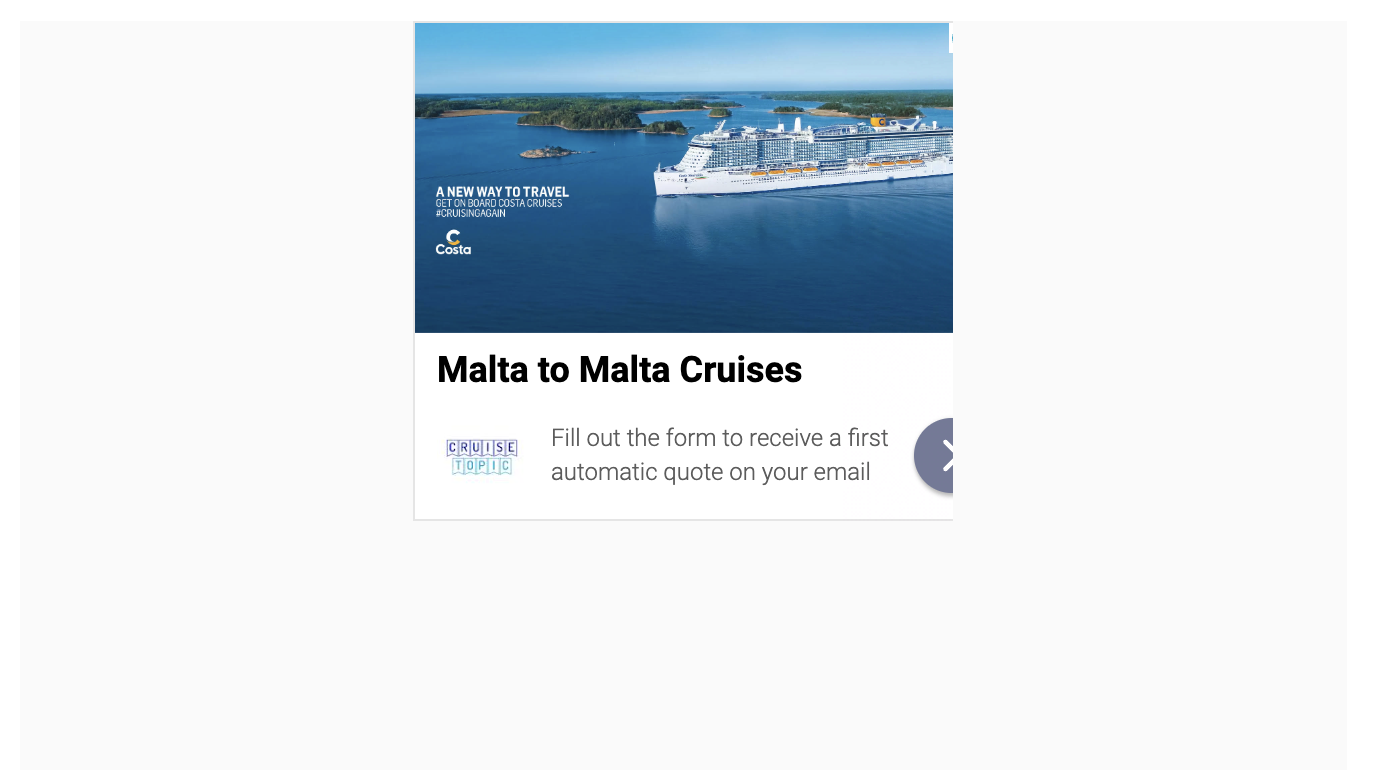
Ads on my site also look cut off.
Could check if everything is okay?
Laura
 0
0 -

Hey Laura Jasenaite - it looks like your theme had a few lines of CSS that were causing ads to get cut off. I see a global style applying to all .container HTML elements that's adding additional padding. Journey ads use the same .container classes on ads, so the theme CSS is also styling ads, which is causing the cutoff.
Adding a few lines of CSS to remove the padding on the journey ads, or updating the .container styles so that it only applies to specific elements should fix this up.
0 -
Perfect. It looks good now.
0 -

I am facing few issues for ads allignment on my site. The main issue is that ads are being croped & not showing to full width. The issue presists for desktop & mobile devices as well. It is important to mention that this issue does not exist for grow placeholder ads. The issue exists for orignal ads.
(1) Anchor Sticky Ads on bottom of screen - The ads are being cut off, It means some part of ads is being cropped on the right side of the Ad. This makes ad ugly which results in bad UI & ultimately in low CTR.
(2) In Content Ads - Same issue exists for in content ads. Initially I thought it will be due to less horizental space on mobile devices. But this is not the case. The issue exists for desktop devices as well.
(3) Sidebar Ads - These are also being cropped in sidebar. Other issue with sidebar ad is that there should be some space between sidebar content & the ad. The space is idle on below page.
https://innercircletrader.net/blog/
but is not good in article pages. The space between sidebar content & ad should be like above url on all the pages. I hope you will have got my point. After browsing few pages you will witness the issues I have explained above.
0 -

Hello,
I'm also experiencing a problem with ads cut off on the right (see screenshots), both on 300x250 formats and in horizontal format, in ads inserted within my content.
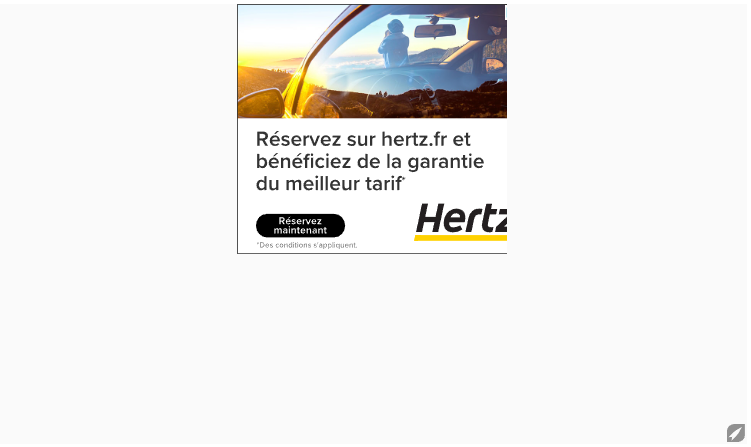
What can I do to solve this problem?
Thank you in advance for your help.
Reda0 -
Hi Shah and Guideduchien! I just took a look at both sites, and they actually look to have the same issue. Both sites have styles (padding on both and some max-width styles on your site Shah) that are applying to the
containerclass and cutting off the ads. It's possible the styles are coming from themes, and you'll just want to make sure they're not applying to any of the elements inside of the ad boxes, and you should be all set. Thanks!0 -
Hi John, can you provide some specific css code to fix the issue or solve at your end.
I have tried below solutions but none worked, so approaching you for help.
(1) /* Ensure the ad container has no padding and full width */
.ad-container {
padding: 0 !important;
max-width: 100% !important;
width: 100% !important;
box-sizing: border-box;
}/* Specifically target elements inside the ad boxes to avoid overflow */
.ad-container * {
overflow: visible !important;
}
(2) /* Reset padding and width for ad containers */
.ad-container, .mediavine-ad {
padding: 0 !important;
margin: 0 auto !important;
max-width: 100% !important;
width: 100% !important;
}/* Prevent overflow within ad elements */
.mediavine-ad * {
overflow: visible !important;
display: block !important;
}(3) /* Ensure no padding or margin affects the ad container */
.ad-container, .mediavine-ad, .widget-area, .entry-content {
padding: 0 !important;
margin: 0 auto !important;
max-width: 100% !important;
width: 100% !important;
}/* Prevent ad elements from being clipped */
.mediavine-ad * {
overflow: visible !important;
}/* Fix any height-related issues */
.ad-container iframe, .mediavine-ad iframe {
height: auto !important;
min-height: 0 !important;
}
0 -
Hello John ,
For those who might find it helpful, here's the CSS code I added to remove the padding my theme was adding to ads:
.mv-ad-box .container {
padding: 0!important;
margin: 0;
}Have a nice day
0 -
Hey Shah! I recommend giving the above solution a try.
0 -
Hi Team MV, I have tried above css as well but issue is still there. Kindly look into the issue in detail. Also done with removing cache.
0 -
Hey Shah - it looks like there may also be a max-width style applying on all .container elements which may be cutting off ads - it also looks like your sidebar ad would need to be included in this fix, so I recommend ensuring that you're targeting the #sidebar_btf element as well.
0 -
Hey!
I am seeing again that some ads on the Desktop are cut off (https://travel2malta.com/). The bottom banner and the side banner.
Could you check?
Thanks!

 0
0
Journey is Self Supported
Please sign in to leave a comment.
Comments
14 comments