Unable to Enable Ad Script
Featured Completed
Hi! I'm having an issue with adding the ads script to my site. Here's what's happening:
1. It's showing a yellow notification that I need to update the plugin (but I have already).
2. I head to Wordpress, enable the script and it says success.
3. I cleared my cache
4. Checked for the script and it's not there
Any insight for what to do next would be appreciated!
-

Hi Rachel! It's possible that there's some additional caching on the server side of things that could be keeping the plugin update and script addition from being visible. Could you reach out to your host to have them clear all the caching on their end and also have them check if there are any firewalls or security measures in place that could be blocking Grow Publisher Portal from seeing things added? Once that's done, hopefully you'll be able to complete the onboarding. If you run into additional issues, though, please just let us know!
1 -

Just to piggyback on this, I went through the motions of using the Wordpress plugin and even though I went through all the steps to configure and adjust security, it never worked. The process to check to see if the script was there always failed. Only the manual setup for me worked. :/
0 -

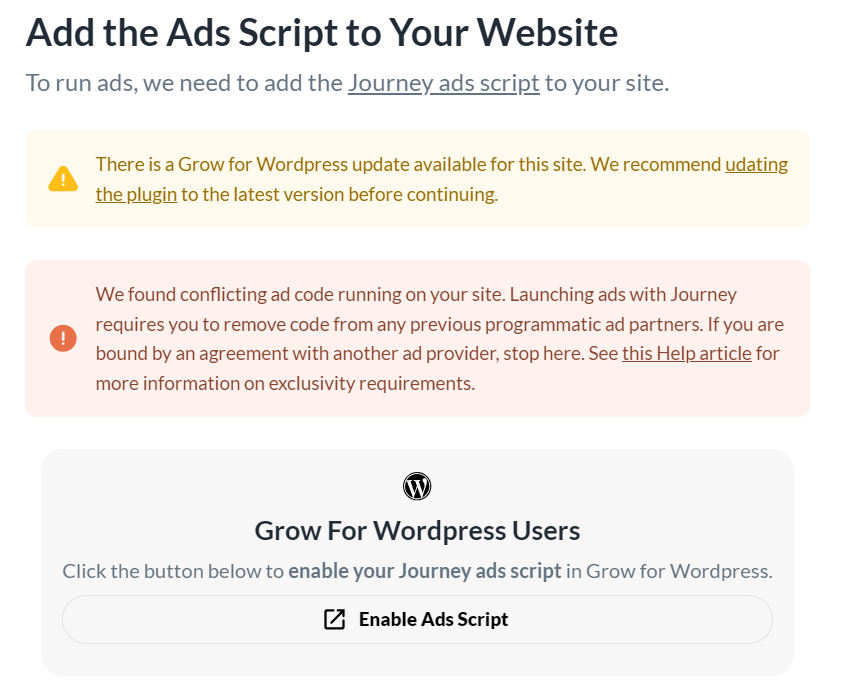
I am experiencing the same problem. I deleted all the cache, but the issue persists, and I am unsure how to resolve it. I even disabled the cache system, yet the problem remains. I also tried manually installing the script, but that didn't work either.
0 -
Hi Edith! From the screenshot that you sent, it looks like you're getting a message that we're finding an existing ad script still on the site. I just took a look, and I am seeing a Google ad script still running. If you can go ahead and get that removed and clear all the caching, you should be able to proceed with onboarding. Thanks!!
0 -
Thanks also for your input, John. We're not able to say exactly what was causing the issue on your site, but it sounds like you were able to get the script added manually and should be good to go.
0 -

Hey there I am experiencing the same issue and had my blog host clear my cache. It also says my Grow plugin is not updated, but on my end, Wordpress is saying that everything is up to date. This is the message I am getting. I have been trying to figure this out for WEEKS now.
Any help would be appreciated!
 0
0 -
Hi Caitlin! It's possible that there's a firewall or security that's causing the onboarding to not see the script if it's been added via the plugin, but we can't say that certainly. If you haven't already, it would absolutely make sense to go ahead and follow the links on the page in your screenshot to go ahead and install the script (and potentially the ads.txt) manually to see if that gets things working here. If we can answer any additional questions, just let us know. Thanks!!
0 -
Thanks for getting back to me John!
I reached out to my host and they've cleared the cache and security is a non-issue. I still am unable to add the script. Any other suggestions for where to go from here?
0 -
Hi Rachel! Thanks for getting back to us. I just took a look at the site and saw that you actually have Mediavine Control Panel activated on the site. Could you try deactivated this plugin, clearing all your caching, and adding the script via your Grow Plugin again? If we can answer any additional questions, just let us know. Thanks!!
0 -
Hi John-- this worked!! Thank you so much!
0 -
Hey John! I honestly do not know where to go next. I have downloaded the Grow app and nothing I have done works! When I click Journey ads script it makes me sign into Wordpress and then does not bring me to Grow or anything. It leads me nowhere and I feel like it is supposed ot lead me somewhere. I also cleared cache with my host. I never had any other ads running on my site prior, so I do not think that is causing an issue. Literally stumped!!!
0 -
Hi Caitlin! I just took a look at the site, and it's possible your setup with a redirect to www is leading to an issue with the link from your onboarding and your getting logged out. Changing the link to include the www prefix could potentially take care of this for you. When you have a chance, please login to your WP Admin, open the onboarding in GPP in another tab or window, and use this link in the WP Admin browser:
https://www.[yoursitename].com/wp-admin/admin.php?page=grow-journey-enable. You would just want to replace [yoursitename] with the actual site name.Hopefully that gets things working here. If you're still not able to get the script added using this approach, it could absolutely make sense to add the script manually following the instructions in your onboarding.
1 -
Hey John! This WORKED! YAY!! Everything is set up. Thank so much!!
0 -

I am having the exact same problem as EDITH above. I clear the sites cache, go through all of the steps to be told that I need to update my Grow Plug in (its on the latest) then it says I have ads still on my site. I do not because when I refresh the screen that says like EDITH above, it changes to page CAITLIN above has. I added the script manually to my header, but it is not picking up. I cannot find the ads.txt info to add manually like I tried to do with Google recently. I removed the ads.txt google script and now it is empty when checking.
Is the cache clearing on a host level different than clearing the sites cache on my own manually?
Trying to think of all angles.
0 -

Lowcarbwiththecarrs Caching on the hosting level (or server level) is typically separate from the caching plugins running on your site, so both need to be cleared out and your host can help you with that.
I took a look at your site though, and I see ads are up and running and the ads.txt file is in place! Were you able to resolve the issue by clearing the host level cache?
Thanks!
0 -
I had to remove Google Site Kit completely, remove and choose a different plug in to add the ads.txt and now its fixed! Thanks so much!
0 -

Hello
I was having the same problems as above but managed to add the ad script yesterday following the step you recommended for Caitlin above. I thought I saw ads on my site yesterday and today, however I have gone on my site on desktop and mobile and can't see any being displayed. So did I actually manage to set them up?
Thanks so much
Michelle
0 -
Hi Michelle - ads are looking good on my end so you should be all set! If you're running an ad blocker, that could be the issue. Since you're on the site more often than a typical reader, it's also normal that you might run out of premium impressions on your end and see fewer ads. What you can do is open the site in a new incognito window to check on what the ads are looking like. Also, you can append
?test=testAdsto the end of a post URL, and that will signal our script to display placeholder ads so you can see where the ads will display for readers.0 -

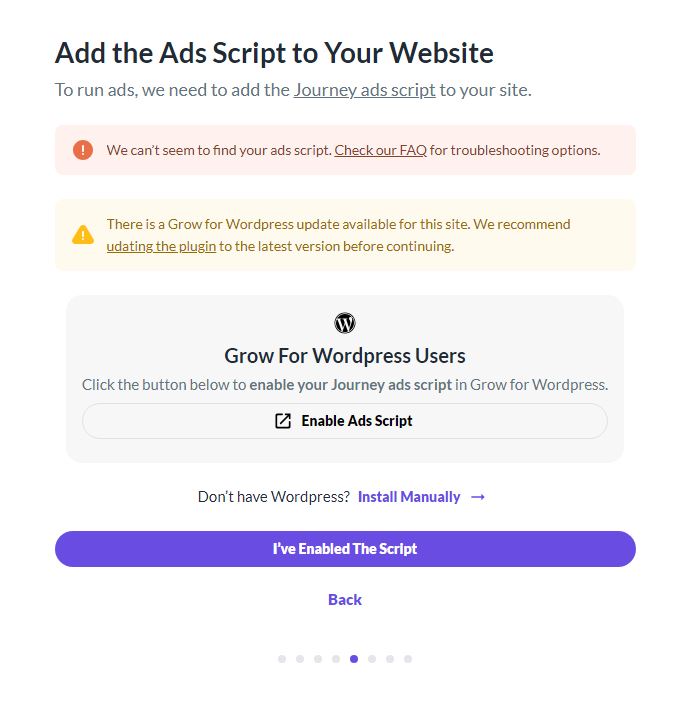
I have tried for days to verify my manually installed ad script (since the button didn't work it only brought me to my login on WordPress and when I signed in nothing) to my WordPress site and it still won't verify. I have read so many articles.
I had my host clear the cache. I read this article and followed the instructions for the WPRocket conflict https://help.grow.me/hc/en-us/articles/6312680343963-Grow-Conflicts-and-Compatibilities
Then I cleared the cache in WPRocket. Logged out of Grow, Logged back in, and tried to verify, and it is the same error.
Also, I have the latest plugin of Grow 1.3 I didn't see any other updates and it recommends updating the plugin.
I am at a loss for what to try next. Can anyone help me? Thanks in advance, Theresa
 0
0 -
Hi Theresa! If the script is properly installed, there's likely a firewall or security setting that's preventing the connection. I would check with your host to see if they have any firewalls or security settings running, and you could also try disabling any security plugins or security settings in Cloudflare to see if that resolves the issue.
In the past, some hosts have also had to whitelist the MediavineMetadataParser user agent from being blocked in Cloudflare due to increased bot protection, so it would be worth asking your host about this as well if they use Cloudflare.
Hope this helps!
0 -
Hi Rachel, I ran that by my host and he said none of that would apply. I don't know what I should try next. What do you recommend that I try or do?? Thanks in advance.
0 -
Hi Theresa! I had our engineers take a look, and this might be caused by the Chicory ad scripts running on your site. Just so we can rule it out, could you try removing any Chicory scripts, clearing all site/server/CDN caching, and then letting us know if that clears up the issue?
Thanks for working with us on this!
0 -
Hi Rachel, I disabled Chicory. Yes, it seems that was the problem. I verified the site, added the AD text script, and verified it. Did that work? But, now it won't complete the process and says it isn't reading Ad text (when it showed it installed?) I can't tell from my end. Can you see if it worked? What happens next? I am hoping to get this resolved as soon as possible.
Also, does this mean I shouldn't or can't use Chicory? Either way, it won't be a problem.
Thanks in advance for your help! Theresa
0 -
Hi Theresa - I'm seeing that you've finished the onboarding process and don't see any errors pertaining to the ads.txt file. Is everything looking good on your end now too? And as of now, Chicory is considered a conflicting ad script with Journey since we require exclusivity.
Thanks!
0 -

I am trying to add the Journey ads script to my wordpress site, and nothing is working. Can someone please take a look at my site before I pull all my hair out? This is all above my head :).
I am having similar problems as others have mentioned above.
Here are the details:
1. I keep getting the suggestion to update my Grow plugin, but it's up to date.
2. I get this when I attempt to add it automatically:
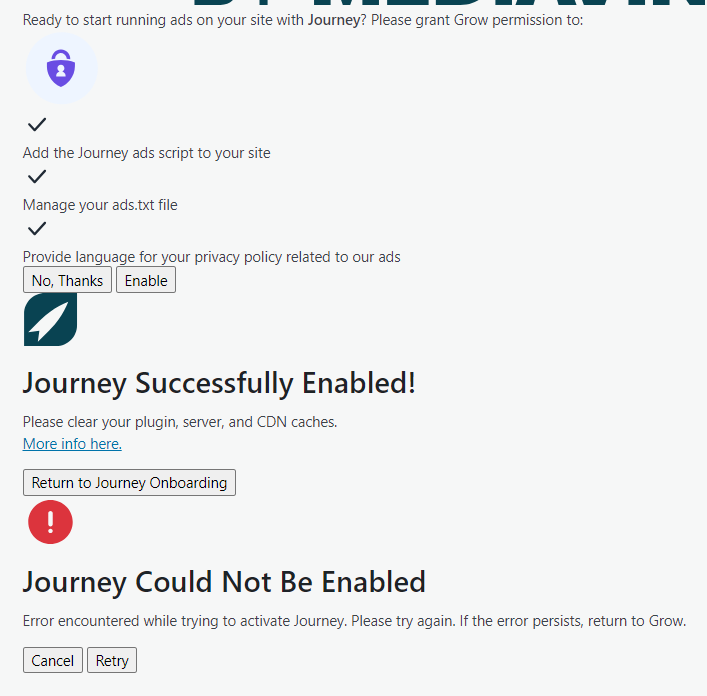
3. When I attempt to add it manually, I get a “We found conflicting ad code running on your site..” message, but I don't have any leftover ad code on my site. Wordpress and Exoic support have confirmed this. I just recently removed the Google Site Kit plugin off my site as Lowcarbwiththecarrs mentioned above.
4. Cache (at all levels) has been cleared... multiple times.
Please help me!! :)
0 -
Hey Meagan! Looks like this was a caching issue – I'm not seeing the conflicting ad code error on your dashboard anymore, so you should now be able to finish the onboarding process now.
0 -
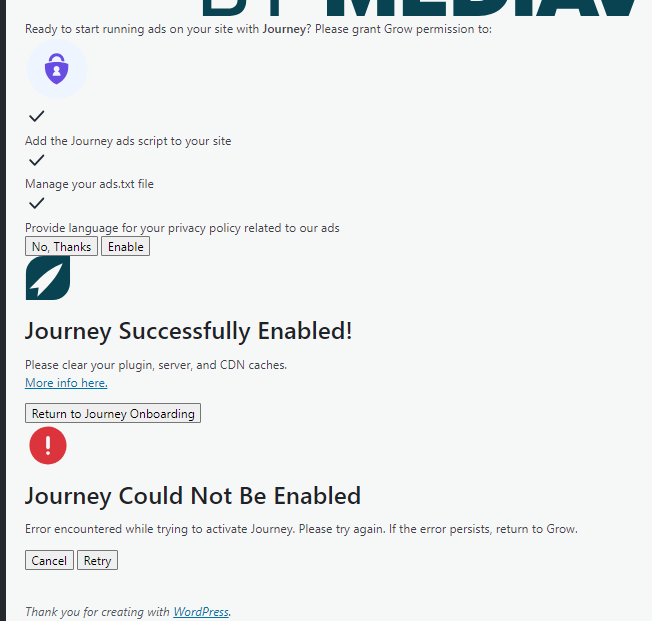
Thank you for responding so quickly, Rachel. I am still getting the below. Should I attempt to add it manually? Or do I still need to fix the caching issue? Thanks again for your quick response :).
 0
0 -
Hi Meagan! You need to go to your Grow dashboard to continue the onboarding process -- it wouldn't be through your WordPress dashboard.
It's possible that error notice is no longer relevant since the notice above it says “Journey Successfully Enabled”. You should just need to click “Finish Journey Setup” in your Grow dashboard and finish things up there.
 0
0 -
Yay!!! It's working!! Thank you so much!!
0 -

Hello - piggybacking on this post too! I'm also experiencing issues adding the script and need assistance. My developer has also tried without success. I've added to my Grow account and he will try again this afternoon (but he is expensive so if there is a way we can sort this without me continuing to pay him it would be great!). We've done troubleshooting, but there's a recurring issue: whenever I press the button from the Journey portal to add the ad script, I'm forced to log in to my WordPress account again. Once logged in, I'm unable to add the script from the plugin. If I go back to the Grow portal while keeping my WordPress website open in another window, the same issue occurs, eventually leading to WordPress logging me out. I suspect this might be my issue but I'm not sure.
Is there a way for my developer to manually add the ad script?
Thanks!
0
Journey is Self Supported
Please sign in to leave a comment.
Comments
46 comments