Struggling To Set Up Ads.txt on SquareSpace
Answered
Hi! I have been trying to setup Ads.txt on Squarespace and it's not working. I've checked it and tried about 20 times and went through all of the troubleshooting outlined in the blog post. Any advice would be helpful!
-
Official comment

Jessie Bernhardt thanks so much! It looks like your first url mapping rule is overriding the ads.txt redirect and forcing it to redirect to /blog/ads.txt. Since advertisers need to be able to access the ads.txt file at /ads.txt, you'll need to make a slight adjustment.
It looks like the order of URL mapping rules can change their priority. For instance, if you switch the two rules' positions then /ads.txt should redirect to our file and then your /blog redirect would apply to all non-ads.txt urls.
Could you try placing the /blog redirect on the 2nd line and placing our ads.txt redirect on the 1st line?
-
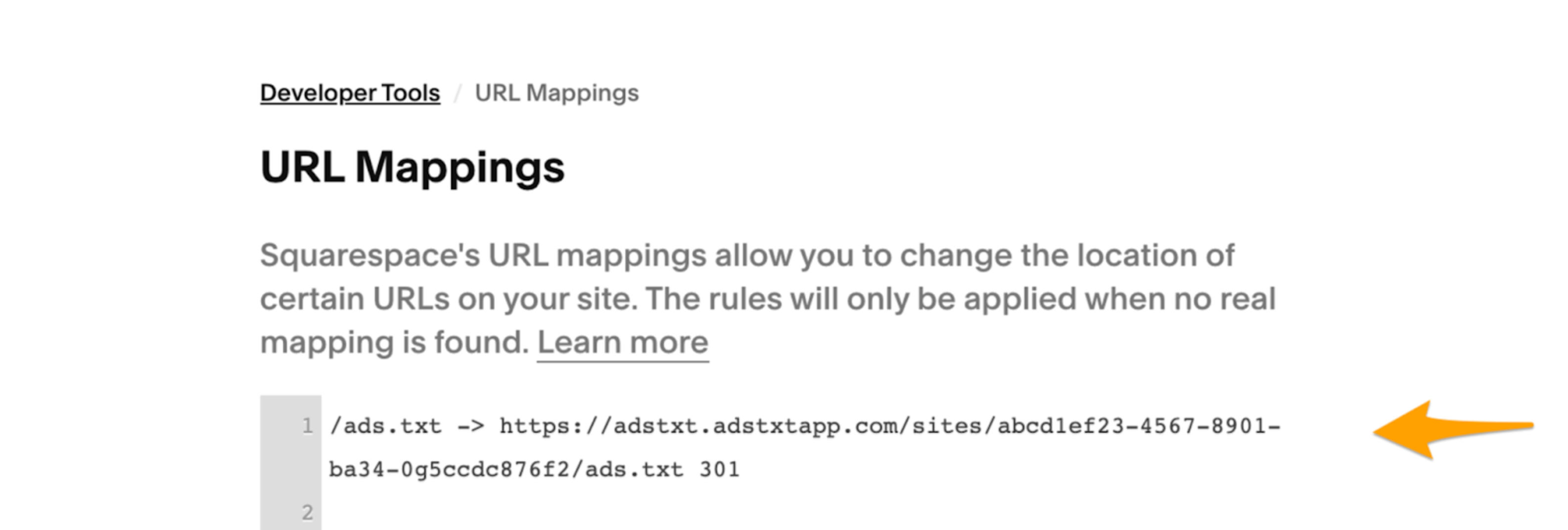
Hi Jessie Bernhardt, can you provide a screenshot of the URL Mappings setting in your Squarespace admin? You can find it by logging into your account, accessing the Settings area, clicking on Developer Tools, and then clicking on URL mappings. It should look similar to this:
 0
0 -
 0
0 -
Support See above!
0
Journey is Self Supported
Please sign in to leave a comment.
Comments
4 comments