Duplicate script issues
Completed
Hello! I've been on Journey by Mediavine for about 6 months and my earnings were going up June-October, but have dropped pretty significantly starting in November and continue to go way down… I'm not sure why and the drop seems pretty significant as if something changed or might be wrong? I'm very new to having ads on my site, so I'm at a loss for looking into this. How can I troubleshoot this drop? Would love any insight and help with this. Thank you so much! My site is a food photography site that shares educational photography content on my blog. https://reganbaroni.com
-

Hi Regan Baroni ! This could be due to a wide range of factors, but from a technical perspective, I did notice you have two ad scripts running on the site, which can sometimes impact performance. I would remove one instance of the ad script so only one ad script is running, then clear out all caches.
Thanks!
0 -
Hi Rachel!
Thank you for your reply! Where do I find the duplicate ad scripts and how do I remove one? Is there some instruction that can be provided?
0 -
Regan Baroni One script could be inserted through the Grow plugin if you're using it and the other would then have to be inserted manually through some sort of code/script insertion plugin, theme setting that allows you to add scripts, or it could've been added directly to one of the site's files that you have to access through cPanel/FTP. If you're not using the Grow plugin though, then both scripts would have to be inserted manually in one of the above mentioned ways.
Your host should be able to help locate and remove one instance of the script since they'll have access to your site. The full script that needs to be removed can be found in your dashboard under Journey Settings → Ads Script, and you can send that to your host for reference if you need assistance.
Thanks!
0 -

Hi Rachel - my earnings are also down after initially increasing last month they are dropping now. The site is in the midst of a redesign. After initially increasing last month, they are dropping now.
The site was in the midst of a redesign while earnings were increasting, so I am unsure if that has anything to do with it. I have added the scriptwrapper under the Page Optimization section within the LiteSpeed Cache plugin and it still is pulling in very little. Any guidance, support or direction would be greatly appreciated.
Thanks,
Marc
0 -
Marc M I'm also seeing two ad scripts running on your site, which can impact performance. You'll want to remove one instance of the ad script so only one ad script is running following the advice in this thread. Your host should also be able to assist.
Thanks!
1 -
Hi Rachel, I think I removed the script in the theme. Let me know if you still see two running. Thanks!
0 -
Marc M Looks good now!
0 -

Hi Rachel,
I think I might have the same problem with two scripts running. Could you check if that’s the case for me? I’ve been on board since the beginning of December, but my RPM is very low. Could you also check if there’s anything else I can optimize?
Best regards,
Tim0 -
Tim Nocent Your ad script looks good but I am seeing two Grow scripts, so you'll want to remove one instance of the Grow script to ensure accurate reporting data.
0 -
Hi Rachel,
Is this the ad script that I'm looking for a duplicate of (I got this from the ad script under journey settings:
<script type="text/javascript" async="async" data-noptimize="1" data-cfasync="false" src="//scripts.scriptwrapper.com/tags/fa56ded0-51ef-45fd-87ba-ff4832d6a021.js"></script>
I sent this to my host and they are not seeing it in wordpress.
I do have the grow plugin, which I believe contains this script automatically during the set up? I don't remember ever manually adding this anywhere, so I think it's just in the plugin as I went through the getting started process.
If that is the wrong script, what is the script that we should be looking for? And, if you are seeing a duplicate, can you tell me where both of them are? I guess I'm at a bit of a loss trying to figure this out without more guided help from someone who knows what they're doing... Is there a way to get more help beyond this thread?
Please let me know…
Thanks so much!
Regan
0 -
Regan Baroni That is the correct script! Journey is supported by the forum and is intended to be self-service, so your host would need to help when it comes to logging into your site to find the script. The Grow plugin is likely inserting one script, but it's hard to say where the duplicate script is coming from by just looking at the source code. If it helps, I only see one ad script on the homepage, so that would indicate whatever is inserting the second script isn't applied globally on the site.
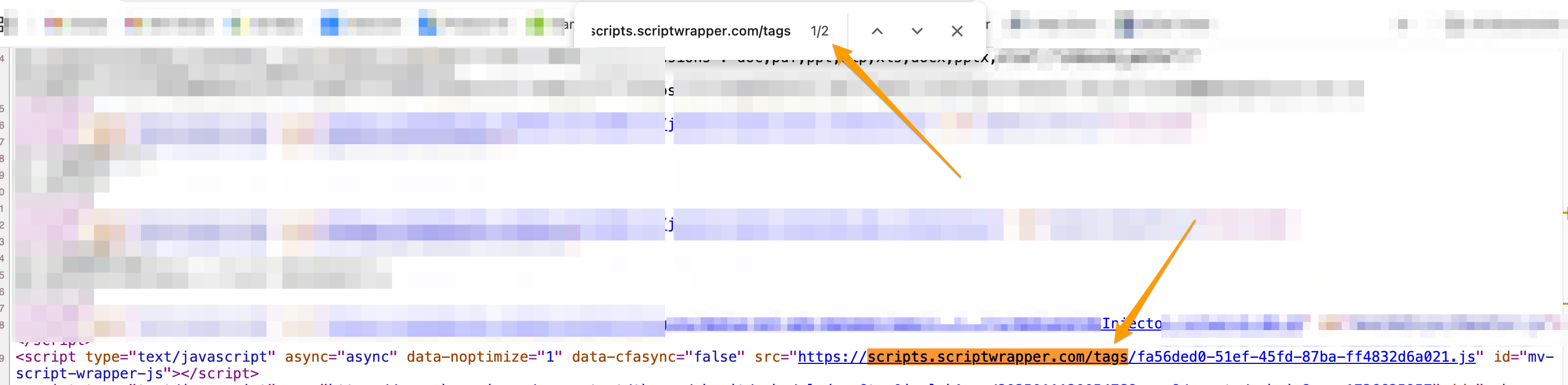
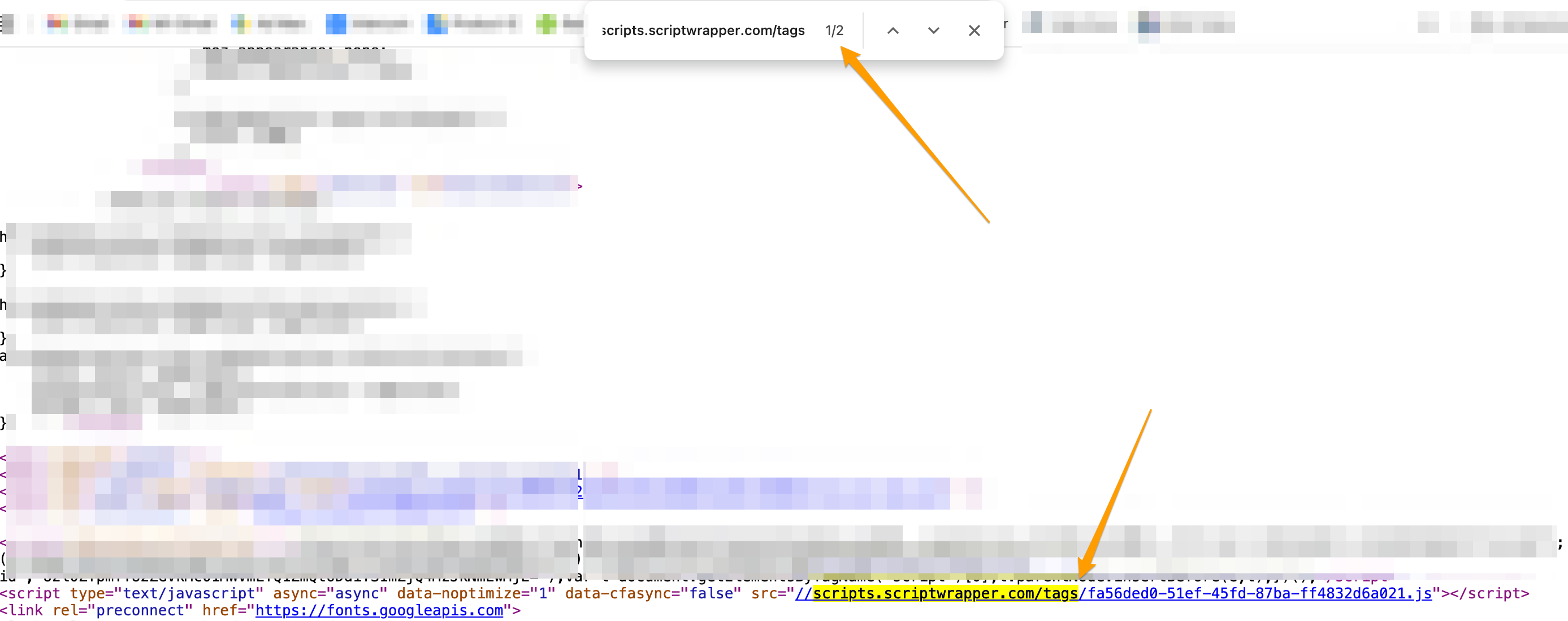
Both scripts are also located in the <head> area of the site, so the duplicate script could be in your post template theme file or inserted through a code plugin/theme setting that has an option to add scripts to the site's header area. If your host looks at your source code on a blog post and searches for scripts.scriptwrapper.com/tags, they'll see there are two instances of the script and that might help them track it down.
0 -
Thanks, Rachel!
I sent this information along and the host is saying he only sees one instance of that specific code in one blog post.
He's also asking if it's possible to include a screenshot of what they are seeing with the double scripts within the source code of a blog post?
0 -
Regan Baroni Have them look at the post that ends with /blog/food-photography/food-photography-angles/ and they should see two scripts in the source code. Here's the first one:
And the second one:
 0
0 -
Thanks so much, Rachel.
He sent this screenshot attached and said:
I loaded up that blog post and I'm seeing this when searching for the script (see screenshot).
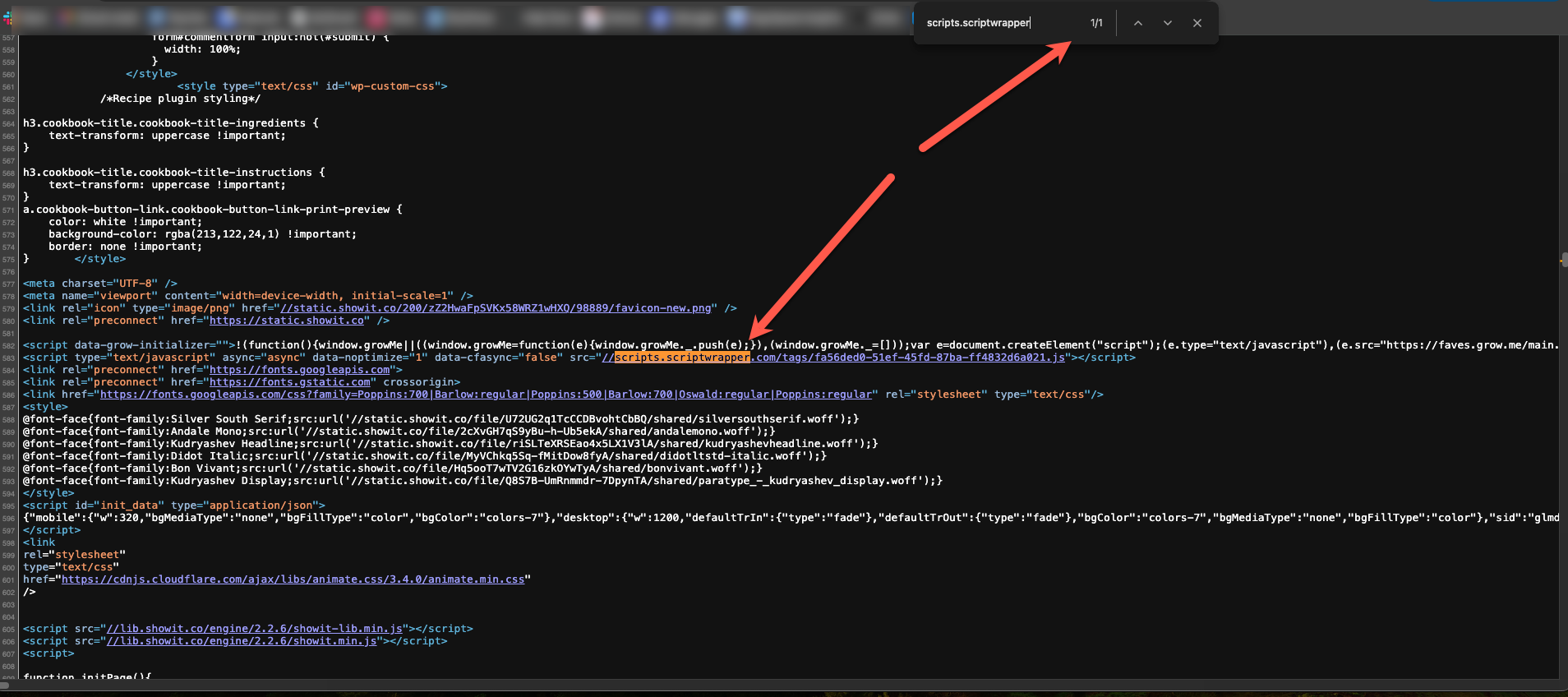
I'm wondering if they may be seeing a cached version of the page there.
0 -
Regan Baroni Ah, that's strange. Even when I bust the cache by adding ?test=1234 to the end of the URL, I'm still seeing two scripts. Do they see two when they aren't logged in or checking in an incognito window?
Regardless, it does sound like it could be caching, so they'd want to clear the cache in all caching plugins, CDN if you use one, and server caching.
0 -
Hey Rachel,
I think we're getting closer - here's what he said:
He sees two in the incognito window - One is coming from Grow and the other is coming from Media.net Ads Manager.
What is media.net ads manager?
0 -
Regan Baroni I see the media.net ads manager script above the Journey ad script in the source code, but it shouldn't be what's inserting the Journey ad script. They look like completely separate scripts on my end, and we wouldn't have had you add a media.net script to your site since it's unrelated to Journey and it could even be a conflict if it's another programmatic advertiser. I would actually recommend removing that script if you aren't using it.
0 -
Thanks Rachel! I'm going to deactivate that media.net ads. I am honestly not even sure what that plugin is… haha. Does this sound right on your end?
0 -
Regan Baroni It's definitely nothing we would've had you install, so if you're not using it, I would disable it!
0 -
Great! I've deactivated that plugin. Hopefully that solves the duplicate script issue?
0 -
Regan Baroni The media.net script is completely separate from Journey and wouldn't be what was inserting the Journey script. It was just above it in the source code, but that doesn't mean it was what was inserting the script. Even with it gone, the extra script is still there. Your host should look at your template theme files and at any script insertion plugins to find the duplicate ad script.
0
Journey is Self Supported
Please sign in to leave a comment.
Comments
21 comments