ads.txt file no updating automatically.

Hi, I had to manually place the ads.txt file in my domain with the help of my hosting provider. But every time there is a new version of the ads.txt file, I again have to manually update the file. This has become a nuisance. Is there a way to automate this process?
Site: trippingonearth.com
-

Hi Moksh Bansal. If manually added, the ads.txt will need to be updated on your end when a new version is released. An option, though, is to have your host just setup a redirect to our servers - this will keep you from having to update the file. There are threads in the forum here that get into detail on this, and you can refer to this one to start. Thanks!
0 -
I added the redirection. Can we check if it is done right?
Site: trippingonearth.com0 -
Hi Moksh Bansal. I'm seeing a redirect in place on /ads.txt, but it appears to just be redirecting to the /ads.txt route on the Journey site. Per the thread that I linked and the screenshot, you'll want to point the redirect to the specific ads.txt URL listed in you Journey Settings, as below. It would begin with
https://adstxt.journeymv.com/sites/followed by a unique identifier and then the route. You can just use the full URL from your settings. Once you have the redirect setup for that URL, you should be all set.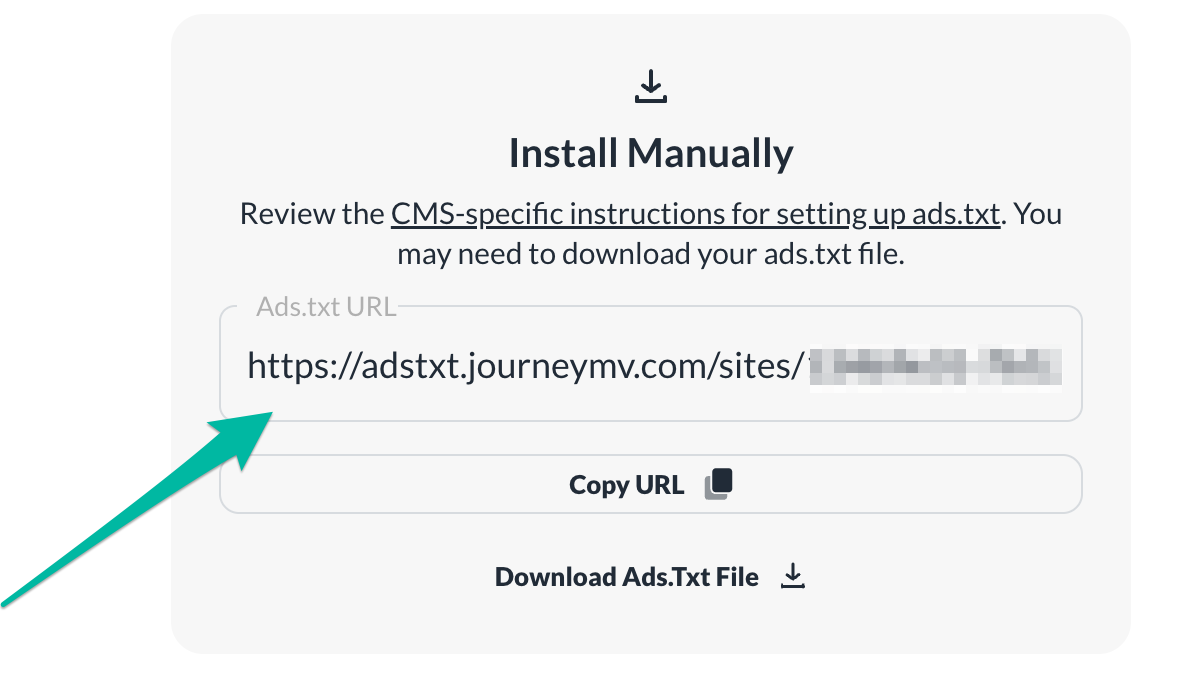 0
0 -

I rectified it. Can you check it again, please?
0 -
Hi Moksh Bansal. The redirect looks to be working great - you should be all set!
0
Journey is Self Supported
Please sign in to leave a comment.
Comments
5 comments