Ads making my jump links not work

Hi,
Ever since I started using Journey Ads, my jump links don't work. Jump links are a useful tool for readers, and I don't want to get rid of them. I gave it a few months and a lot of updates, and it still isn't fixed. I'm considering removing the ads from my website, so I thought I would try asking for help here to see if there's anything that can be done before I resort to that.
Can anyone help?
Thanks,
Robin
-

Hi vegandollhouse ! I took a look at your site, and the jump links intermittently not working doesn't seem to be related to ads.
To test, I disabled the Journey ad script in Chrome dev tools. Even with it completely disabled, I was still experiencing some issues with the jump buttons. It looks like some of the anchors for the jump buttons aren't correct in the Table of Contents for some posts, which is why the links aren't jumping in some cases.
For example, when you click the Thanksgiving Tofu Marinade jump button in this post, it's trying to find the anchor #marinade, which doesn't exist. The actual anchor is #how-to-make-the-marinade-for-the-tofu-turkey. When you switch the anchor at the end of the URL to #how-to-make-the-marinade-for-the-tofu-turkey, it works as expected. If you're referring to other links, feel free to send over examples.
Thanks!
0 -
Hi,
It looks like you just happened to find one that had an error, which is not the norm (I would hope haha). For an example, go to the frittata recipe (https://vegandollhouse.com/recipes/mini-tofu-frittatas/) and click on the video link in the TOC. It takes you to ingredient substitutions instead of the video.
Thanks,
Robin
0 -
Hi vegandollhouse ! I disabled the script and clicked the video link, and I was still taken to the ingredient substitutions section, so this doesn't appear to be related to ads (see below).
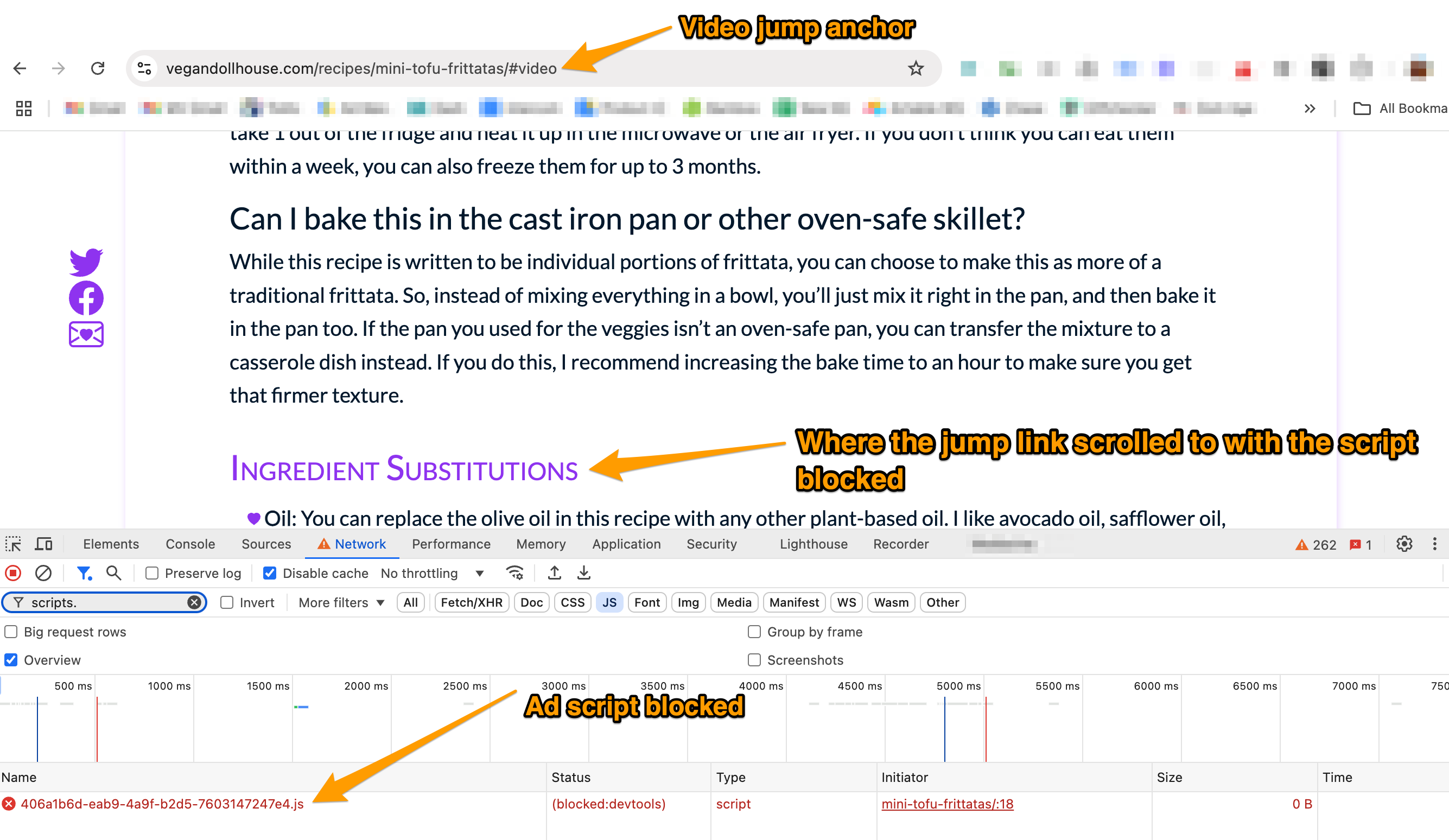
I'm not sure what specifically is causing this to happen, because a few times it did skip to the video (with ads disabled and enabled), but for the most part it went to the ingredient substitutions section. I would recommend working with a developer to see if they can fine tune the jump buttons to jump to the correct location consistently.
Thanks!
0 -
Thanks so much for looking into that. I shouldn't have assumed it was caused by the ads just because it started happening at the same time. I will have my tech support figure it out.
0
Journey is Self Supported
Please sign in to leave a comment.
Comments
4 comments