Privacy Policy Message Formatting Issue
Completed
Hello there,
Good day.
It appears that the Privacy Policy message is not properly formatted on the page. Specifically, it is located after the footer, which affects the overall layout. Is it possible to adjust its position and formatting to ensure it is displayed correctly within the main content area? Thank you!
-

Hi Austin! Sometimes this occurs if you add your privacy policy URL without finishing the onboarding process, but I'm not seeing the privacy policy loading after the footer on your site on my end -- is this still happening anywhere on your end?
0 -
Hello Rachel,
Actually I already also sent a message regarding the same issue to the grow plugin team. I'm just waiting for their reply.
Here is the message I've sent them:
"I have an issue where the inline subscribe form is always pushed to the bottom, below the footer. The Mediavine policy page is also being pushed to the same location. I've tried deactivating and reactivating plugins, as well as clearing the cache and Cloudflare, but the problem persists. To resolve it temporarily, I copied and pasted the Mediavine privacy policy directly onto the page instead of relying on the plugin.
I am using a "copy protection and no right click" plugin to prevent unauthorized copying of my content. However, this plugin causes an issue where I can't fill out the grow form. I have to deactivate it for the form to work. Despite deactivating the plugin, the grow form still appears after the footer instead of its intended location.
I am also unsure if the issue with the plugin is affecting the journey ads. I am not seeing any ads within my content, only the footer ads and two more ads in each sidebar. There are no ads appearing inside the content, and no video ads are showing.
Kindly assist.
Thanks."
note: I've temporarily changed my privacy URL on Journey dashboard because I manually copied and pasted Mediavine's privacy policy directly on the page to avoid duplication. However, I've now redirected it back to my original Privacy Policy page URL and cleared the cache, and the issue has reappeared.
0 -
Regarding the "copy protection and no right-click" plugin, all other forms are working fine except for the grow forms.
0 -
Hi Austin! You should be seeing content ads now and the subscribe form will be higher up in the content in the optimized location now that content ads are loading. If you're experiencing other issues with the Grow form, you'll want to wait to hear back from the Grow team since this forum is just for Journey. I'm also still not seeing the privacy policy below the footer on my end, so we would need a link and screenshot if possible to take a closer look.
0 -
Hi there Rachel,
Could you please take a look at the attached screenshot of the Privacy Policy page layout issue?
Here is the link to my Privacy Policy page for reference: https://theenlightenmentjourney.com/privacy-policy/
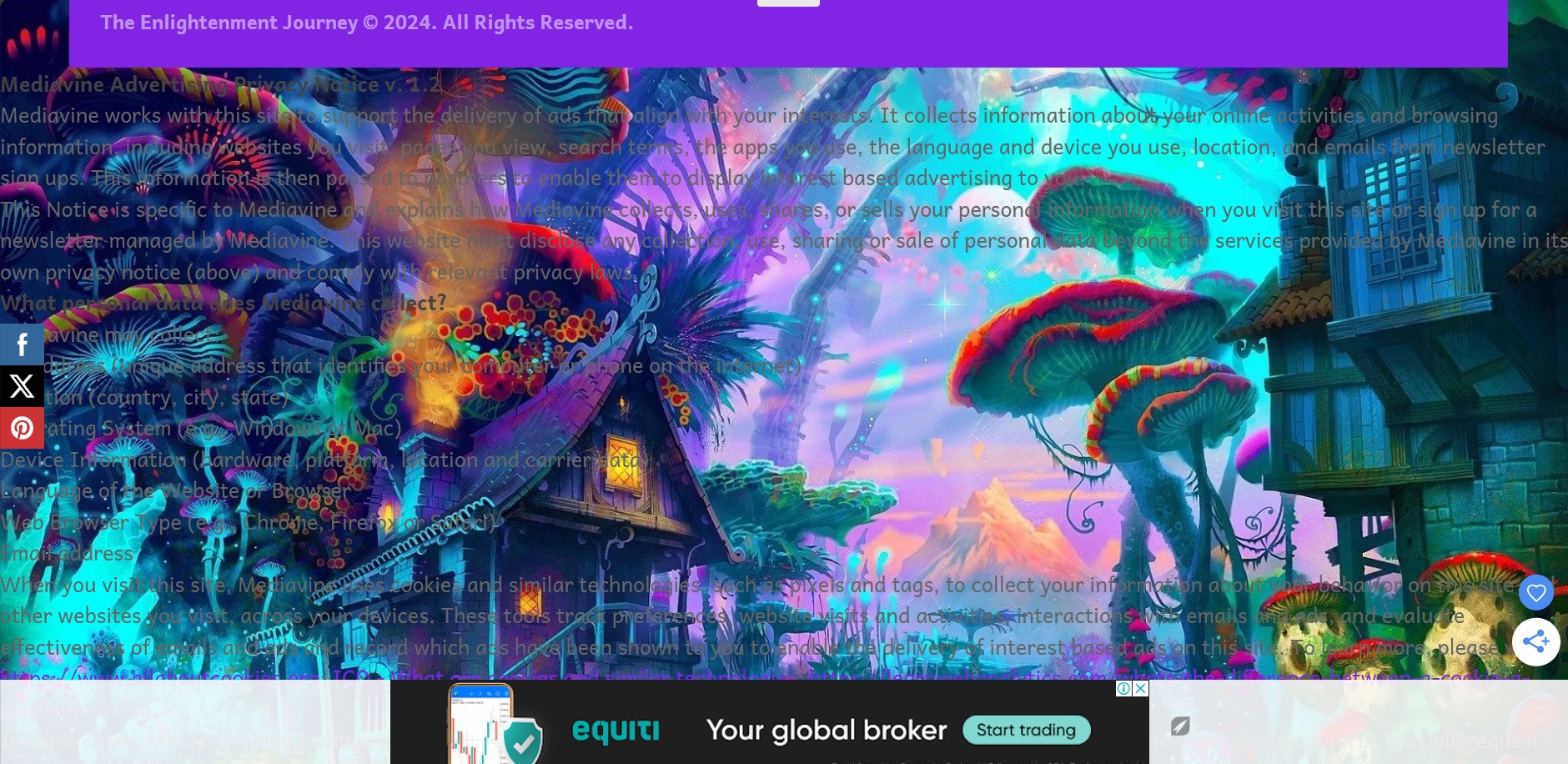
I also have a quick question about the ads on the sidebars. I have two sidebars, but only one of them is showing an ad. Is there a limit to the number of ads displayed on the sidebars? Additionally, the ad on the sidebar isn't staying sticky when I scroll down the page. Your help would be greatly appreciated!
Thanks so much!
0 -
Hi Austin! It looks like you might've added the Privacy Policy language manually to the page. If that's the case, could you remove what you added manually since the script is supposed to add it in dynamically? I just want to give that a try first to see if it resolves the issue!
As for the sidebar, you're only supposed to have one sidebar ad since it's better for overall ad viewability and user experience. It looks like it isn't sticking due to conflicting CSS styles, specifically transform and transition styles applying to most sidebar elements. These transition styles would need to be removed in order for the sidebar ad to stick, and a developer would be able to help you with that, but it should look something like the following:
.sidebar,.sidebar-content{transform:unset!important;transition:unset!important;}If you get the sidebar to stick, I'd also recommend moving the social share buttons to the right side of the screen to avoid accidental clicks on the sidebar ad.
0 -
Hi Rachel,
I wanted to let you know that I’ve already removed the manually added privacy policy from the page. I also noticed that my earnings are significantly lower compared to what I used to receive from AdSense (daily earnings). I started using Journey on July 1st. Is this normal? Could you please help me understand why there might be a dip in earnings?
Thanks so much!
0 -
Thanks for trying that! I've escalated to our engineers so they can take a look at why this might be happening. And July 1 marks a time when many advertising budgets reset, causing a temporary dip in ad spend. There's also typically a ramp up period after ads first launch, which could be a secondary reason behind lower spend.
0 -
I see, thank you for the information. I have one more question: do you recommend using Bot Fight Mode on Cloudflare? Could this affect Journey ads or the traffic? I'm sorry for all the questions; I just want to ensure that Journey ads are properly set up and functioning since I'm new to this.
Thanks again for your help!
0 -

Hi Austin! Cloudflare's bot fight mode is a conflict with Grow, so we would recommend keeping it disabled.
0 -
Hey Austin! Just letting you know the privacy policy text is displaying in the correct place now.
0
Journey is Self Supported
Please sign in to leave a comment.
Comments
11 comments