ads.txt losing connection again and again
Answered
Almost every time I open up my Journey dashboard, I get an error message saying that the ads.txt connection has lost.
I go into it, click the refresh button a few times, and it gets restored again.
This has been happening twice or thrice almost every single day.
Not sure if this is supposed to happen, or if there's something I can do to fix it.
-

Hi Enozia! I pulled up your ads.txt file, and I first saw the following pop up:
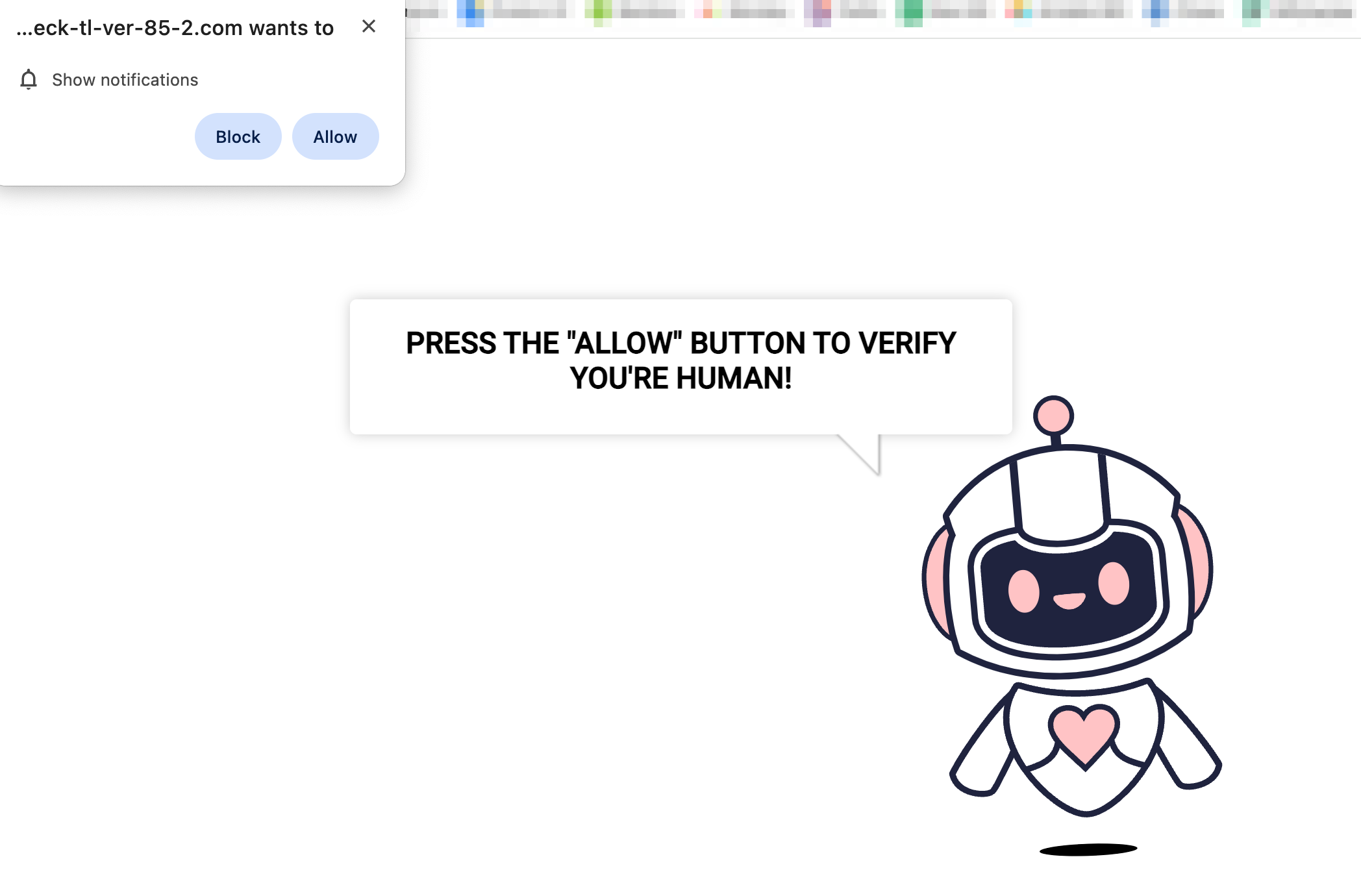
When I refreshed, I was taken to the correct ads.txt file.
I'm not sure what this is coming from, but this is likely why the ads.txt file is periodically showing as “missing”. If you have the option to whitelist the ads.txt file URLs from this service or plugin (specifically https://adstxt.journeymv.com/sites/78ecf3a0-02a8-40ef-8b04-7ac0e0d61df0/ads.txt and https://yoursitename.com/ads.txt), that could do the trick. Just make sure to replace yoursitename with your site's domain.
Otherwise, if you're not using it actively or don't need it, you could disable the service or plugin that's adding the pop up or disable the specific feature that's adding the pop up.
Hope this helps!
0 -
Hi Rachel
Thanks for getting back.
I'm not sure which plugin or feature is causing this.
Do you have any information about the source? If you could share that with me it would be awesome.
0 -
Hi Enozia! I'm not sure where this is coming from, but your host should be able to help since they'll have more access to your site and should know what security features are running. I would reach out to them with this information and see if they can point you in the right direction.
0 -
Rachel, I went ahead and contacted my host, and here's what they have to say.
We are currently unsure what pop-ups are being displayed by your website, as it could depend on your ads providers. What I have done is I have excluded the ads.txt from being cached and can confirm the site is now loading https://adstxt.journeymv.com/sites/78ecf3a0-02a8-40ef-8b04-7ac0e0d61df0/ads.txt while visiting https://uniquecooks.com/ads.txt. Can you please recheck with them and let us know?
This must be some cached status on their end, hence when you refresh it goes away. It is certainly nothing related to your website, because your ads.txt is redirecting to https://adstxt.journeymv.com/sites/78ecf3a0-02a8-40ef-8b04-7ac0e0d61df0/ads.txt, which is not an URL part of your website (meaning your website does not control the contents of the file).Can you please let me know? I'm still seeing those connection lost updates again and again.
I check every few hours and try to refresh my connection, but in the hours that I'm sleeping, I'm not able to, and the max traffic to my site is from the US, which is making me lose out on revenue.
0 -
Here's another answer I received from their end.
We will need the inputs from Mediavine on the exact error that they are seeing - I can confirm that ads.txt file or the Mediavine journey scripts are not blocked on the server end.
0 -
Hi Enozia! Thanks for reaching out to them. I would tell them to try to pull up your ads.txt file in an incognito window, and then they might see this bot verification redirect:
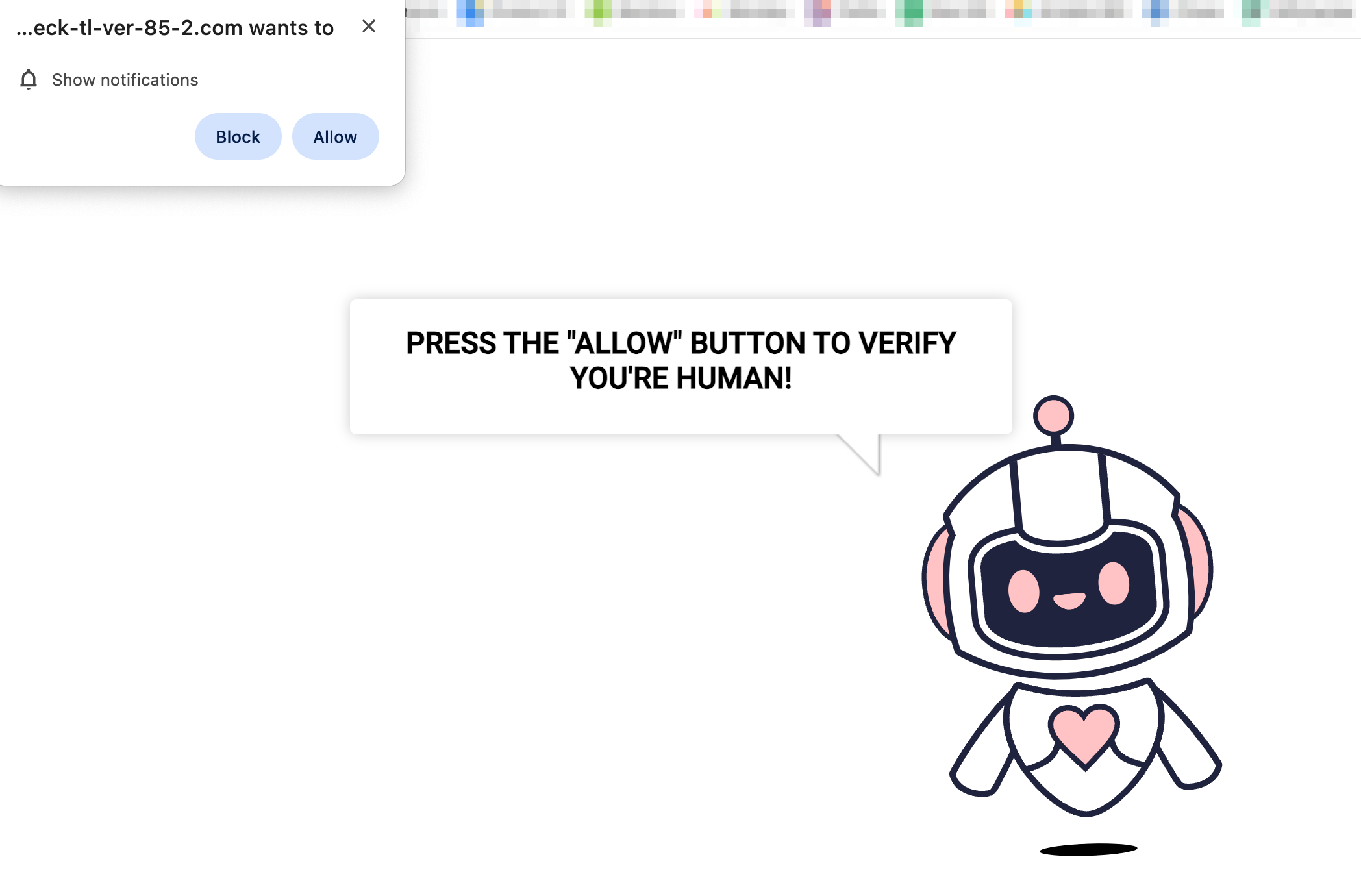
You can also just send them the above screenshot and tell them this is what comes up intermittently when we try to visit the ads.txt file. That should hopefully point them in the right direction!
0 -
Here's what they replied with-
We're having hard time replicating this and that bot protection, I think we're seeing it for the first time, so I am not sure from where it might be showing.
Can you ask them for the exact OS and browser they are using ( in case its not Chrome ), on which they are able to replicate the redirect0 -
I was just able to replicate again in a Chrome (most recent version) incognito window on a MacBook Air.
This is the URL I'm redirected to when I try to access your ads.txt file at yoursitesname.com/ads.txt (replace yoursitesname with your domain):
Looking at the network requests, the following Javascript calls are executing when I'm redirected and should be what's causing this to occur:
https://wa.check-tl-ver-235-1.com/space-robot/assets/trls.jshttps://wa.check-tl-ver-235-1.com/space-robot/assets/main.js?v=3https://wa.check-tl-ver-235-1.com/shared-js/assets/static-pl.js?v=2https://cdnstatic.check-tl-ver-235-1.com/ps/ps.js?&edg=true&sw=&fullscreen=true&pl=true&pp=false&id=CHiI7Gh3GUyTa8XGgNqDyQ&sm=space-robot&click_id=cpo6b9ijvq3fllkjltcg&sub_id=&appspot=&d=https%3A%2F%2Fcdnstatic.check-tl-ver-235-1.com&timeout=30&tb=true&nrid=0122a4b9f9cb488b8e8abd28e1ad4629https://cdnstatic.check-tl-ver-235-1.com/ps/config.js?id=CHiI7Gh3GUyTa8XGgNqDyQhttps://www.gstatic.com/firebasejs/10.3.1/firebase-messaging-compat.jshttps://www.gstatic.com/firebasejs/10.3.1/firebase-app-compat.jsI had a few teammates take a look, and they were all redirected to the same robot screen if they opened the ads.txt file in a Chrome incognito window.
I would send all of the above information to your host and hopefully they'll be able to figure out where it's coming from!
0 -
Sent all this Rachel!
Here's what they replied with.
Nope, I am still not able to replicate this from my end, running on Mac Pro with latest verison on Chrome.
From which country are they accessing the site?0 -
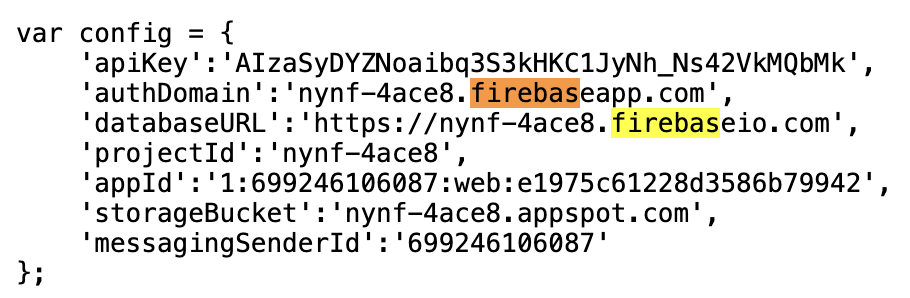
We're accessing it from the United States. It looks like it's definitely coming from something called firebase (link here: https://firebase.google.com/products/hosting/.)
If they open up this Javascript file that initiates the pop up, they'll see the references to firebase (also see the screenshot below). I'm not personally familiar with firebase and am not sure if this is who you host with, but this should give them more context to go off of!
 0
0 -
Rachel, we did two things.
My host told me they removed a code snippets plugin I had, that was apparently not in use.
I, at the same time, went into my Perfmatters plugin and removed this code (/ads.txt/*) from the exclude from lazyloading section.
The error is now gone, which is great, but we definitely messed up something because now I don't see any traffic or earnings recorded for yesterday.
0 -
Glad that did the trick! Reporting for today is delayed -- our engineers are looking into it, but not seeing data for yesterday is to be expected at this point. They should hopefully have a fix out soon!
0 -
Hey Rachel
The issue happened again a few hours back, but I did check another post here in the community, by someone else having the exact issue.
They reached out to their host and posted the reply by them in the communication.
I reached out to my host, letting them know how the other host managed to fix the issue and they tried implementing the same fix from their end.
They've now responded back with this message
We are now seeing the ads.txt file here at:
https://adstxt.journeymv.com/sites/78ecf3a0-02a8-40ef-8b04-7ac0e0d61df0/ads.txt
showing up - can you please request them to check this now?
Thank you!0 -
Hi Enozia! The ads.txt file looks good on my end, so hopefully you should be good to go here :)
0 -
Hey Rachel.
The issue still persists. The connection is lost every few hours and I need to manually refresh and it's back up again.
here's what my host has to say about it.Ah Sorry - I though this is already corrected - I did add a redirect rule as well and the tests from geopeeker which tries to access the file from various locations are showing OK :
https://geopeeker.com/fetch/?url=https%3A%2F%2Funiquecooks.com%2Fads.txt&csrf_token=3m9VWpw36uiwfJinUUBvNrW8Pvw7UvImlwMjmTkOYLc%3D
is it possible for them to review this again?0 -
Hi Enozia! Typically the only two possibilities as to why this continues to happen would be a security/firewall setting or really aggressive caching. We unfortunately aren't able to tell exactly why this continues to happen though, and your host is who would need to help with either of these two possibilities since this isn't something broken or that we can fix on our end.
0
Journey is Self Supported
Please sign in to leave a comment.
Comments
16 comments